

Passwall Password Manager
Passwall Ltd Productivity iPhoneiPadiPod touch
Passwall Password Manager is a free Productivity app for iPhone and iPad by Passwall Ltd. Requires iOS 15.1. Updated October 12, 2026.
- Price
- Free
- on the App Store
- Size
- 54 MB
- Age 4+
- Updated
- Oct 12
- 2026 · v2.7.0
Screenshots



About Passwall Password Manager
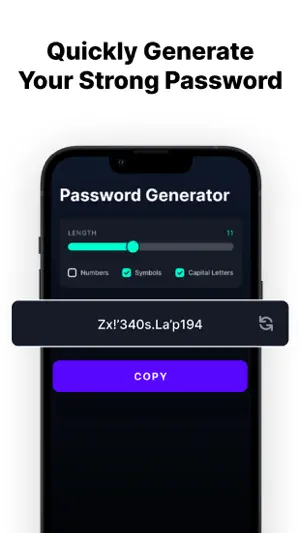
Passwall: The Ultimate Secure Password Manager Welcome to Passwall, the ultimate mobile application for securely storing and managing all your passwords. With Passwall, you can say goodbye to the hassle of remembering multiple passwords and confidently access your online accounts with just a single master password. Our app takes your security seriously by utilizing advanced encryption methods to store and protect your valuable login credentials. Key Features: • Create Strong and Secure Passwords Tired of coming up with complex passwords? Let Passwall's built-in password generator do the work for you. With a single tap, you can create strong and secure passwords that help keep your accounts safe. • Securely Encrypted Vault All your usernames and passwords are stored in Passwall's encrypted vault. Our encryption helps protect your data against unauthorized access. Your information is accessible only with your master password. • Intuitive and User-Friendly Interface Passwall offers a clean, intuitive interface for managing your passwords. Organize accounts, search quickly, and enjoy a simple experience without compromising on security. • Effortless Autofill With Passwall's Autofill, logging in is easier. Go to a login page and Passwall can detect username and password fields. One tap fills in your credentials so you can sign in without typing. • Customizable Autofill Settings Configure Passwall to remember specific sites or apps and fill in credentials when you need them. Control your Autofill preferences to match how you use your devices. • Simplify Your Digital Life Spend less time remembering and typing passwords. With Autofill, streamline logins, save time, and focus on what matters. Download Passwall and manage your passwords with confidence. Join the users who trust Passwall to help protect their accounts. — Privacy Policy: https://passwall.io/privacy Terms of Use (EULA): https://passwall.io/terms
What’s new
Version 2.7.0 · Updated October 12, 2026
This update makes Passwall faster, safer and works even when you're offline. Security • New lock screen: unlock with Face ID / Touch ID, a PIN or your master password • Auto-lock after a time you choose; the vault is cleared from memory when locked • Keys are stored only on this device and are never included in backups • Copied passwords are cleared from the clipboard automatically • The app content is hidden in the app switcher • Re-prompt for your master password on sensitive items AutoFill • Unlock AutoFill with Face ID, Touch ID or your master password • Works from an encrypted copy of your vault: faster, and no sign-in needed • More accurate website matching (e.g. e-Devlet) • New passwords saved from AutoFill sync to your vault automatically Vault • Faster sync, with offline access to your items • Identity, SSH key and other item types are now visible • Mark items as favorites • Edits keep all fields, extra URLs and attachments intact • Support for shared organization items and admin policies Subscriptions • Clearer Pro plans, monthly and yearly, with a free trial • Pro activates right after purchase Fixes • Fixed the app getting stuck on the splash screen • Fixed endless scrolling when the keyboard opens on sign-in and sign-up • Many stability improvements
App privacy
The developer, Passwall Ltd, reported these privacy practices to Apple.
Data Not Linked to You
The following data, which may be collected but is not linked to your identity, may be used for the following purposes:
- Identifiers: User ID
- Usage Data: Product Interaction
- Diagnostics: Crash Data
Used for: Developer’s Advertising or Marketing, Analytics
Alternatives to Passwall Password Manager
Looking for apps like Passwall Password Manager? Here are 6 similar apps on the App Store. The highest rated is Passwords Air - Lock Manager (5.0/5), and all 6 are free to download.
-
 Passwords Air - Lock Manager
5.0
Passwords Air - Lock Manager
5.0
-
 Password Manager & Generator
4.5
Password Manager & Generator
4.5
-
 Password Manager ⊙
4.0
Password Manager ⊙
4.0
-
 Secrets - Password Manager
4.6
Secrets - Password Manager
4.6
-
 Password Manager: Safe
4.8
Password Manager: Safe
4.8
-
 Password Manager - Safe Lock
4.5
Password Manager - Safe Lock
4.5
| App | Rating | Price | Last updated | Compare |
|---|---|---|---|---|
| Passwall Password Manager | – | Free | October 12, 2026 | |
| Passwords Air - Lock Manager | 5.0 / 5 (2) | Free | Sep 21, 2024 | Compare |
| Password Manager & Generator | 4.5 / 5 (1,394) | Free | Oct 15, 2026 | Compare |
| Password Manager ⊙ | 4.0 / 5 (93) | Free | Nov 3, 2023 | Compare |
| Secrets - Password Manager | 4.6 / 5 (188) | Free | Oct 27, 2026 | Compare |
| Password Manager: Safe | 4.8 / 5 (2,656) | Free | Oct 17, 2026 | Compare |
| Password Manager - Safe Lock | 4.5 / 5 (16,521) | Free | Aug 20, 2024 | Compare |