

BNEGuard VPN by BNESIM
BNESIM Limited Utilities iPhoneiPadiPod touchMac
BNEGuard VPN by BNESIM is a free Utilities app for iPhone and iPad by BNESIM Limited. Rated 3.8/5 from 4 ratings. Requires iOS 17.0. Updated October 1, 2026.
- Rating
- 3.8
- 4 ratings
- Price
- Free
- on the App Store
- Size
- 58 MB
- Age 4+
- Updated
- Oct 1
- 2026 · v1.5.1
Screenshots


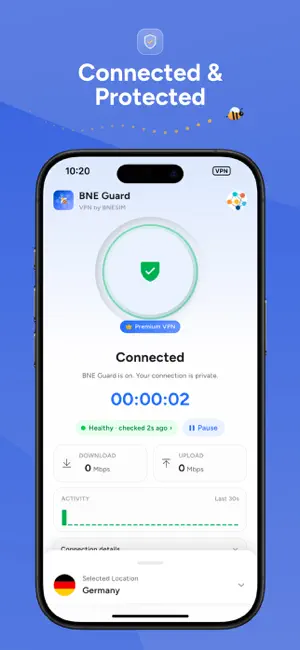
About BNEGuard VPN by BNESIM
BNE Guard VPN turns your connection private in one tap. It routes your traffic through an encrypted WireGuard® tunnel to a location you choose, so the network you are on — hotel Wi-Fi, airport, café, office — can’t see what you do online. ONE TAP, AND YOU’RE COVERED • Tap the ring to connect. Tap again to disconnect. • Fastest available picks the best location for you, or choose a country yourself. • Home shows your session timer, live download and upload speed, an activity graph, and your public and private IP. PICK WHERE YOU APPEAR • Every server location, each with its flag. • Busy locations are marked, so you can choose another one. KNOW YOUR CONNECTION IS WORKING • Connection health shows the last check, latency, data this session, server, protocol and your verified public IP. • If a tunnel stops responding, BNE Guard flags it and offers a one-tap Reconnect. • Network diagnosis checks your connection and tells you what’s wrong. PAUSE, THEN IT TURNS ITSELF BACK ON • Pause protection for 5, 15 or 60 minutes when you need to. • BNE Guard resumes automatically when the time is up — even if the app is closed. YOU DECIDE WHAT GOES THROUGH • Full tunnel mode routes everything through BNE Guard. • Split tunnel routes only the networks (IP ranges) you list. • Use BNE Guard DNS, or set your own primary and secondary DNS servers. ONE ACCOUNT, FIVE DEVICES • Use BNE Guard on up to 5 devices — iPhone, iPad and Mac. • See every device on your account, remove one to free a slot, and rename this device’s VPN. • Devices on your account can reach each other privately inside the VPN. BUILT FOR IPHONE AND IPAD • Home Screen and Lock Screen widgets show your status and connect with a tap. • Live Activity and Dynamic Island keep the session in view while you connect, connected or paused. • Control Center toggle (iOS 18 and later), Action button, and Siri Shortcuts: “Protect me”, “Turn off”, “Connect to [location]”, “Pause 15 minutes”, “Am I protected?”. • Light and dark theme. Available in English, Spanish, Arabic, Persian, Japanese, Russian, Italian and Turkish. PRIVACY BNE Guard doesn’t track or record your online activity. The app collects only the minimal service statistics needed to keep the VPN running, as described in the privacy policy inside the app and at the link below. HOW IT WORKS Sign in with your BNE account — email or account number, Google, or Apple — or create one. Choose a plan (monthly, 6-month or yearly). Tap the ring. That’s it. BNE Guard VPN requires an active subscription to connect. Payment is charged to your Apple ID account at confirmation of purchase. Subscriptions renew automatically unless cancelled at least 24 hours before the end of the current period. Manage or cancel in your Apple ID account settings. Need help? Live chat and email support are built into the app: Settings → Help & support.
What’s new
Version 1.5.1 · Updated October 1, 2026
A new BNE Guard, redesigned from the ground up. • One-tap connect with Fastest available. • Pause protection for 5, 15 or 60 minutes with automatic resume. • Connection health with latency, data and a verified public IP. • Home Screen and Lock Screen widgets, Live Activity, Control Center toggle and Siri Shortcuts. • Full tunnel, split tunnel by network, BNE Guard DNS or custom DNS. • Light and dark theme, 8 languages.
App privacy
The developer, BNESIM Limited, reported these privacy practices to Apple.
Data Used to Track You
The following data may be used to track you across apps and websites owned by other companies:
- Purchases: Purchase History
- Contact Info: Email Address
- User Content: Customer Support
- Identifiers: User ID, Device ID
Data Linked to You
The following data, which may be collected and linked to your identity, may be used for the following purposes:
- User Content: Customer Support
- Purchases: Purchase History
- Contact Info: Email Address, Name
- Identifiers: User ID, Device ID
Used for: Analytics, App Functionality
Data Not Linked to You
The following data, which may be collected but is not linked to your identity, may be used for the following purposes:
- User Content: Other User Content
- Diagnostics: Crash Data, Performance Data, Other Diagnostic Data
Used for: Analytics, App Functionality
Alternatives to BNEGuard VPN by BNESIM
Looking for apps like BNEGuard VPN by BNESIM? Here are 6 similar apps on the App Store. The highest rated is PremierVPN (5.0/5), and all 6 are free to download.


| App | Rating | Price | Last updated | Compare |
|---|---|---|---|---|
| BNEGuard VPN by BNESIM | 3.8 / 5 (4 ratings) | Free | October 1, 2026 | |
| PremierVPN | 5.0 / 5 (1) | Free | Oct 9, 2026 | Compare |
| LocVPN | 4.0 / 5 (3) | Free | Nov 22, 2025 | Compare |
| CyberProxy | 5.0 / 5 (1) | Free | Aug 14, 2024 | Compare |
| Privacy Expert: Secure VPN | – | Free | Apr 22, 2026 | Compare |
| FairyVPN | 5.0 / 5 (2) | Free | Mar 27, 2024 | Compare |
| RedgateVPN | 5.0 / 5 (1) | Free | Aug 25, 2026 | Compare |