

Agile Planner: Team Capacity
Ilia Baudin Business iPhoneiPadiPod touchMac
Agile Planner: Team Capacity is a free Business app for iPhone and iPad by Ilia Baudin. Requires iOS 17.0. Updated October 6, 2026.
- Price
- Free
- on the App Store
- Size
- 13 MB
- Age 4+
- Updated
- Oct 6
- 2026 · v1.8.0
Screenshots
About Agile Planner: Team Capacity
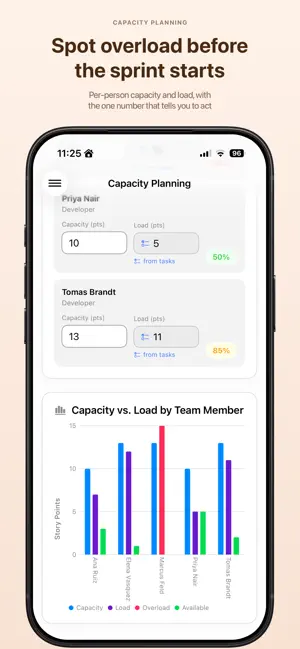
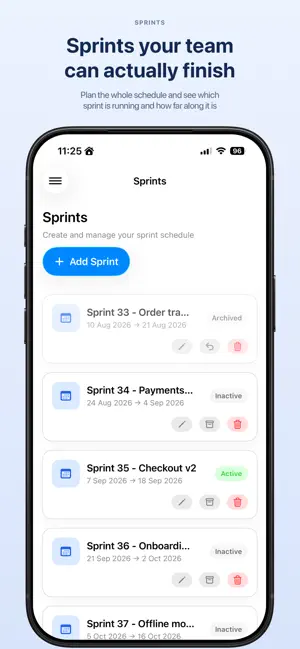
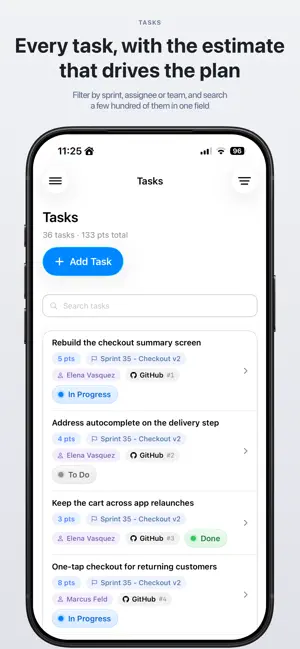
Know exactly how much work your team can take on — before the sprint starts. Agile Planner turns capacity into a number you can trust. Set what each person can handle, assign the load, and see instantly who's overbooked. Works on iPhone, iPad, and Mac. WHO IT'S FOR Team leads, engineering managers, and scrum masters who plan sprints for real people with real limits. SPRINT PLANNING Create sprints with custom dates. Active sprints stay on top, everything sorted chronologically. TASKS Create tasks, assign them to sprints and people, and set estimates. Load is calculated automatically from what's actually assigned. CAPACITY & LOAD Set capacity per person per sprint and watch utilization in real time. Instant alerts when someone goes over. Work in story points, hours, or days. TEAM MANAGEMENT Build teams, add members, set roles. Edit inline with instant saves. DASHBOARD Live overview of active sprints, teams, members, and average utilization — with a warning when your team is stretched too thin. WIDGETS See your active sprint and days remaining at a glance. ICLOUD SYNC Everything syncs across your devices automatically. Requires iCloud sign-in. FREE VS PRO Free: 2 sprints, 1 team, full capacity and load planning. Pro: unlimited sprints and teams, tasks, widgets, and warnings for backlog items and unassigned tasks. AgilePlanner Pro is available as a monthly or yearly auto-renewable subscription with a 7-day free trial for new subscribers. In-App Purchases - Agile Planner Pro Monthly — auto-renewable, 1 month - Agile Planner Pro Yearly — auto-renewable, 1 year Prices are shown in the app. Payment will be charged to your Apple ID at confirmation of purchase. Subscriptions automatically renew unless canceled at least 24 hours before the end of the current period. Manage or cancel anytime in your App Store account settings. Terms of Use (EULA): https://www.apple.com/legal/internet-services/itunes/dev/stdeula/ Privacy Policy: https://agileplanner.bittech.me/privacy-policy/
What’s new
Version 1.8.0 · Updated October 6, 2026
See how every sprint is going, straight from the list. - How much of the work is done, how much effort is burned and how many days are left — on the card, without opening anything - Sprints that need attention stand out, so you find them while you can still do something about it - Finished sprints stop hiding among the ones that haven't started: Upcoming, Active, Ended and Archived each read differently at a glance - Changing a sprint's dates takes one tap, and you see the new length before you commit to it - Fixed bugs and improved stability
App privacy
The developer, Ilia Baudin, reported these privacy practices to Apple.
Data Not Linked to You
The following data, which may be collected but is not linked to your identity, may be used for the following purposes:
- Purchases: Purchase History
- Identifiers: Device ID
- Usage Data: Product Interaction
Used for: Analytics
Alternatives to Agile Planner: Team Capacity
Looking for apps like Agile Planner: Team Capacity? Here are 6 similar apps on the App Store. The highest rated is Standup - Scrum Task Updates (3.0/5), and all 6 are free to download.
-
 RetroStack
-
 Yeliner: Outline, Notes, Tasks
-
 Standup - Scrum Task Updates
3.0
-
 DoneTonic
-
 diReminder: To Do List
-
 World Clock - Time Calculator
| App | Rating | Price | Last updated | Compare |
|---|---|---|---|---|
| Agile Planner: Team Capacity | – | Free | October 6, 2026 | |
| RetroStack | – | Free | Jul 15, 2025 | Compare |
| Yeliner: Outline, Notes, Tasks | – | Free | May 26, 2026 | Compare |
| Standup - Scrum Task Updates | 3.0 / 5 (3) | Free | Oct 26, 2026 | Compare |
| DoneTonic | – | Free | Jul 30, 2025 | Compare |
| diReminder: To Do List | – | Free | Oct 3, 2026 | Compare |
| World Clock - Time Calculator | – | Free | Dec 22, 2024 | Compare |