

Incheon Airport: Flight Alerts
GEUNYOUNG LEE Travel iPhoneiPadiPod touch
Incheon Airport: Flight Alerts is a free Travel app for iPhone and iPad by GEUNYOUNG LEE. Rated 4.2/5 from 9 ratings. Requires iOS 15.5.
- Rating
- 4.2
- 9 ratings
- Price
- Free
- on the App Store
- Size
- 86 MB
- Age 4+
- Updated
- Oct 12
- 2026 · v3.0.4
Screenshots


About Incheon Airport: Flight Alerts
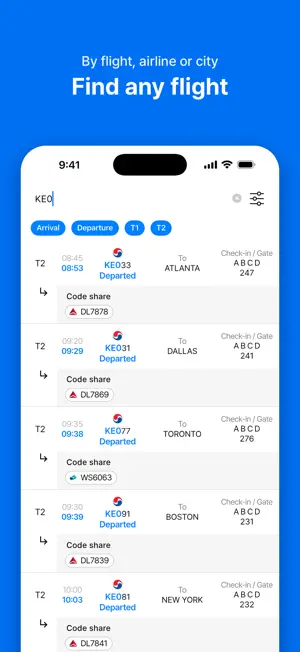
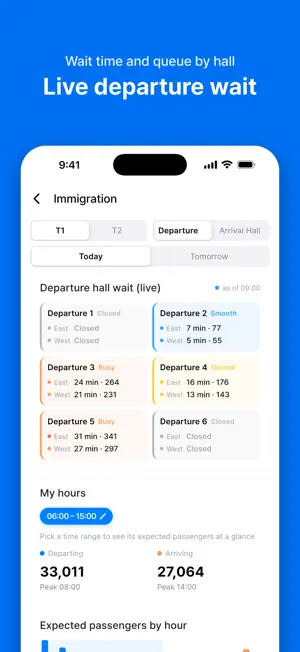
Check arrivals and departures at Incheon, Gimpo and Jeju airports every minute, and get notified the moment your flight's gate, baggage carousel or time changes. A fast, lightweight flight app used every day by airport staff, people picking someone up, and travelers. ■ Airport tab: everything at a glance (NEW) • Departure-hall wait times for Incheon Terminals 1 and 2 as a color-coded bar chart, with the fastest spot in each terminal • Remaining spaces and how full each short-term and long-term car park is, by terminal • Put the Right now, Flight Info and Information cards in the order you like ■ Search tab: find flights by number, airline or city (NEW) • Search flights straight from the bottom tab • Combine several keywords with commas and filter by arrivals, departures and terminal • Recent searches are saved ■ Flights by location: see where bags are coming out • Baggage carousels, arrival exits and departure gates shown as color-coded tiles • Orange outline means bags are coming soon, orange fill means bags are coming out now • Each tile shows the time until the next arrival • Departure gates show boarding, final call and delays in color • Carousel timeline: every arrival from landing to the last bag, belt by belt • Refreshes on its own every minute while open ■ My spots (Plus) • Group the carousels, exits, gates and airlines you work and see them on one screen • Bags coming out, bags coming soon, boarding and delays at a glance • Set alerts: assignments and changes, delays, first and last bags • Work mode: time to the next flight and flights in the next two hours on the Lock Screen and Dynamic Island, live • Sign in with the same account to see the same sets on all your devices ■ Your flight, updated the moment it changes • Separate alerts for gate, baggage carousel, arrival exit, departure and arrival time, status and aircraft • Turn each alert type on or off • Follow a baggage carousel or arrival exit, handy when picking someone up • Track your flight live on the Lock Screen and Dynamic Island ■ Faster than the airport boards • Incheon Terminals 1 and 2, Gimpo and Jeju, refreshed every minute • Codeshares, scheduled and changed times, aircraft type • Save your flight as an offline card ■ Immigration congestion • Wait time and queue length at each departure hall in Incheon Terminals 1 and 2, every minute (Terminal 2 by entrance A–D) • Passengers waiting at each arrival hall, with arriving flights • Expected passengers and peak times for the hours you care about ■ Trip plans from your boarding pass • Take a photo of your booking or e-ticket and the flight is added • Checklists, D-day reminders and destination weather • Live tracking starts automatically as departure gets close ■ Before you head to the airport • Live parking spaces and parking fees • Restaurants, lounges, pharmacies, currency exchange and terminal maps ■ On the road • Currency converter for 50+ countries • Flight comments to share tips with people on the same flight • Travel stories that pin your photos on a map ■ Korean, English, Japanese and Simplified Chinese Questions and ideas: 1:1 Inquiry in Mypage, or [email protected] ■ About Plus Plus is a monthly auto-renewing subscription that removes ads and unlocks My spots sets, set alerts and work mode. It renews unless canceled at least 24 hours before the end of the current period. You can cancel any time in your App Store account settings. Flight search, flights by location, immigration congestion and the other existing features stay free without a subscription. Terms of Use: https://www.apple.com/legal/internet-services/itunes/dev/stdeula/ Privacy Policy: https://bridging.co.kr/privacy.html
Ratings & reviews
4.2
9 ratings
What’s new
Version 3.0.4 · Updated October 12, 2026
• Terminal 2 departure wait times are now live, by hall and by entrance A–D • The Right now card shows T1 and T2 departure halls together, with the fastest spot in each terminal
App privacy
The developer, GEUNYOUNG LEE, reported these privacy practices to Apple.
Data Used to Track You
The following data may be used to track you across apps and websites owned by other companies:
- Identifiers: Device ID
Data Linked to You
The following data, which may be collected and linked to your identity, may be used for the following purposes:
- Purchases: Purchase History
- Identifiers: User ID
- Contact Info: Email Address
Used for: Analytics, App Functionality
Data Not Linked to You
The following data, which may be collected but is not linked to your identity, may be used for the following purposes:
- Identifiers: Device ID
- Usage Data: Advertising Data
- Location: Coarse Location
Used for: Third-Party Advertising, Analytics, App Functionality
Alternatives to Incheon Airport: Flight Alerts
Looking for apps like Incheon Airport: Flight Alerts? Here are 6 similar apps on the App Store. The highest rated is SMART AIRPORTS (4.0/5), and all 6 are free to download.
-
 Incheon Airport+
2.4
Incheon Airport+
2.4
-
 Airport Railroad
-
 SMART AIRPORTS
4.0
SMART AIRPORTS
4.0
-
 Visit Seoul – Seoul travels
3.0
Visit Seoul – Seoul travels
3.0
-
 EastarJet
1.0
EastarJet
1.0
-
 전국 시외버스 승차권 통합 예매(버스타고)
1.5
전국 시외버스 승차권 통합 예매(버스타고)
1.5
| App | Rating | Price | Last updated | Compare |
|---|---|---|---|---|
| Incheon Airport: Flight Alerts | 4.2 / 5 (9 ratings) | Free | October 12, 2026 | |
| Incheon Airport+ | 2.4 / 5 (20) | Free | Sep 21, 2026 | Compare |
| Airport Railroad | – | Free | Jun 30, 2026 | Compare |
| SMART AIRPORTS | 4.0 / 5 (1) | Free | Mar 6, 2026 | Compare |
| Visit Seoul – Seoul travels | 3.0 / 5 (1) | Free | Oct 6, 2026 | Compare |
| EastarJet | 1.0 / 5 (3) | Free | Oct 6, 2026 | Compare |
| 전국 시외버스 승차권 통합 예매(버스타고) | 1.5 / 5 (14) | Free | Oct 19, 2025 | Compare |