

Secret Box - Password Vault
Ali Jaber Productivity iPhoneiPadiPod touch
Secret Box - Password Vault is a free Productivity app for iPhone and iPad by Ali Jaber. Requires iOS 16.0. Updated October 8, 2026.
- Price
- Free
- on the App Store
- Size
- 20 MB
- Age 4+
- Updated
- Oct 8
- 2026 · v1.6.1
Screenshots

About Secret Box - Password Vault
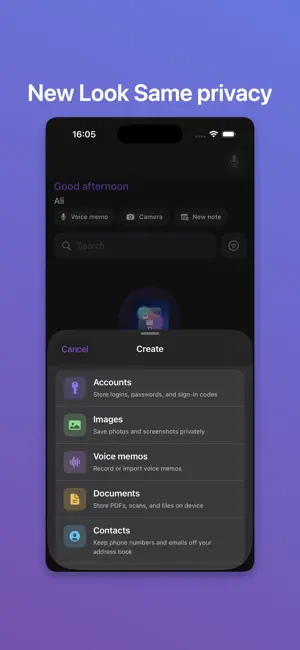
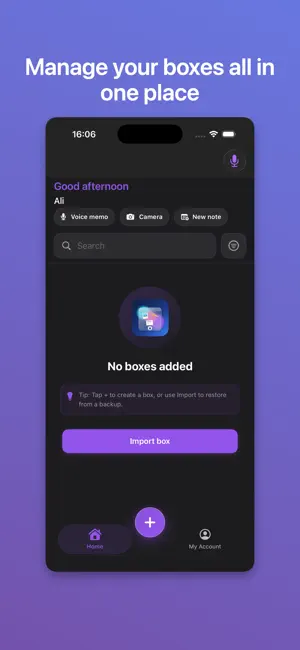
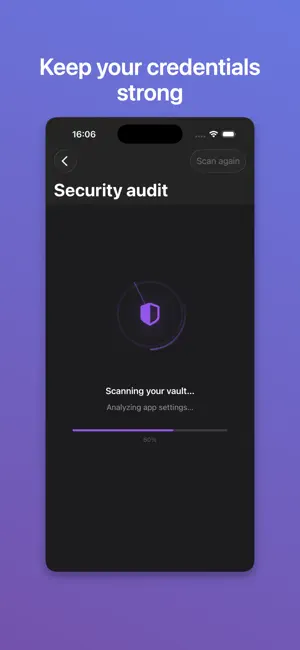
Secret Box: Password Vault keeps passwords, notes, contacts, photos, and documents in locked boxes on your iPhone and iPad—private by default, organized your way, and ready when you need it. Create secure boxes for work, travel, or personal life. Save accounts with usernames and passwords, write notes, store contacts, images, and documents—then open anything fast with global search, Face ID, and a clean, modern interface. FREE — START SECURE • Multiple vault boxes for different parts of your life • Accounts, notes, contacts, images, and documents in each box • Face ID, password, PIN, and security questions (free plan uses one lock type at a time) • Global search across your vault • Password generator when adding accounts—with on-device strength feedback • Your Plan in Settings—see usage for boxes, items, search, and Share saves • Share extension—save into your vault from other apps (daily limit on free plan) • New installs include a complimentary Premium trial so you can explore everything PREMIUM — FULL POWER • Password AutoFill in Safari and other apps from saved accounts • Combine password, Face ID, PIN, and security questions for stronger protection • Auto-lock after you leave the app • Security audit—spot weak or reused passwords on-device • Custom tags on any item—filter across all boxes from Home; Manage Tags in Settings • Encrypted full vault backup & restore—your file, your control • Weekly backup reminders so you don’t forget to protect your vault • Recently deleted—restore items within 7 days • iCloud sync for boxes (optional) • Higher limits—more boxes, more items per box, full search results, more Share saves • Home Screen widget, Siri Shortcuts, and more NEW IN THIS VERSION • Password generator for everyone • Your Plan usage overview in Settings • Tags, Home filtering, and vault-wide tag management (Premium) • Weekly backup reminders (Premium) • Smoother Settings navigation PRIVACY YOU CAN TRUST Your vault lives on your device. Secret Box is built for personal privacy—not ads, not selling your data. Password generation and security tools run on your device. Optional iCloud and encrypted backup are there when you choose them. SUBSCRIPTION (PREMIUM) Premium is an auto-renewing subscription billed to your Apple ID. Payment is charged at confirmation; renews unless canceled at least 24 hours before the end of the period. Manage or cancel in Settings → Apple ID → Subscriptions after purchase. Privacy Policy: https://sites.google.com/view/my-secret-box/home Terms of Use (EULA): https://www.apple.com/legal/internet-services/itunes/dev/stdeula/ Download Secret Box: Password Vault and keep what matters most—accounts, notes, and files—in one place you control.
What’s new
Version 1.6.1 · Updated October 8, 2026
This update brings your two‑factor codes to AutoFill, scans paper straight into your vault, lets guests join your Wi‑Fi with a QR code, and gives Home a good tidy‑up. What’s new: • **Premium: two‑factor codes in AutoFill** — When a site asks for a verification code, Secret Box offers it right above the keyboard. No more switching apps and racing the 30‑second timer. • **Premium: scan documents** — Point the camera at a passport, a contract or a receipt and it lands in your vault as a PDF, several pages at once. You see the first page, the page count and the size, so you know it worked. • **Premium: find boxes from iOS Search** — Turn it on in Settings → Tools and your box names show up when you search from the Home Screen. Only the names, never what’s inside — and never hidden boxes or boxes travel mode is hiding. Opening one still asks for its lock. • **More things to keep, the right way** — Five new item types: ID card, driving licence, health insurance card, insurance policy and vehicle registration. Each asks for what’s actually on the card, and expiry dates work with Premium expiry reminders. • **Share your Wi‑Fi with a QR code** — Open a saved Wi‑Fi network and tap Show QR code to join. Guests point their camera at it and they’re on — no reading out the password. Your phone asks for Face ID first. • **A calmer Home** — One + button for everything: a new box, a note, a photo or a voice memo. Your greeting and vault numbers share one line, tags have moved into the filter menu, pinned items sit in a single row, and the backup reminder is one line you can dismiss. • **No more “Recently opened”** — Home no longer keeps a list of what you last looked at. A vault shouldn’t remember that for anyone to see. • **Good evening, not good night** — The greeting now says hello late at night instead of goodbye. Fixes: • Searching on Home no longer shows what’s inside a locked box. Box names still match; the items inside only appear for boxes without a lock. • A pinned item in a hidden box no longer shows up on Home. Thanks for using Secret Box — we’re glad you’re here.
App privacy
The developer, Ali Jaber, reported these privacy practices to Apple.
Data Not Collected
The developer does not collect any data from this app.
Alternatives to Secret Box - Password Vault
Looking for apps like Secret Box - Password Vault? Here are 6 similar apps on the App Store. The highest rated is Lockit Secure Password Manager (4.7/5), and all 6 are free to download.


| App | Rating | Price | Last updated | Compare |
|---|---|---|---|---|
| Secret Box - Password Vault | – | Free | October 8, 2026 | |
| Lockit Secure Password Manager | 4.7 / 5 (758) | Free | Oct 25, 2026 | Compare |
| Remena | – | Free | Mar 27, 2026 | Compare |
| Kromb | – | Free | Dec 21, 2023 | Compare |
| Beesure | – | Free | Jun 18, 2026 | Compare |
| Notebook Lists | – | Free | Jun 17, 2026 | Compare |
| Smart Spend: Review Money | – | Free | Oct 20, 2026 | Compare |