

aPlayer - Video Player & Cast
Le Tu Utilities iPhoneiPadiPod touch
aPlayer - Video Player & Cast is a free Utilities app for iPhone and iPad by Le Tu. Rated 4.2/5 from 14 ratings. Requires iOS 15.6. Updated October 6, 2026.
- Rating
- 4.2
- 14 ratings
- Price
- Free
- on the App Store
- Size
- 128 MB
- Age 17+
- Updated
- Oct 6
- 2026 · v3.8.0
Screenshots


About aPlayer - Video Player & Cast
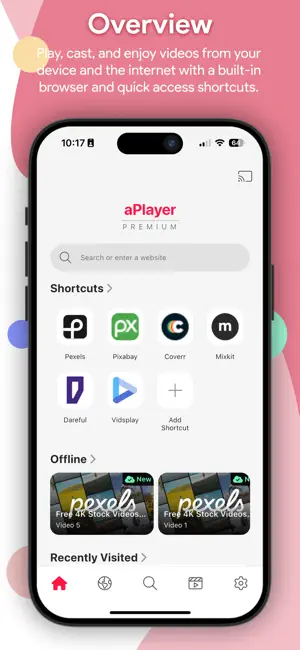
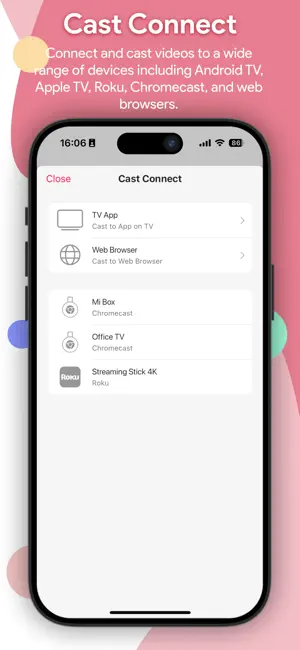
aPlayer is a powerful media utility designed to enhance your viewing experience. It combines a robust high-definition video player with seamless casting capabilities, allowing you to bridge the gap between your mobile device and the big screen. PROFESSIONAL VIDEO PLAYER The most complete video player for your device: ● All major formats: MP4, MKV, AVI, MOV, FLV, WMV, MTS, RMVB, 3GP, TS, MPG ● 4K Ultra HD & 1080p Full HD with hardware acceleration ● Variable speed: 0.5x to 2.0x ● Subtitles support: SRT, VTT ● Gesture controls: swipe to adjust volume, brightness, and seek ● Picture-in-Picture (PiP) mode ● Night Mode for comfortable low-light viewing ● Screen lock to prevent accidental touches ● Automatically organizes videos from local storage and SD card ● Cache web media into the app's internal sandbox for stable, smooth playback without internet. CAST TO TV Cast your videos to the big screen effortlessly: ● Chromecast & Google Cast: All devices with Google Cast built-in. ● Smart TVs (Native Receivers): Optimized experience with our dedicated aPlayer Receiver apps available on: - Android TV & Google TV - Apple TV - LG Smart TV - Samsung Smart TV - Roku Devices - Web Browser ● DLNA receivers: Support for various DLNA-certified video streaming devices. BUILT-IN WEB BROWSER A smooth, privacy-friendly browser integrated directly in the app: ● Browse your favorite websites and enjoy online video content ● Multi-tab support for easy navigation ● Browsing history & bookmarks stored locally on your device ● Privacy mode for a more secure browsing session --- DISCLAIMER aPlayer is a media playback and transmission tool. It does not host, store, provide, or modify any third-party media content. Users are solely responsible for ensuring that their use of this app complies with all applicable laws and the terms of service of any content platforms they access. Chromecast is a trademark of Google LLC. Apple TV is a trademark of Apple Inc. Roku is a trademark of Roku, Inc. This app is not affiliated with or endorsed by any of these brands. Streaming performance depends on Wi-Fi network quality and device compatibility. PRIVACY POLICY https://aplayer.co/privacy-policy TERMS OF USE https://aplayer.co/terms-of-use
Ratings & reviews
4.2
14 ratings
What’s new
Version 3.8.0 · Updated October 6, 2026
Added subtitle support for offline videos. Fixed Premium being disabled when offline. Fixed subtitles not showing on the web receiver.
App privacy
The developer, Le Tu, reported these privacy practices to Apple.
Data Used to Track You
The following data may be used to track you across apps and websites owned by other companies:
- Usage Data: Advertising Data
Data Not Linked to You
The following data, which may be collected but is not linked to your identity, may be used for the following purposes:
- Usage Data: Advertising Data
- Diagnostics: Crash Data, Performance Data
Used for: Third-Party Advertising, Analytics
Alternatives to aPlayer - Video Player & Cast
Looking for apps like aPlayer - Video Player & Cast? Here are 6 similar apps on the App Store. The highest rated is Web Cast - Automated (5.0/5), and all 6 are free to download.
-
 Web Cast - Automated
5.0
Web Cast - Automated
5.0
-
 Web Videos for Google Cast™
4.4
Web Videos for Google Cast™
4.4
-
 Offline Ultra - Offline Player
4.4
Offline Ultra - Offline Player
4.4
-
 TV Cast & Screen Mirroring HD
4.4
TV Cast & Screen Mirroring HD
4.4
-
 Chromecast Video Cast - CastX
3.7
Chromecast Video Cast - CastX
3.7
-
 DLNA for Chromecast
2.0
DLNA for Chromecast
2.0
| App | Rating | Price | Last updated | Compare |
|---|---|---|---|---|
| aPlayer - Video Player & Cast | 4.2 / 5 (14 ratings) | Free | October 6, 2026 | |
| Web Cast - Automated | 5.0 / 5 (7) | Free | Jul 14, 2025 | Compare |
| Web Videos for Google Cast™ | 4.4 / 5 (490) | Free | Oct 14, 2026 | Compare |
| Offline Ultra - Offline Player | 4.4 / 5 (132) | Free | Jul 28, 2026 | Compare |
| TV Cast & Screen Mirroring HD | 4.4 / 5 (59) | Free | Jun 26, 2024 | Compare |
| Chromecast Video Cast - CastX | 3.7 / 5 (3) | Free | Jun 9, 2026 | Compare |
| DLNA for Chromecast | 2.0 / 5 (6) | Free | Sep 30, 2026 | Compare |