

Optima mobile 3
DIVUS GmbH Lifestyle iPhoneiPadiPod touch
Optima mobile 3 is a free Lifestyle app for iPhone and iPad by DIVUS GmbH. Requires iOS 13.0. Updated May 17, 2024.
- Price
- Free
- on the App Store
- Size
- 72 MB
- Age 4+
- Updated
- May 17
- 2024 · v1.5.0
Screenshots


About Optima mobile 3
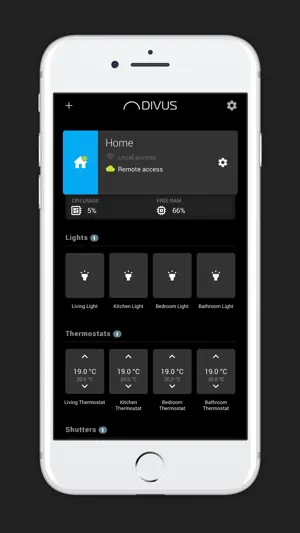
With DIVUS OPTIMA mobile 3 you can control your home automation system even when you are on the road. Use your device in order to supervise and control the functions of your home via Wi-Fi or mobile network. The app acts as client software that connects to your DIVUS KNX SERVER or DIVUS D+ device and thereby gives you access to your KNX system. The simple interface of the DIVUS OPTIMA app gives you easy access to all functionalities of your system. Not only light control is possible but also HVAC control, irrigation, scenarios, shutter functions, energy management and much more can be easily managed remotely. In order to use the app no additional configuration is required! Once your KNX bus system is working and your DIVUS KNXCONTROL device is set up, just insert the IP address / port of the device and a valid set of credentials in the app settings and you will gain access to all the KNX devices of your system. New: Take advantage of the new interface where each project has its summary page, showing the connection status and giving access to a set of quick-access objects which you can directly control - without loading the whole visualization. Of course you can also load the project as usual and access all of its functions. +Requirements: This application is compatible only with the following DIVUS devices: DIVUS KNX SERVER with software version 2.5.0 or higher, DIVUS KNX SERVER 3 (any version), DIVUS D+ (any version) +Additional information When connecting for the first time with a DIVUS device there will be an initial loading time of approximately 1 minute during which the contents from the server are downloaded. Additional information about the usage of the app can be found in the documentation section on the DIVUS homepage. +Functions: - Project overview page - Quick-access objects - QR-code scanning and project sharing to quickly configure the access to a project - Light control (on / off, dimming), shutters, irrigation, … - HVAC (heating / cooling) - Scenarios - Energy management - Weather information - Notifications - Cloud access
What’s new
Version 1.5.0 · Updated May 17, 2024
New in this version: - Added support to iOS 17. - Improved app performances. - Fixed an issue that prevented the project loading in certain network conditions. - Fixed some other minor bugs.
App privacy
The developer, DIVUS GmbH, reported these privacy practices to Apple.
Data Not Linked to You
The following data, which may be collected but is not linked to your identity, may be used for the following purposes:
- Location: Coarse Location
- Contact Info: Email Address
- Identifiers: Device ID
- Usage Data: Product Interaction
- Diagnostics: Crash Data, Performance Data
Used for: App Functionality
Alternatives to Optima mobile 3
Looking for apps like Optima mobile 3? Here are 6 similar apps on the App Store. The highest rated is CUBEVISION 2+ APP (3.0/5), and all 6 are free to download.
-
 MDT VisuControl Plus
-
 Tense VisuControl Plus
-
 Quantum Play
-
 CUBEVISION 2+ APP
3.0
CUBEVISION 2+ APP
3.0
-
 Basalte Access
-
 YOUVI Mobile
| App | Rating | Price | Last updated | Compare |
|---|---|---|---|---|
| Optima mobile 3 | – | Free | May 17, 2024 | |
| MDT VisuControl Plus | – | Free | Mar 6, 2026 | Compare |
| Tense VisuControl Plus | – | Free | May 21, 2026 | Compare |
| Quantum Play | – | Free | Jul 24, 2025 | Compare |
| CUBEVISION 2+ APP | 3.0 / 5 (3) | Free | Oct 17, 2026 | Compare |
| Basalte Access | – | Free | Oct 6, 2026 | Compare |
| YOUVI Mobile | – | Free | Apr 20, 2026 | Compare |
Compare Optima mobile 3 with the top alternatives: ratings, updates, ASO score and keyword gaps →