

Speed Reader: Read Faster
Niklas Baudy Productivity iPhoneiPadiPod touch
Speed Reader: Read Faster is a free Productivity app for iPhone and iPad by Niklas Baudy. Rated 3.8/5 from 6 ratings. Requires iOS 16.0.
- Rating
- 3.8
- 6 ratings
- Price
- Free
- on the App Store
- Size
- 83 MB
- Age 12+
- Updated
- Oct 5
- 2026 · v1.4.3
Screenshots


About Speed Reader: Read Faster
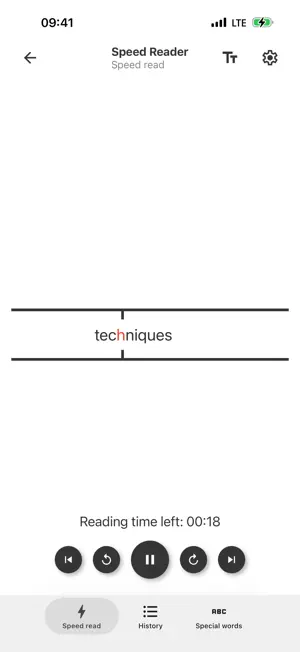
Read faster without turning reading into a game. Speed Reader is a speed reading app that shows text one word at a time using RSVP and Spritz-style speed reading. Your eyes stay still. You start around 300 words per minute and can work up to 750 WPM or more when the pace feels right. How it works: Paste text, share an article from another app, grab what’s on your clipboard, or paste a website link and the app will try to extract the article for you. Hit play. Words appear in a fixed spot so you spend less time scanning a page and more time actually reading. Use it for: • Articles and news you would otherwise skim on your phone • Study texts and long assignments • Emails, notes, and anything you can share or paste • Full web pages, when you only have the link • Your own writing, when you want to hear the rhythm at speed Special words: Speed reading should match how you read, not the other way around. Add any word or character as a special word — a period, a name, a heading — and decide what happens when it appears: • Extra delay, so the end of a sentence actually lands • Split the text there • Stop the reading Add as many special words as you want and tune each one. That is how you keep 750 WPM from turning into a blur. Features: • Adjustable words per minute • Spritz speed reading with an optional focus point • Speed reading lines for visual support • 1 to 10 words on screen at once • Pause whenever you need to stop • Write or paste your own text • Share text from other apps and start reading immediately • Read from the clipboard • Paste a link and extract the page to speed read • Special words with delay, split, or stop • Light and dark themes This is not a course and not a book library. It is a fast reader for text you already have — in the app, from share, from the clipboard, or from a URL. The more you use Speed Reader, the easier higher WPM feels. Try it when you want a speed reading app that reads your pages, not just a demo paragraph. https://vanniktech.de/SpeedReading/privacy_policy.html https://www.apple.com/legal/internet-services/itunes/dev/stdeula/
Ratings & reviews
3.8
6 ratings
What’s new
Version 1.4.3 · Updated October 5, 2026
Bug fixes. Speed Reader still lets you: • Paste text or a link and extract the article • Share text from other apps and start RSVP immediately • Set WPM (start around 300, work up to 750+) • Add special words (like ".") to delay, split, or stop • Read 1–10 words at a time, with pause, Spritz, and dark mode Read faster on your phone — articles, study text, clipboard, or a URL.
App privacy
The developer, Niklas Baudy, reported these privacy practices to Apple.
Data Not Linked to You
The following data, which may be collected but is not linked to your identity, may be used for the following purposes:
- Identifiers: Device ID
- Usage Data: Advertising Data
- Diagnostics: Crash Data, Performance Data, Other Diagnostic Data
Used for: Developer’s Advertising or Marketing, Analytics, Other Purposes
Alternatives to Speed Reader: Read Faster
Looking for apps like Speed Reader: Read Faster? Here are 6 similar apps on the App Store. The highest rated is RR - RapidReads (5.0/5), and all 6 are free to download.
-
 Speed Reading UpRead
4.2
Speed Reading UpRead
4.2
-
 Handy Reader - Speed Reading
4.9
Handy Reader - Speed Reading
4.9
-
 Text to Speech ePub PDF: Stage
3.4
Text to Speech ePub PDF: Stage
3.4
-
 RR - RapidReads
5.0
RR - RapidReads
5.0
-
 Speedy Reader - RSVP
5.0
Speedy Reader - RSVP
5.0
-
 Spreeder - Speed Reader
4.8
Spreeder - Speed Reader
4.8
| App | Rating | Price | Last updated | Compare |
|---|---|---|---|---|
| Speed Reader: Read Faster | 3.8 / 5 (6 ratings) | Free | October 5, 2026 | |
| Speed Reading UpRead | 4.2 / 5 (116) | Free | Feb 19, 2025 | Compare |
| Handy Reader - Speed Reading | 4.9 / 5 (8) | Free | Dec 30, 2025 | Compare |
| Text to Speech ePub PDF: Stage | 3.4 / 5 (9) | Free | Oct 21, 2026 | Compare |
| RR - RapidReads | 5.0 / 5 (1) | Free | Sep 30, 2026 | Compare |
| Speedy Reader - RSVP | 5.0 / 5 (4) | Free | Sep 14, 2026 | Compare |
| Spreeder - Speed Reader | 4.8 / 5 (13) | Free | Jul 15, 2026 | Compare |