

Studuck - Class schedule
Victor Shamruk Education iPhoneiPadiPod touch
Studuck - Class schedule is a free Education app for iPhone and iPad by Victor Shamruk. Rated 4.8/5 from 6 ratings. Requires iOS 13.0. Updated July 6, 2026.
- Rating
- 4.8
- 6 ratings
- Price
- Free
- on the App Store
- Size
- 156 MB
- Age 4+
- Updated
- Jul 6
- 2026 · v1.0.26
Screenshots



About Studuck - Class schedule
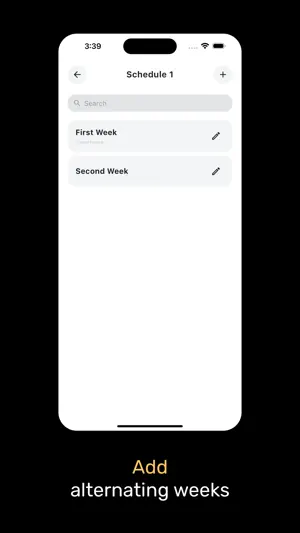
1. Add a class schedule. Flexible functionality will allow you to easily set up alternating weeks. 2. Write down tasks and specify a deadline for them and priority over other tasks. Now you won't forget to do anything! 3. Instantly get up-to-date information about classes and activities from teachers or other students using groups. SCHEDULES. You can create several schedule templates at once and switch between them. Alternating weeks work automatically. If the schedule has several weeks, they will switch one after the other. If one week - it will just repeat. For each lesson, you can specify the building and the audience, as well as the teacher. For convenience, you can specify a color to quickly find the right activity in the list. TASKS. For each task, you can specify the priority: normal, medium and high - just click on the exclamation mark icon when creating the task. You can also specify the deadline for completing the task so that everything is done on time. For convenience, you can add to the task the subject with which it is associated. GROUPS. You can use groups to interact with teachers and other students. For example, if a class has been canceled or a new assignment has been added, the teacher can create a post and notify all participants about it. You can add photo materials to each post. The application also includes subscriptions with several tariff plans. What does a SUBSCRIPTION give? 1. Auto-sync - to automatically save your data to the cloud. 2. Creating schedules - no restrictions! Without Premium, you can create only 1 schedule. 3. Creating groups - no restrictions! Without Premium, you can create only 1 group. 4. Creating tasks - without restrictions! Without Premium, you can create only 100 tasks. 5. The ability to add up to 10 photos to the post! Without Premium, you can only add up to 5 photos. 6. Premium subscriber icon. Stand out in the list of group members! 7. Project support. You can ask us a question, report a problem with the app, or share ideas by email: [email protected]. Privacy policy: https://stu-duck.ru/about/privacy Terms of use: https://www.apple.com/legal/internet-services/itunes/dev/stdeula/
Ratings & reviews
4.8
6 ratings
What’s new
Version 1.0.26 · Updated July 6, 2026
A few important fixes
App privacy
The developer, Victor Shamruk, reported these privacy practices to Apple.
Data Linked to You
The following data, which may be collected and linked to your identity, may be used for the following purposes:
- Contact Info: Email Address, Name
Used for: Analytics, App Functionality
Data Not Linked to You
The following data, which may be collected but is not linked to your identity, may be used for the following purposes:
- Identifiers: User ID, Device ID
- Usage Data: Product Interaction, Other Usage Data
- Diagnostics: Crash Data, Performance Data, Other Diagnostic Data
- User Content: Photos or Videos
Used for: Analytics, App Functionality
Alternatives to Studuck - Class schedule
Looking for apps like Studuck - Class schedule? Here are 6 similar apps on the App Store. The highest rated is ClassTime: School & College (4.8/5), and all 6 are free to download.
-
 TSU.InTime – schedule
4.4
TSU.InTime – schedule
4.4
-
 School Timetable Planner
4.7
School Timetable Planner
4.7
-
 Дневач - Расписание занятий
4.6
Дневач - Расписание занятий
4.6
-
 Кампус - Расписание занятий
4.5
Кампус - Расписание занятий
4.5
-
 ClassTime: School & College
4.8
ClassTime: School & College
4.8
-
 Weeklie: Class Timetable
4.7
Weeklie: Class Timetable
4.7
| App | Rating | Price | Last updated | Compare |
|---|---|---|---|---|
| Studuck - Class schedule | 4.8 / 5 (6 ratings) | Free | July 6, 2026 | |
| TSU.InTime – schedule | 4.4 / 5 (8) | Free | Dec 18, 2025 | Compare |
| School Timetable Planner | 4.7 / 5 (22) | Free | May 29, 2026 | Compare |
| Дневач - Расписание занятий | 4.6 / 5 (14) | Free | Mar 22, 2026 | Compare |
| Кампус - Расписание занятий | 4.5 / 5 (178) | Free | Oct 1, 2026 | Compare |
| ClassTime: School & College | 4.8 / 5 (8) | Free | Jan 7, 2024 | Compare |
| Weeklie: Class Timetable | 4.7 / 5 (225) | Free | Oct 13, 2026 | Compare |