

Coperniq
Coperniq Inc. Business iPhoneiPadiPod touch
Coperniq is a free Business app for iPhone and iPad by Coperniq Inc. Rated 1.0/5 from 1 ratings. Requires iOS 17.0. Updated October 19, 2026.
- Rating
- 1.0
- 1 ratings
- Price
- Free
- on the App Store
- Size
- 247 MB
- Age 4+
- Updated
- Oct 19
- 2026 · v3.1.1
Screenshots


About Coperniq
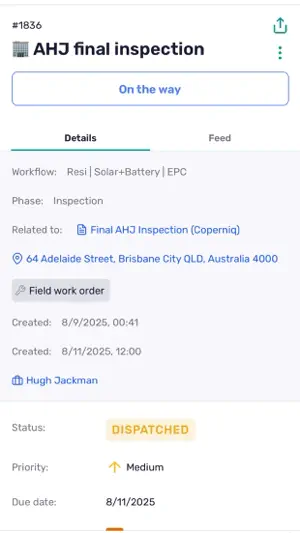
Workflow management software for solar & energy contractors. Manage your solar installation & service business on the go. Access project tracking, schedules, inspection forms, checklists, & more.
What’s new
Version 3.1.1 · Updated October 19, 2026
Proposals Present a proposal in person. The client picks the option, add-ons and service plan, signs on your screen and the proposal is accepted on the spot. Create proposals from a project. Set a waste percentage for the whole proposal in the Options settings. Send to Account is back on the proposal preview. Service plans and add-ons show up right away on the Summary. Billing options now read Cash and Financing. Work orders and forms Change a work order’s status, including Completed, straight from the Information tab. Status options now match web for each work order type. Long notes are readable without opening the keyboard. Forms scroll all the way down with the keyboard open. The keyboard bar looks like the system one, and swiping down closes it. Swipe between job sheet photos without closing the viewer. Read-only Date and Person fields are now read-only. “Send to review” on file requests works again. In-app dictation on iOS works reliably again. Projects and search Documents show on the project Work tab, and you can create them there. The Work tab now looks the same as on web. Search results show project and opportunity titles and share one layout. Time-range properties now show on the Properties tab. Ask AI now lives under Comms on records, same as web. Inbox and calls Add unknown missed calls and texts to an account right from the Inbox. Notification links for unlinked texts and missed calls open the Inbox instead of a dead end. Android: incoming calls ring even if the microphone permission was never granted. Inbox loads faster. Fixes Fixed a crash with background uploads on Android. Fixed an Android crash when leaving a screen while pulling to refresh. Fixed a hang on the form screen on iOS. Android: the Search tab no longer goes white after opening a result. Fixed PDF annotations failing to load on Android. The app no longer crashes when the device runs out of storage while you work offline. Opening a not-started workflow step is much faster. Plus other bug fixes and speed improvements.
App privacy
The developer, Coperniq Inc., reported these privacy practices to Apple.
Data Linked to You
The following data, which may be collected and linked to your identity, may be used for the following purposes:
- Location: Precise Location
- User Content: Photos or Videos
- Diagnostics: Crash Data, Performance Data, Other Diagnostic Data
Used for: App Functionality
Alternatives to Coperniq
Looking for apps like Coperniq? Here are 6 similar apps on the App Store. The highest rated is OpenSolar (4.4/5), and all 6 are free to download.
-
 Stakt Commissions
4.0
Stakt Commissions
4.0
-
 SiteCapture Mobile
3.9
SiteCapture Mobile
3.9
-
 OpenSolar
4.4
OpenSolar
4.4
-
 Scanifly Mobile
3.7
Scanifly Mobile
3.7
-
 Sunbase
4.1
Sunbase
4.1
-
 Arrivy
2.8
Arrivy
2.8
| App | Rating | Price | Last updated | Compare |
|---|---|---|---|---|
| Coperniq | 1.0 / 5 (1 rating) | Free | October 19, 2026 | |
| Stakt Commissions | 4.0 / 5 (8) | Free | Jun 2, 2026 | Compare |
| SiteCapture Mobile | 3.9 / 5 (40) | Free | Sep 22, 2026 | Compare |
| OpenSolar | 4.4 / 5 (10) | Free | Sep 3, 2026 | Compare |
| Scanifly Mobile | 3.7 / 5 (26) | Free | Sep 26, 2026 | Compare |
| Sunbase | 4.1 / 5 (22) | Free | Oct 14, 2024 | Compare |
| Arrivy | 2.8 / 5 (11) | Free | Oct 2, 2026 | Compare |
Compare Coperniq with the top alternatives: ratings, updates, ASO score and keyword gaps →