

On-Axis
OK-Sound Utilities iPhoneiPadiPod touch
On-Axis is a free Utilities app for iPhone and iPad by OK-Sound. Rated 5.0/5 from 7 ratings. Requires iOS 17. Updated March 8, 2026.
- Rating
- 5.0
- 7 ratings
- Price
- Free
- on the App Store
- Size
- 20 MB
- Age 4+
- Updated
- Mar 8
- 2026 · v1.4.3
Screenshots

About On-Axis
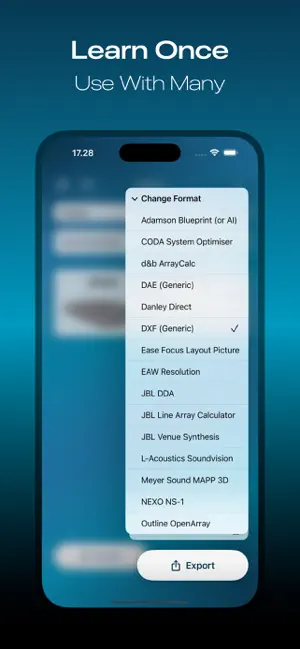
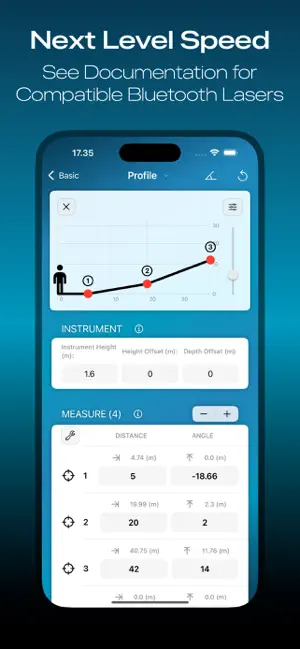
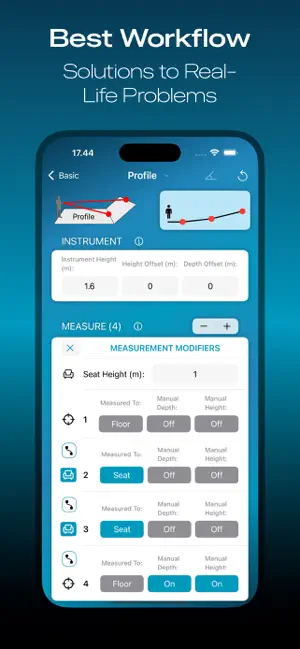
THE APP Introducing On-Axis: The must-have app for audio professionals in the event and touring industry! Measure and model your audience area with a completely new method compatible with many popular loudspeaker simulation programs. The On-Axis method significantly speeds up the measurement of the audience area, allowing you to focus on the most important thing, making the actual speaker design. WORKFLOW The On-Axis workflow begins by taking measurements of the audience area with the app. The On-Axis exports a file that can be imported into the selected loudspeaker simulation software. The On-Axis does not replace traditional methods such as CAD drawings or other precise models. It is a new addition to your existing toolbox. MODES The app consists of three different operating modes. Venue and Planes mode can be used to draw a 3D model of the listening area. The On-Axis Profile mode can be used to draw a uniform plane to the speaker’s axis, starting from the speaker’s rigging point and ending at the farthest point of the audience area. BLUETOOTH SUPPORT The app can be paired with a compatible laser distance finder via Bluetooth. This enables the measured distance and angle to be transferred wirelessly. See the compatibility chart for more info on supported devices. TO GET STARTED Watch the tutorial videos to get started: http://link.oksound.fi/playlist The app is free to download but requires an In-App-Purchase to unlock the export, save and open functions. A 14-day free full trial is also available to see if this tool fits your workflow. This is a 3rd party solution and compatibility with simulation software is guaranteed only with tested versions. Check the website for more information and compatibility: https://onaxisapp.com or https://oksound.fi
Ratings & reviews
5.0
7 ratings
What’s new
Version 1.4.3 · Updated March 8, 2026
- New mode "Sensors" added. Now you can utilize the device's internal sensors (iOS only). Free for all users regardless of license. - The application will no longer remind you every time you open it that a new version is available. From now on, the reminder will be given less frequently. - MAPP 3D export related bug fixed. - Preview related bug fixed. - Keyboard related bug fixed. - Bug fixed where app crashed in certain devices when trying to access profile measurement page.
App privacy
The developer, OK-Sound, reported these privacy practices to Apple.
Data Not Linked to You
The following data, which may be collected but is not linked to your identity, may be used for the following purposes:
- Purchases: Purchase History
- Usage Data: Product Interaction
Used for: Analytics
Alternatives to On-Axis
Looking for apps like On-Axis? Here are 6 similar apps on the App Store. The highest rated is WaveCalc - sound calculator (5.0/5), and 5 of the 6 are free to download.
-
 Tracebook - Speaker Reference
-
 Astral Remote
3.2
Astral Remote
3.2
-
 MeasureMate
-
 ProVisionaire Portal
-
 WaveCalc - sound calculator
5.0
WaveCalc - sound calculator
5.0
-
 Omni Sub
3.7
Omni Sub
3.7
| App | Rating | Price | Last updated | Compare |
|---|---|---|---|---|
| On-Axis | 5.0 / 5 (7 ratings) | Free | March 8, 2026 | |
| Tracebook - Speaker Reference | – | Free | Nov 27, 2024 | Compare |
| Astral Remote | 3.2 / 5 (6) | Free | Aug 18, 2026 | Compare |
| MeasureMate | – | Free | Nov 5, 2025 | Compare |
| ProVisionaire Portal | – | Free | Sep 10, 2026 | Compare |
| WaveCalc - sound calculator | 5.0 / 5 (1) | Free | Aug 4, 2026 | Compare |
| Omni Sub | 3.7 / 5 (3) | 34.99 USD | Aug 22, 2026 | Compare |
Compare On-Axis with the top alternatives: ratings, updates, ASO score and keyword gaps →