

Voice Aloud Reading
ryo muranaka Medical iPhoneiPadiPod touch
Voice Aloud Reading is a free Medical app for iPhone and iPad by ryo muranaka. Requires iOS 16.6. Updated October 16, 2026.
- Price
- Free
- on the App Store
- Size
- 43 MB
- Age 4+
- Updated
- Oct 16
- 2026 · v1.21.0
Screenshots
About Voice Aloud Reading
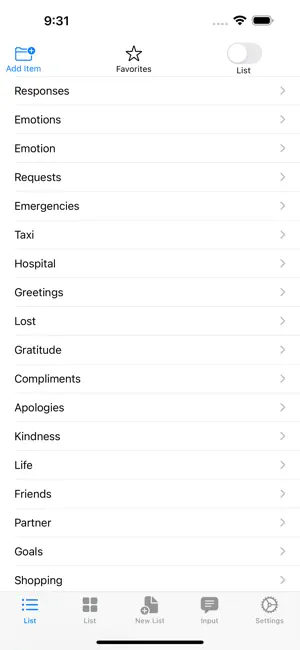
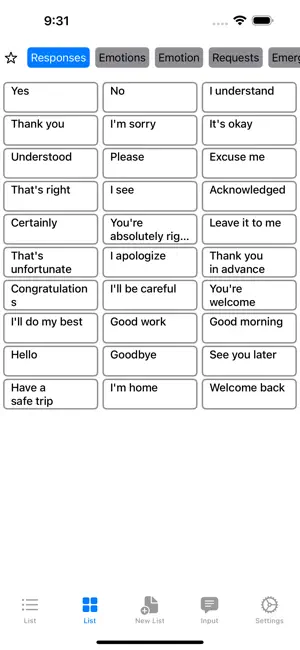
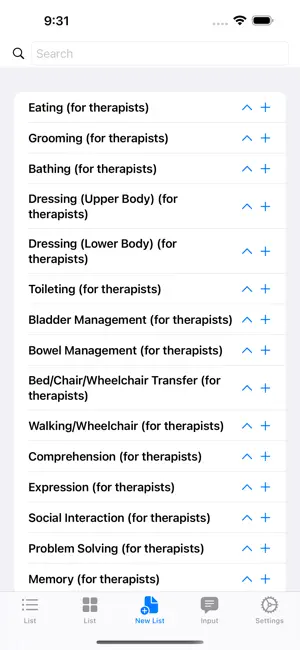
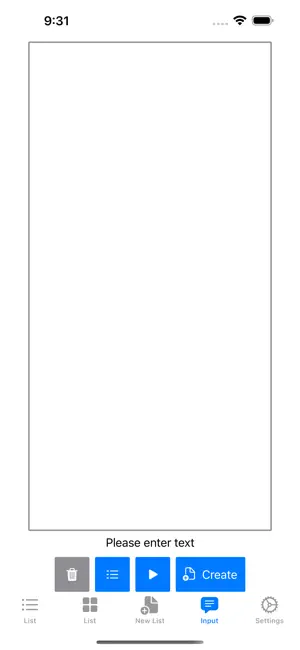
Voice Aloud Reading is a free, easy-to-use text-to-speech app for reading out both ready-made and freely typed sentences. The main functions are as follows Read aloud in your own voice: Record your voice for each phrase before losing it, for example before surgery, and hear it instead of a synthesized voice. Existing audio can be imported, and a full backup moves everything to a new device. High-quality Japanese voices (VOICEVOX): Add natural-sounding Japanese voices generated on your device. Compare 80 voices with the same sentence and listen before you download; one tap downloads and switches. Ready-made sentences: 400 phrases for daily life, travel and work. You can add your own without limit. Tap to speech: Tap a sentence and it is read out immediately in a natural voice. Text-to-speech: Type your own text and have it read out. What you type is kept in the history. Dark mode: Easy on the eyes at night or in dark places. Font size: Change the size of the text on screen to suit your eyesight. Designed with accessibility in mind, for medical, care and educational settings as well as everyday conversation. Updated regularly — missing a sentence? Mention it in a review and we will add it. Frequently Asked Questions: Q: What is My Voice? A: You record your own voice for each phrase; tapping it plays your recording instead of a synthesized voice. Made for people preparing to lose their voice, for example before surgery. Settings > Voice > My Voice. Q: Where are recordings stored? Are they sent anywhere? A: They stay on this device only. Nothing is sent anywhere, including to our servers. Q: How long can one recording be? A: Up to 60 seconds. For longer sentences, we recommend splitting them into separate phrases. Q: Can I use audio I have already recorded? A: Yes — from the Files app, iCloud Drive, or the share sheet in Voice Memos. Up to 10 minutes per file, and several files at once with matches suggested from file names. Q: Will I lose my data when I change devices? A: No. The full backup saves phrases, categories, order, recordings and settings in one file. Settings > Full Backup. Q: Is the app paid? A: Every reading feature is free. Ads are shown, and a one-time purchase to remove them is available. Nothing is locked behind that purchase. Q: Ads came back after I changed devices. A: Ad removal is tied to your Apple Account, so it is not included in the backup. Go to Settings > Remove Ads and tap "Restore Purchase". Q: Can I use Personal Voice (iOS 17 or later)? A: Yes. It is created in iOS Settings > Accessibility and supports English (US), Spanish (Mexico) and Chinese. For other languages, use My Voice. Q: The silence before and after my recording bothers me. A: It is trimmed automatically and can be undone. Strength: Settings > Voice > My Voice. Q: Does it work on iPad? A: Yes, both iPhone and iPad are supported. Q: Can I add my own phrases and categories? A: Yes, with no limit. Add, edit, reorder and move phrases between categories; put frequent ones in Favorites. Q: Can I change the voice? A: Yes. Pick from the voices on your device; speed and pitch in Settings > Voice. Q: How many languages are supported? A: Eleven, switching automatically with your iPhone's language setting. Q: Does it work offline? A: Yes. Only some high-quality voices need an initial download in iOS. Q: Can I save the spoken text as a file? A: Yes, and share it. If the phrase has your recording, that is exported. Q: There is no sound. A: Check the silent switch and volume, then close and reopen the app. Q: Can I open the app's screens directly from other apps? A: Yes: speechlist://main, //grid, //new, //input, //settings — handy with the Shortcuts app. Voices: VOICEVOX:冥鳴ひまり, VOICEVOX:九州そら, VOICEVOX:雀松朱司, and more (full credits in the app)
What’s new
Version 1.21.0 · Updated October 16, 2026
- Added Natural Voices for reading Japanese text. More natural voices (VOICEVOX) are generated on your device. Under "Natural Voices (Japanese)" in Settings, you can preview them before downloading and compare 80 voices with the same sentence. - Fixed an issue where creating an audio file for the same text twice in a row could fail the second time.
App privacy
The developer, ryo muranaka, reported these privacy practices to Apple.
Data Used to Track You
The following data may be used to track you across apps and websites owned by other companies:
- Location: Coarse Location
- Identifiers: Device ID
- Usage Data: Product Interaction, Advertising Data
- Diagnostics: Crash Data, Performance Data
Data Linked to You
The following data, which may be collected and linked to your identity, may be used for the following purposes:
- Location: Coarse Location
- Identifiers: Device ID
- Usage Data: Product Interaction, Advertising Data
- Diagnostics: Crash Data, Performance Data
Used for: Third-Party Advertising
Alternatives to Voice Aloud Reading
Looking for apps like Voice Aloud Reading? Here are 6 similar apps on the App Store. The highest rated is Lose Belly Fat at Home (4.9/5), and all 6 are free to download.
-
 Cubitt Pro
4.1
Cubitt Pro
4.1
-
 WalkWork
4.1
WalkWork
4.1
-
 HUAWEI Health
4.5
HUAWEI Health
4.5
-
 Calz - Calorie Counter AI
4.7
Calz - Calorie Counter AI
4.7
-
 Lose Belly Fat at Home
4.9
Lose Belly Fat at Home
4.9
-
 WalkTask-Walking Step Counter
4.6
WalkTask-Walking Step Counter
4.6
| App | Rating | Price | Last updated | Compare |
|---|---|---|---|---|
| Voice Aloud Reading | – | Free | October 16, 2026 | |
| Cubitt Pro | 4.1 / 5 (155) | Free | Oct 8, 2026 | Compare |
| WalkWork | 4.1 / 5 (402) | Free | Sep 22, 2025 | Compare |
| HUAWEI Health | 4.5 / 5 (14,980) | Free | Oct 13, 2026 | Compare |
| Calz - Calorie Counter AI | 4.7 / 5 (4,275) | Free | Oct 16, 2026 | Compare |
| Lose Belly Fat at Home | 4.9 / 5 (13,725) | Free | Sep 17, 2025 | Compare |
| WalkTask-Walking Step Counter | 4.6 / 5 (13,000) | Free | Jan 6, 2026 | Compare |