

Countdown Fred
DaMtech Productivity iPhoneiPadiPod touch
Countdown Fred is a free Productivity app for iPhone and iPad by DaMtech. Rated 5.0/5 from 2 ratings. Requires iOS 26.0. Updated August 14, 2026.
- Rating
- 5.0
- 2 ratings
- Price
- Free
- on the App Store
- Size
- 2 MB
- Age 4+
- Updated
- Aug 14
- 2026 · v5
Screenshots

About Countdown Fred
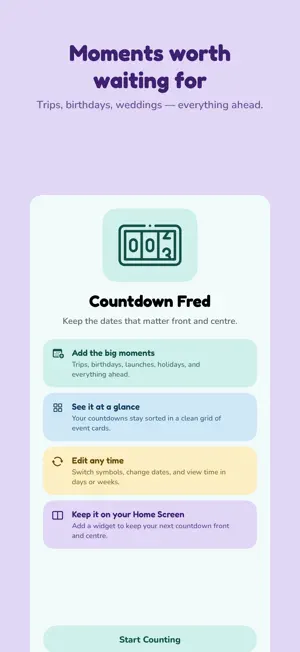
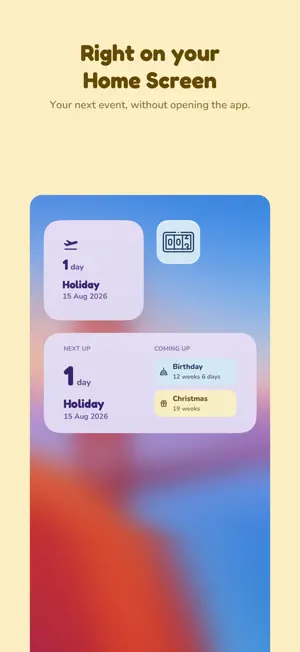
Countdown Fred keeps the dates you are looking forward to where you can actually see them. Add the moments that matter — a holiday, a birthday, a wedding, a gig, the first day of something new — and Countdown Fred turns them into a clean grid of colourful cards, always sorted so the next one comes first. No accounts. No feeds. No clutter. Just how long until the good stuff. MAKE EVERY EVENT YOURS • Give each event a name, a date and one of eleven symbols • Choose from four card colours • Cards sort themselves by date, so what is next is always at the top • Tap any card to edit it or take it off the list DAYS OR WEEKS One tap switches the whole app between days and weeks. "45 days" or "6 weeks 3 days" — however you naturally think about time. ON YOUR HOME SCREEN • A small widget for your next event • A medium widget showing what is next plus two more coming up • The widget takes on the colour of your next event • Refreshes itself every day, so the number is always right MADE TO BE LOOKED AT • Flat, friendly design with rounded type and soft colour • Light and dark mode are each designed properly, not one inverted copy of the other • Quick to open, quick to add, then out of your way YOURS ALONE Everything stays on your iPhone. There is no account to create, nothing to sign in to, no tracking and no analytics. Your events are nobody else's business.
What’s new
Version 5 · Updated August 14, 2026
Version 5 is a complete redesign. A NEW LOOK Countdown Fred has been rebuilt around flat, colourful cards and friendly rounded type. Light and dark mode are each designed properly now, rather than one being an inverted copy of the other. A NEW ICON Flat and simple, built from the same mark you see inside the app, with light, dark and tinted versions to suit whichever Home Screen you use. PICK YOUR COLOURS Every event can now be set to one of four card colours. Tap a card, choose Edit, and pick the one you want. Events you already have are given a colour automatically and keep it from then on. A BETTER WIDGET The Home Screen widget has been redesigned to match. It takes on the colour of your next event, and the medium size shows two more events coming up underneath. FIXES • Switching between days and weeks now updates the widget straight away • Day counts stay correct when the app is left open past midnight • Events sharing a date no longer appear in a different order in the app and the widget • The event name field is now readable in dark mode • A number of smaller sorting and layout corrections Thank you for using Countdown Fred
App privacy
The developer, DaMtech, reported these privacy practices to Apple.
Data Not Collected
The developer does not collect any data from this app.
Alternatives to Countdown Fred
Looking for apps like Countdown Fred? Here are 6 similar apps on the App Store. The highest rated is stashy: save anything (5.0/5), and all 6 are free to download.
-
 Orosimo Countdown
-
 Dot Countdown - Track Events
3.0
Dot Countdown - Track Events
3.0
-
 Weekr: Weekly & Daily Planner
-
 Shelver: Home Organization
4.9
Shelver: Home Organization
4.9
-
 stashy: save anything
5.0
stashy: save anything
5.0
-
 TimeTill: Countdown Widget
5.0
TimeTill: Countdown Widget
5.0
| App | Rating | Price | Last updated | Compare |
|---|---|---|---|---|
| Countdown Fred | 5.0 / 5 (2 ratings) | Free | August 14, 2026 | |
| Orosimo Countdown | – | Free | Jul 18, 2026 | Compare |
| Dot Countdown - Track Events | 3.0 / 5 (1) | Free | Aug 7, 2026 | Compare |
| Weekr: Weekly & Daily Planner | – | Free | Oct 16, 2026 | Compare |
| Shelver: Home Organization | 4.9 / 5 (33) | Free | Feb 26, 2026 | Compare |
| stashy: save anything | 5.0 / 5 (20) | Free | Oct 13, 2026 | Compare |
| TimeTill: Countdown Widget | 5.0 / 5 (12) | Free | Oct 14, 2026 | Compare |
Compare Countdown Fred with the top alternatives: ratings, updates, ASO score and keyword gaps →