

PixelLab: AI Background Eraser
Sohel Ibna Saad Graphics & Design iPhoneiPadiPod touch
PixelLab: AI Background Eraser is a free Graphics & Design app for iPhone and iPad by Sohel Ibna Saad. Rated 4.3/5 from 266 ratings. Requires iOS 14.0.
- Rating
- 4.3
- 266 ratings
- Price
- Free
- on the App Store
- Size
- 105 MB
- Age 4+
- Updated
- Nov 19
- 2025 · v1.2.6
Screenshots



About PixelLab: AI Background Eraser
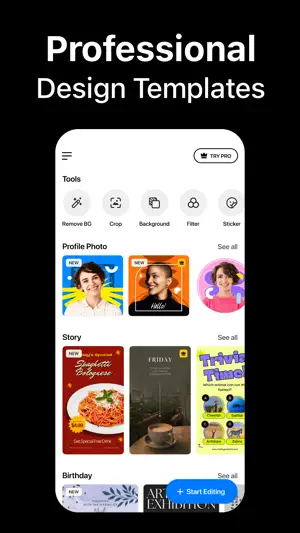
Instantly remove background from images and create transparent or colorful backgrounds on your iPhone. Background Eraser lets you apply colors, filters, borders, and even add text to change background in your photos and save as high-quality PNG or JPEG. Looking for the best background removal app for iPhone? Use our AI-infused tool to automatically cut out objects or people in the background. Simply select your image from the library, and the app will do the rest! Key Features of Background Eraser: • One tap to remove background from photos automatically • Crop, rotate, and flip images for adjustment • Manual background remover to erase or restore any objects • Add custom text and emojis to a photo background • Add border outline to a photo with different colors • Inbuilt image background color changer • Apply amazing photo filters from 100+ presets • Change resolution before saving your edited photos in PNG or JPEG format • Instantly share your creation on multiple platforms like Facebook, Instagram, etc. Remove Background with AI The built-in automatic background remover works like a charm – needing you to only select an image from the gallery. After the AI background removal, you can use the Eraser tool to manually delete background from images and achieve perfection. Change Background Color Wondering how to change the background of a photo to a different color? Choose your pick from the palette and change background color of any photo on your iPhone. You can add white background to a photo or make the background transparent as well. Text, Emojis, Filters – You name it Add text and emojis to images to personalize your captures the way you want. You can also apply photo effects and filters to enhance the appearance, add border frame to change the outlook, and so on. How to remove background from a picture on iPhone? Using the Background Eraser app to crop out or remove people and objects from photo backgrounds is easy – - Launch the app and tap on the Plus (+) button. - Choose an image from your iPhone Library. - Crop or rotate if needed. Then hit Next. - It will automatically remove the background for you. To further refine the edges, use the Eraser tool for adjustments. Auto-Renewable Subscription Terms: Subscribe to get unrestricted access to all the features outlined above. - Subscription Length: Weekly, Yearly - Subscription with a free trial period will automatically renew to a paid subscription unless it is canceled at least 24 hours before the end of the trial period. - Payment will be charged to iTunes Account at confirmation of purchase. - Your Apple ID account will be charged for renewal within 24 hours before the end of the trial period. - You can manage and cancel your subscriptions by going to your account settings on the App Store. - Any unused portion of a free trial period, if offered, will be forfeited when the user purchases a subscription to that publication, where applicable. - By signing up for this subscription, you agree to our Terms of Use and Privacy Policy. Terms of Use: https://pixeltouch.net/legal/bgeraser/terms.html Privacy Policy: https://pixeltouch.net/legal/bgeraser/privacy.html
Ratings & reviews
4.3
266 ratings
What’s new
Version 1.2.6 · Updated November 19, 2025
[New] • You can now create photos for passports, visas, and IDs instantly with our new ID Photo feature, fully aligned with each country’s requirements. [Fixes] • Bug fixes and performance improvements.
App privacy
The developer, Sohel Ibna Saad, reported these privacy practices to Apple.
Data Used to Track You
The following data may be used to track you across apps and websites owned by other companies:
- Identifiers: User ID, Device ID
Data Linked to You
The following data, which may be collected and linked to your identity, may be used for the following purposes:
- Identifiers: User ID, Device ID
- Usage Data: Product Interaction, Advertising Data
- Diagnostics: Crash Data, Performance Data
Used for: Third-Party Advertising, Analytics, App Functionality
Alternatives to PixelLab: AI Background Eraser
Looking for apps like PixelLab: AI Background Eraser? Here are 6 similar apps on the App Store. The highest rated is SnapBG: Remove Background AI (4.8/5), and all 6 are free to download.
-
 SnapBG: Remove Background AI
4.8
SnapBG: Remove Background AI
4.8
-
 Remove Objects, Photo Eraser
4.7
Remove Objects, Photo Eraser
4.7
-
 Remove Objects From Photo・
4.1
Remove Objects From Photo・
4.1
-
 Remove Background - Snip BG
4.7
Remove Background - Snip BG
4.7
-
 Object & Person Remover: Nixel
4.6
Object & Person Remover: Nixel
4.6
-
 Photo Cut: Cutout pro & paste
4.7
Photo Cut: Cutout pro & paste
4.7
| App | Rating | Price | Last updated | Compare |
|---|---|---|---|---|
| PixelLab: AI Background Eraser | 4.3 / 5 (266 ratings) | Free | November 19, 2025 | |
| SnapBG: Remove Background AI | 4.8 / 5 (105) | Free | Apr 17, 2026 | Compare |
| Remove Objects, Photo Eraser | 4.7 / 5 (1,019) | Free | Sep 11, 2026 | Compare |
| Remove Objects From Photo・ | 4.1 / 5 (491) | Free | Jul 1, 2026 | Compare |
| Remove Background - Snip BG | 4.7 / 5 (1,254) | Free | Oct 28, 2026 | Compare |
| Object & Person Remover: Nixel | 4.6 / 5 (114) | Free | Jul 26, 2026 | Compare |
| Photo Cut: Cutout pro & paste | 4.7 / 5 (6,180) | Free | Aug 25, 2026 | Compare |