

PDF: Lock & Unlock
Hardik Dhameliya Utilities iPhoneiPadiPod touch
PDF: Lock & Unlock is a free Utilities app for iPhone and iPad by Hardik Dhameliya. Rated 3.5/5 from 6 ratings. Requires iOS 15.0. Updated October 15, 2026.
- Rating
- 3.5
- 6 ratings
- Price
- Free
- on the App Store
- Size
- 35 MB
- Age 4+
- Updated
- Oct 15
- 2026 · v3.4
Screenshots


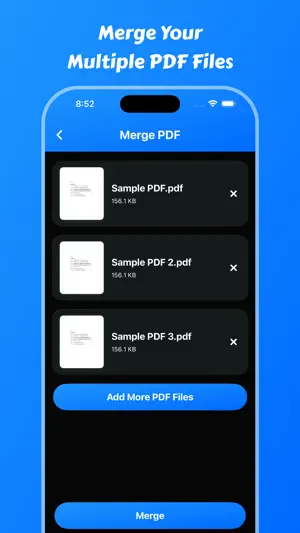

About PDF: Lock & Unlock
Instantly lock and unlock PDF password using PDF: Lock & Unlock. Your PDF will be locked or unlocked and ready for download within seconds. Most PDFs can be unlocked! Files with an owner password can be unlocked instantly. However, if the file is thoroughly encrypted, you can only unlock the file by providing the correct password. PDF: Lock & Unlock is the ultimate solution for managing your PDF files with ease and efficiency. Whether you need to secure, edit, or convert PDFs, this powerful iOS application provides all the essential tools in one place. Key Features: Secure & Protect Your PDFs * Lock PDF – Set a strong password to restrict unauthorized access. * Unlock PDF – Remove password protection from encrypted PDFs easily. Edit & Modify PDFs * Merge PDF – Combine multiple PDF files into a single document in seconds. * Page Remover – Delete unwanted pages from a PDF for a cleaner document. * Extract Pages – Select and save specific pages from a PDF as a new file. * Add Watermark – Protect your PDFs with custom text or image watermarks. Text Extraction & Recognition * Text Scanner (OCR) – Scan printed or handwritten text and convert it into digital text. * Text Recognize – Detect and extract text from images or PDF documents with high accuracy. * PDF to Text – Convert PDFs into plain text files for easy editing. Sign & Authenticate Documents * Digital Signature – Add legally binding electronic signatures directly to your PDFs. Convert & Share PDFs * Web to PDF – Save web pages as PDFs for offline reading and sharing. * Fast & Secure Sharing – Share PDFs via email, cloud storage, or messaging apps. How to remove passwords from PDF files: 1. Select your PDF document. 2. Enter your password. 3. Select the option to remove the password. 4. File will save in saved files. 5. Users can share saved pdf files Features: - Users can lock and unlock pdf files. - It is easy to use. - Users can get all saved pdf files. - Users can share pdf files. - Users can delete pdf files. - Users can view pdf files. Main Features : - Lock PDF – Protect your PDFs with a secure password to prevent unauthorized access. - Unlock PDF – Remove password protection from PDFs for hassle-free access. - Merge PDF – Combine multiple PDFs into a single document with just a few taps. - Add Watermark – Insert custom watermarks to protect your documents from unauthorized use. - Text Scanner (OCR) – Extract text from images or scanned documents with high accuracy. - Text Recognize – Convert handwritten or printed text into editable digital text. - Digital Signature – Sign your PDFs electronically for quick and secure document authentication. - Extract Pages – Select and extract specific pages from a PDF file to create a new document. - Web to PDF – Convert web pages into PDFs for offline reading and sharing. - Page Remover – Delete unnecessary pages from your PDF to streamline the document. - PDF to Text – Convert PDFs into editable text files for easy modification. Why Choose PDF: Lock & Unlock? - All-in-One PDF Manager – No need for multiple apps; get everything in one place. - User-Friendly Interface – Simple and intuitive design for easy navigation. - Fast & Efficient Processing – Perform PDF actions in seconds. - Offline Mode – Most features work without an internet connection. - Secure & Private – Your files remain private, with no data leaks. Download and enjoy the PDF: Lock & Unlock app. Privacy Policy: https://softapps.in/App_Privacy.html Terms of use: https://softapps.in/App_TOS.html
Ratings & reviews
3.5
6 ratings
What’s new
Version 3.4 · Updated October 15, 2026
- Performance Improved - Crashes FIxed - iOS 27 Support added
App privacy
The developer, Hardik Dhameliya, reported these privacy practices to Apple.
Data Used to Track You
The following data may be used to track you across apps and websites owned by other companies:
- Usage Data: Advertising Data
Data Not Linked to You
The following data, which may be collected but is not linked to your identity, may be used for the following purposes:
- Usage Data: Advertising Data
Used for: Third-Party Advertising
Alternatives to PDF: Lock & Unlock
Looking for apps like PDF: Lock & Unlock? Here are 6 similar apps on the App Store. The highest rated is Omni PDF Unlocker - Password (5.0/5), and all 6 are free to download.
-
 PDF Password Remover Offline
3.4
PDF Password Remover Offline
3.4
-
 Omni PDF Unlocker - Password
5.0
Omni PDF Unlocker - Password
5.0
-
 Lock Pdf & Unlock PDF Offline
-
 lock pdf | unlock pdf expert
-
 PDF Secure
4.8
PDF Secure
4.8
-
 PDF Secure, Lock PDF password
| App | Rating | Price | Last updated | Compare |
|---|---|---|---|---|
| PDF: Lock & Unlock | 3.5 / 5 (6 ratings) | Free | October 15, 2026 | |
| PDF Password Remover Offline | 3.4 / 5 (22) | Free | Oct 21, 2026 | Compare |
| Omni PDF Unlocker - Password | 5.0 / 5 (5) | Free | Jun 15, 2026 | Compare |
| Lock Pdf & Unlock PDF Offline | – | Free | Apr 19, 2025 | Compare |
| lock pdf | unlock pdf expert | – | Free | Jul 29, 2025 | Compare |
| PDF Secure | 4.8 / 5 (383) | Free | Oct 2, 2024 | Compare |
| PDF Secure, Lock PDF password | – | Free | Dec 24, 2024 | Compare |
Compare PDF: Lock & Unlock with the top alternatives: ratings, updates, ASO score and keyword gaps →