

Procut - 自动化剪贴板、稍后阅读、灵感收集、笔记
骞 赵 Productivity iPhoneiPadiPod touchMac
Procut - 自动化剪贴板、稍后阅读、灵感收集、笔记 is a free Productivity app for iPhone and iPad by 骞 赵. Rated 3.9/5 from 7 ratings. Requires iOS 16.0. Updated October 21, 2026.
- Rating
- 3.9
- 7 ratings
- Price
- Free
- on the App Store
- Size
- 18 MB
- Age 4+
- Updated
- Oct 21
- 2026 · v1.7.1
Screenshots


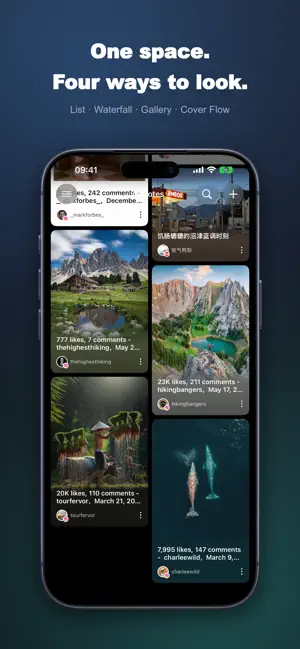

About Procut - 自动化剪贴板、稍后阅读、灵感收集、笔记
How many things have you saved, only to never find them again? Xiaohongshu guides, Bilibili tutorials, Zhihu long-reads, that one podcast segment—you saved them all back then. Later, they got scattered across chat histories, browser bookmarks, notes, and "Read Later" lists. When you finally needed them, all you had left was a vague keyword you couldn't quite remember. Procut does it differently: All you have to do is copy. ■ Copy a link, and it turns into a card on its own Open the app, and the link in your clipboard will be automatically recognized, extracted, and organized into a card featuring a cover image, title, main text, and author. Over 20 platforms are supported, including Xiaohongshu, Douyin, Bilibili, Zhihu, Weibo, Jike, Douban, X, Instagram, YouTube, and Reddit. No screenshots needed, no copying and pasting the text, and no more worrying about the original post being deleted—the text and images stay right here with you. ■ One space, four ways to view The list view is perfect for quick scanning, the waterfall layout is great for browsing images, the gallery is ideal for flipping through albums, and CoverFlow transforms your notes into a row of large image cards that you can flip through horizontally across the screen. The same collection of content, viewed exactly how you want. ■ Find anything in seconds, no matter how much you save Three layers of organization: Folders, Tags, and Smart Filters; Combine platforms, authors, types, and dates into custom filters and save them. Tap any avatar to instantly view only that author's content. ■ Save while listening, and pick up right where you left off Podcasts and videos feature a persistent mini-player that can be minimized into a floating ball docked to the edge. It doesn't block your content and keeps you on the current page; next time you open it, it automatically resumes from where you left off. ■ Your collection belongs only to you Data is stored locally and synced across devices via your own private iCloud database— We have no servers, and we cannot read any of your content. Clipboard access only happens when you open the app, and you can turn it off in settings at any time. ■ Designed to fit seamlessly into your workflow One-tap save via the system share menu · Shortcuts · Automation rules for "Read Later" · Four content typography themes · Trash bin · 12 languages · Full adaptation for iPhone / iPad Split View / Mac. —— About Premium —— Basic capturing, parsing, organizing, and browsing are completely free. Advanced features like iCloud cross-device sync require a subscription. Choose between monthly or annual plans. Pricing and billing cycles are clearly displayed before you subscribe, and you can cancel anytime in your system settings. Subscription Instructions: - Subscription Cycle: Monthly Auto-Renewal / Yearly Auto-Renewal / Lifetime Purchase - Subscription Price: Subject to the price displayed within the App Privacy Policy: https://hirat.github.io/2026/03/23/Privacy-Policy-Procut/ Terms of Use: https://hirat.github.io/2026/03/23/Terms-Procut/
Ratings & reviews
3.9
7 ratings
What’s new
Version 1.7.1 · Updated October 21, 2026
### New Features - Gallery: Favorite images in full-screen view and gallery, with support for albums, tags and notes, search filters, and drag-and-drop. - App Passcode & Private Folder: Require a passcode before entering the app; content in the private folder must be unlocked to view. - Random Browsing: Swipe up and down in full screen to randomly review items, with options to set the range and whether to include archived content. - List Filters: Apply stacked filters by tag, platform, folder, date, and more on the current list, and save them as smart filters. - Batch Export: Select multiple items to export as PDF or Markdown. - New Smart Filter Criteria: Regular expressions, length, custom dates, title/author/website, nested filters, and items with audio. - Share Images: Added “Post” and “Photo” styles. - Merge from Backup: Merge backup content into your current data, adding without overwriting. - New Platform: Xiaoheihe. - New Settings: Launch animation toggle, transparent home title bar toggle, and tag display style (capsule). ### Improvements - Duplicate Links: Warns “Already favorited” before creation, allowing you to open, restore, or re-parse directly. - Full-Screen Image View: Redesigned in a system Photos style with a thumbnail strip, automatic Live Photo playback, and faster loading. - Optimized details page. - Optimized iCloud sync. - Magic Button: Clearer action hints, undo for moving to folders and editing tags, and haptic feedback on success. - Performance: Faster and smoother image loading, entering full-screen view, opening the filter panel, and batch re-parsing.
App privacy
The developer, 骞 赵, reported these privacy practices to Apple.
Data Not Collected
The developer does not collect any data from this app.
Alternatives to Procut - 自动化剪贴板、稍后阅读、灵感收集、笔记
Looking for apps like Procut - 自动化剪贴板、稍后阅读、灵感收集、笔记? Here are 6 similar apps on the App Store. The highest rated is SnapNote - Cross-Platform Sync (5.0/5), and all 6 are free to download.
-
 Kepori: Read Later & Collect
4.5
Kepori: Read Later & Collect
4.5
-
 SnapNote - Cross-Platform Sync
5.0
SnapNote - Cross-Platform Sync
5.0
-
 OneVoice: Offline Recorder
-
 Swish: To Do Reminder Widget
5.0
Swish: To Do Reminder Widget
5.0
-
 Loopi - Habits & Little Wins
5.0
Loopi - Habits & Little Wins
5.0
-
 EON - Subscription Tracker
5.0
EON - Subscription Tracker
5.0
| App | Rating | Price | Last updated | Compare |
|---|---|---|---|---|
| Procut - 自动化剪贴板、稍后阅读、灵感收集、笔记 | 3.9 / 5 (7 ratings) | Free | October 21, 2026 | |
| Kepori: Read Later & Collect | 4.5 / 5 (4) | Free | Oct 14, 2026 | Compare |
| SnapNote - Cross-Platform Sync | 5.0 / 5 (5) | Free | Oct 15, 2026 | Compare |
| OneVoice: Offline Recorder | – | Free | Oct 13, 2026 | Compare |
| Swish: To Do Reminder Widget | 5.0 / 5 (8) | Free | Oct 12, 2026 | Compare |
| Loopi - Habits & Little Wins | 5.0 / 5 (2) | Free | Oct 10, 2026 | Compare |
| EON - Subscription Tracker | 5.0 / 5 (1) | Free | Oct 18, 2026 | Compare |