

GameTime
Jaime Lucea Utilities iPhoneiPadiPod touch
GameTime is a free Utilities app for iPhone and iPad by Jaime Lucea. Rated 4.0/5 from 1 ratings. Requires iOS 15.0. Updated March 16, 2026.
- Rating
- 4.0
- 1 ratings
- Price
- Free
- on the App Store
- Size
- 4 MB
- Age 4+
- Updated
- Mar 16
- 2026 · v1.4
Screenshots
About GameTime
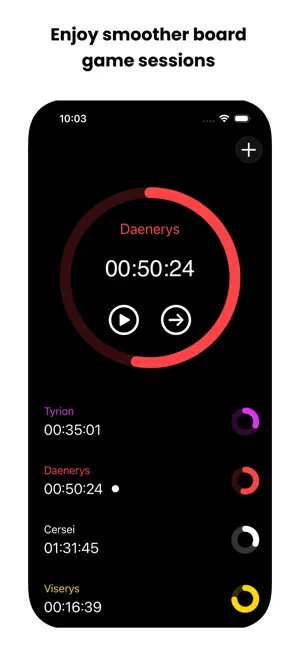
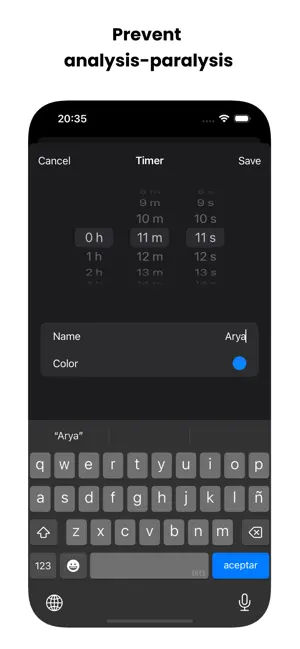
GameTime – The Ultimate Timer for Board Game Geeks GameTime is the perfect companion for board game lovers, making every gaming session smoother and more enjoyable. Designed specifically to keep the flow going, GameTime lets you assign a countdown timer to each player and easily switch between timers as the game progresses. Say goodbye to analysis paralysis and hello to a fair, fast-paced, and fun experience for everyone! Features: • Individual Timers for Each Player – Set specific time limits for each player, ensuring everyone has a fair turn. • Easy Timer Control – Start, pause, or switch timers with just a tap. Effortlessly manage turns without interrupting the game flow. • Reduce Analysis Paralysis – With individual time tracking, players stay engaged without overthinking, keeping the excitement alive. • Customizable for Any Game – From intense strategy games to quick family games, GameTime is adaptable for all types of board games. • Smooth Interface – Designed with simplicity in mind, GameTime is user-friendly and intuitive, making it accessible to all ages. GameTime is ideal for anyone looking to enhance their board game sessions with friends or family. Whether you’re a strategy enthusiast or a casual player, GameTime helps keep gameplay moving. Download GameTime and level up your board game experience today! Keywords: board game timer, game time tracker, player timer, game session manager, prevent analysis paralysis, game companion, iOS timer app, board game utility
What’s new
Version 1.4 · Updated March 16, 2026
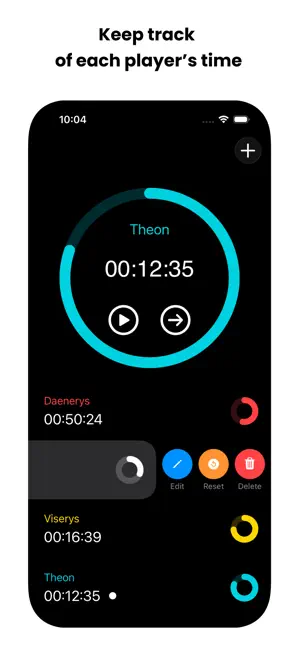
This update introduces a few features requested by users: - You can now edit a timer’s name, duration, and color. - You can now reset a timer. On iPhone, swipe right to left on a timer row to access these options. On iPad, they are available from a new button on the timer card. You can also swipe left or right on the active timer to move to the next or previous timer. Hope you enjoy these improvements. Keep playing.
App privacy
The developer, Jaime Lucea, reported these privacy practices to Apple.
Data Not Collected
The developer does not collect any data from this app.
Alternatives to GameTime
Looking for apps like GameTime? Here are 6 similar apps on the App Store. The highest rated is MultiTimer: Multiple timers (4.7/5), and all 6 are free to download.
-
 Quick Play - Game Timer
-
 Sand Timer - Countdown Clock
3.8
-
 Big Timer - Simple
3.3
-
 MultiTimer: Multiple timers
4.7
-
 Stopwatch & Countdown Timer
4.2
-
 LloydsSmart
4.6
| App | Rating | Price | Last updated | Compare |
|---|---|---|---|---|
| GameTime | 4.0 / 5 (1 rating) | Free | March 16, 2026 | |
| Quick Play - Game Timer | – | Free | May 13, 2024 | Compare |
| Sand Timer - Countdown Clock | 3.8 / 5 (150) | Free | Oct 22, 2025 | Compare |
| Big Timer - Simple | 3.3 / 5 (7) | Free | Jul 23, 2026 | Compare |
| MultiTimer: Multiple timers | 4.7 / 5 (15,649) | Free | Oct 12, 2026 | Compare |
| Stopwatch & Countdown Timer | 4.2 / 5 (646) | Free | Dec 19, 2024 | Compare |
| LloydsSmart | 4.6 / 5 (160) | Free | Dec 23, 2025 | Compare |
Compare GameTime with the top alternatives: ratings, updates, ASO score and keyword gaps →