

Prompt Timer
Swift7Media Ltd Productivity iPhoneiPadiPod touchApple Watch
Prompt Timer is a free Productivity app for iPhone and iPad by Swift7Media Ltd. Requires iOS 17.6. Updated October 22, 2026.
- Price
- Free
- on the App Store
- Size
- 4 MB
- Age 4+
- Updated
- Oct 22
- 2026 · v1.1
Screenshots


About Prompt Timer
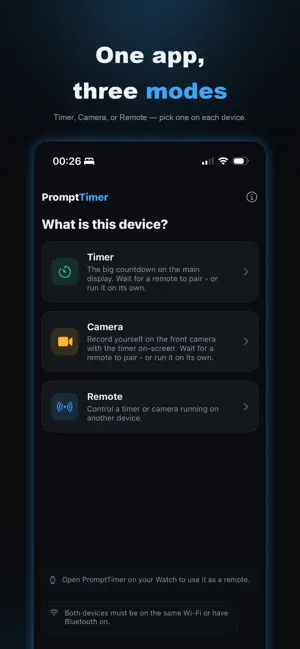
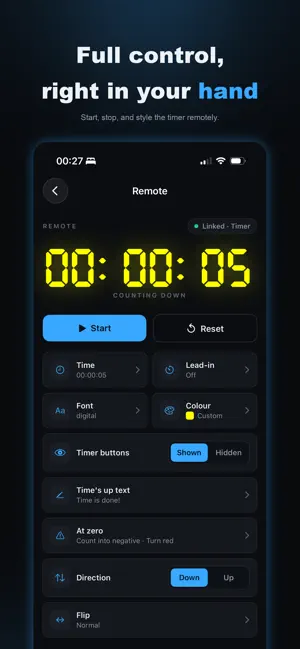
PromptTimer transforms your devices into a full-service countdown rig. Your first selected device displays the large countdown timer for a presenter to see, while the second device can sit in your hand, or even on your wrist. It allows you to start, stop and adjust the timer display without interrupting the camera shot or the presenter. There are no accounts or internet required. Simply open the app on both devices and they'll automatically find each other. Choose a mode for each device: Timer: Displays a large countdown timer, which can be placed on a surface in front of the presenter Camera: Records from the front camera, while clearly displaying the countdown on screen, in a choice of positions Remote: Controls the main timer, allowing you to start, pause, reset and style the timer on the other device. Using the app but only have one device? That works too! Simply tap "Start without a remote" to begin. Apple Watch remote included: Wear the remote instead of holding it. Prop your iPhone or iPad up as the Timer or Camera and run the whole take from your wrist - no second phone or tablet needed! - Watch the live countdown at a glance - Start, pause and reset without touching the main timer display - Begin and end your recording in Camera mode - Set the duration with the Digital Crown, or tap one of the built-in presets - Adjust the lead-in between takes. Seamless pairing: Your devices communicate directly with each other. They simply need to be on the same Wi-Fi network or have Bluetooth enabled. (Note: Filmed content remains on the device that captured it and is automatically saved to your camera roll.)
What’s new
Version 1.1 · Updated October 22, 2026
Updated for iPhone Duo
App privacy
The developer, Swift7Media Ltd, reported these privacy practices to Apple.
Data Not Linked to You
The following data, which may be collected but is not linked to your identity, may be used for the following purposes:
- Usage Data: Product Interaction
Used for: Analytics
Alternatives to Prompt Timer
Looking for apps like Prompt Timer? Here are 6 similar apps on the App Store. The highest rated is Edworking (4.8/5), and all 6 are free to download.
-
 LiveClock the Gig Timer
-
 Edworking
4.8
-
 Ask Me Anything - Ai assistant
4.2
-
 Stage Timer
3.9
-
 Emoji Emoticon Keyboard
4.6
-
 Habit Tracker
4.8
| App | Rating | Price | Last updated | Compare |
|---|---|---|---|---|
| Prompt Timer | – | Free | October 22, 2026 | |
| LiveClock the Gig Timer | – | Free | Oct 1, 2025 | Compare |
| Edworking | 4.8 / 5 (41) | Free | Oct 8, 2026 | Compare |
| Ask Me Anything - Ai assistant | 4.2 / 5 (61) | Free | Mar 6, 2025 | Compare |
| Stage Timer | 3.9 / 5 (16) | Free | Jun 2, 2026 | Compare |
| Emoji Emoticon Keyboard | 4.6 / 5 (432) | Free | Mar 9, 2024 | Compare |
| Habit Tracker | 4.8 / 5 (42) | Free | Mar 11, 2024 | Compare |
Compare Prompt Timer with the top alternatives: ratings, updates, ASO score and keyword gaps →