

Backup Disk
Muharrem Ozkan Utilities iPhoneiPadiPod touchMac
Backup Disk is a free Utilities app for iPhone and iPad by Muharrem Ozkan. Requires iOS 16.0. Updated October 12, 2026.
- Price
- Free
- on the App Store
- Size
- 4 MB
- Age 4+
- Updated
- Oct 12
- 2026 · v2.0
Screenshots
About Backup Disk
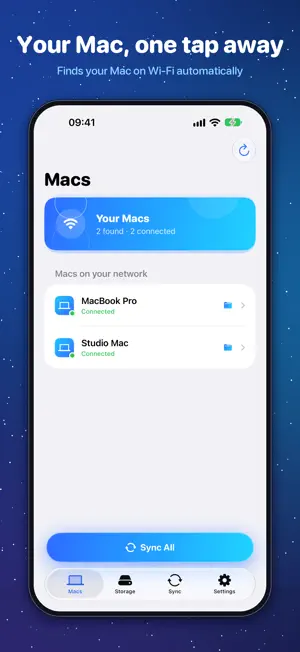
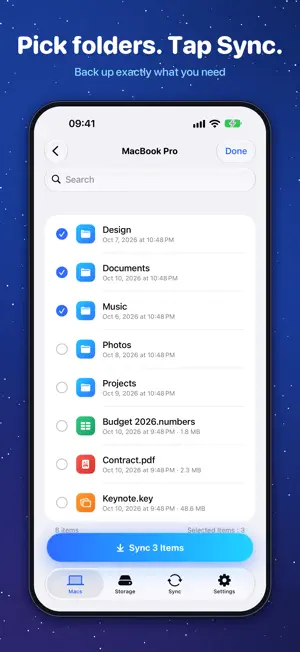
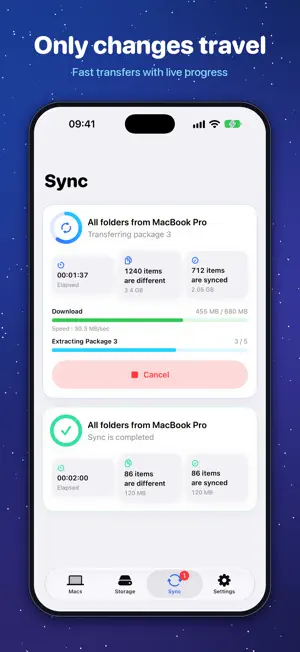
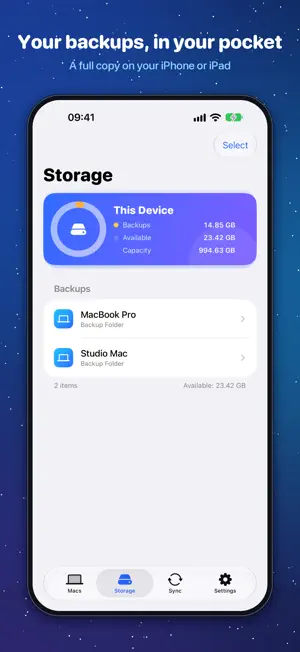
Backup Disk turns your iPhone or iPad into a private backup disk for your Mac. Choose the folders you want to protect on your Mac, open Backup Disk on your iPhone or iPad, and sync them over Wi‑Fi with a single tap. Your files go straight from your Mac to your device — no accounts, no cloud, no tracking. WHY BACKUP DISK • Wireless: your Mac appears automatically on the same Wi‑Fi network, or connect with a cable. • Fast: only changed files are copied, and small files travel in large packages to make the most of your network. • Private: pair with the sync key shown on your Mac. Your files never pass through a server. • Always with you: browse your backups in the app or in the Files app, even offline. • Both ways: download any backed-up folder or file from your iPhone or iPad back to your Mac. • Picks up where it left off: if a sync is interrupted, the next one copies only what's left. HOW IT WORKS 1. Install Backup Disk on your Mac and on your iPhone or iPad. 2. On your Mac, add the folders you want to back up. 3. On your iPhone or iPad, choose your Mac, enter the sync key and tap Sync. BACKUP DISK PRO The free version stores up to 5 GB of backups per device and connects one device at a time. PRO removes the storage limit and lets you connect several iPhones and iPads to your Mac at once. One purchase unlocks PRO on iPhone, iPad and Mac with the same Apple Account. PRO is available as a monthly or yearly subscription, or as a one-time purchase. Payment is charged to your Apple Account at confirmation of purchase. Subscriptions renew automatically unless cancelled at least 24 hours before the end of the current period. You can manage or cancel your subscription in your Apple Account settings. Terms of Use: https://backupdisk.mozkan.com/terms.html Privacy Policy: https://backupdisk.mozkan.com/privacy.html
What’s new
Version 2.0 · Updated October 12, 2026
Backup Disk 2.0 is a complete redesign. • All-new design on iPhone, iPad and Mac • Live transfer progress with speed and package details • A clear overview of your device's storage • Drag folders into the Mac app to back them up • Built-in guide to get you started • Purchases are verified on your device • Now available in 10 languages
App privacy
The developer, Muharrem Ozkan, reported these privacy practices to Apple.
Data Not Linked to You
The following data, which may be collected but is not linked to your identity, may be used for the following purposes:
- Identifiers: Device ID
Used for: Analytics
Alternatives to Backup Disk
Looking for apps like Backup Disk? Here are 6 similar apps on the App Store. The highest rated is Bit Buddy - Drive Organizer (4.8/5), and all 6 are free to download.
-
 Bit Buddy - Drive Organizer
4.8
Bit Buddy - Drive Organizer
4.8
-
 PhotoCube AI
-
 U8-Disk
4.1
U8-Disk
4.1
-
 QPhoto Backup
4.7
QPhoto Backup
4.7
-
 File Transfer Secure Drop
4.8
File Transfer Secure Drop
4.8
-
 Portable USB · Cloud Ready
4.2
Portable USB · Cloud Ready
4.2
| App | Rating | Price | Last updated | Compare |
|---|---|---|---|---|
| Backup Disk | – | Free | October 12, 2026 | |
| Bit Buddy - Drive Organizer | 4.8 / 5 (6) | Free | Oct 21, 2026 | Compare |
| PhotoCube AI | – | Free | Oct 7, 2026 | Compare |
| U8-Disk | 4.1 / 5 (10) | Free | Aug 17, 2026 | Compare |
| QPhoto Backup | 4.7 / 5 (3) | Free | Oct 5, 2026 | Compare |
| File Transfer Secure Drop | 4.8 / 5 (11) | Free | Dec 8, 2025 | Compare |
| Portable USB · Cloud Ready | 4.2 / 5 (60) | Free | Oct 15, 2026 | Compare |
Compare Backup Disk with the top alternatives: ratings, updates, ASO score and keyword gaps →