

Network Tools AI
Ivaylo Ivanov Utilities iPhoneiPadiPod touch
Network Tools AI is a free Utilities app for iPhone and iPad by Ivaylo Ivanov. Rated 4.0/5 from 5 ratings. Requires iOS 15.0. Updated October 27, 2026.
- Rating
- 4.0
- 5 ratings
- Price
- Free
- on the App Store
- Size
- 51 MB
- Age 17+
- Updated
- Oct 27
- 2026 · v27.8
Screenshots

About Network Tools AI
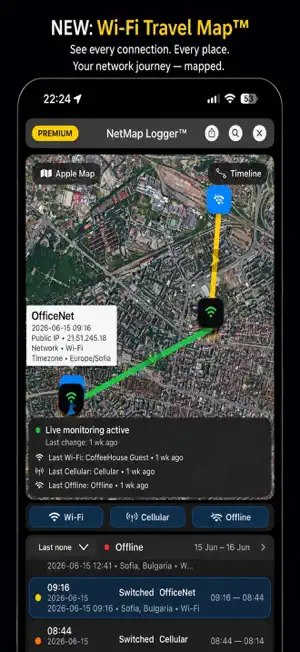
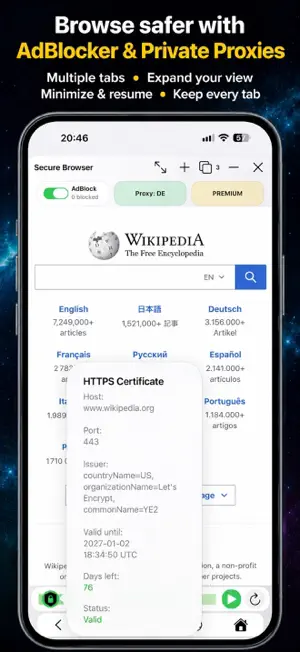
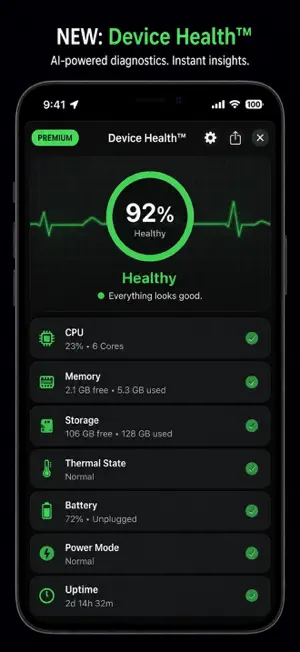
New NetPilot™ can now understand what you want to do, automatically launch the right network tool, analyze the results, and explain what they mean. NETWORK TOOLS AI From everyday Wi-Fi troubleshooting to domain and certificate monitoring, Network Tools AI brings network diagnostics, security checks, and device insights together on your iPhone and iPad. NETPILOT™ — GUIDANCE WHEN YOU NEED IT Not sure where to start? Describe your problem and let NetPilot help you choose a tool and understand your next steps. Learn what each feature can check and what the results can—and cannot—tell you. DEVICE HEALTH™ & ALERTS See how your device is performing right now. Analyze CPU load, memory, storage, thermal state, battery, and uptime with on-device machine learning. Get a Device Health Score with explanations that help you understand what changed and whether action is needed. Enable alerts for supported CPU, thermal, battery, and storage conditions. WI-FI TRAVEL MAP™ — POWERED BY NETMAP LOGGER™ Explore your recorded connection history on a map and timeline. • See where and when connection changes were recorded • Review Wi-Fi, cellular, and offline transitions • Search by city or Wi-Fi network • Switch between Apple Maps and Google Maps • Filter by connection type and date range • Export your history to CSV, XLSX, or TXT NetMap Logger is included in Lifetime Premium. NETWORK MONITOR & LIVE ACTIVITIES Stay informed about connection changes as you move between networks. Follow supported updates on your Lock Screen and Dynamic Island with free Live Activities. Receive notifications on Apple Watch when supported by your device and notification settings. A TOOLKIT FOR EVERYDAY AND ADVANCED DIAGNOSTICS Check reachability, investigate routing, inspect DNS, discover local devices, and measure connection speed. • Ping and Traceroute • DNS Lookup and DNS Propagation • Whois and GeoTrace • LAN AI Discovery™ and Port Scan • Speed Test and System Info • AR Wi-Fi Signal AI-assisted explanations help make supported diagnostic results easier to understand. SCAMGUARD™ — CHECK BEFORE YOU OPEN Assess links for signs of phishing, suspicious redirects, and other potential risks. Review available domain, hosting, and certificate signals to make a more informed decision before visiting a website. SITEGUARD™ & BLACKLIST CHECK Investigate potential website vulnerabilities and check supported blacklist sources for listed IP addresses or domains. SECURE BROWSER Browse with built-in ad blocking, available US, UK, or Germany proxy locations, and useful website security information. • Open and switch between multiple tabs • Minimize to the tab bar and smoothly restore with your tabs preserved • Delete individual recently opened entries or clear them all • View the ad-blocking counter • Inspect SSL certificate details • Check supported website risk signals Closing Secure Browser closes all its tabs. Browser privacy and filtering features apply within Secure Browser. DOMAINGUARD™ — TRACK DOMAIN EXPIRATION Keep track of important domains with expiration reminders, available WHOIS details, and DNS information. Configure supported push and email alerts to stay informed before renewal dates approach. SSLGUARD™ — MONITOR CERTIFICATE EXPIRATION Review certificate validity, issuer, and chain details. Set supported push and email reminders to help you act before certificates expire. FLEXIBLE ACCESS Start with free tools and available trials. Lifetime Premium unlocks advanced features, including NetMap Logger. Network Security Pack subscriptions provide access to SSLGuard, DomainGuard, and Secure Browser. See the in-app purchase screens for current plans and included features. Explore your network with clearer information and practical tools—all in one app. Privacy Policy: https://appios.pro/networktools/privacy.php Terms of Use (EULA): https://www.apple.com/legal/internet-services/itunes/dev/stdeula/
Ratings & reviews
4.0
5 ratings
What’s new
Version 27.8 · Updated October 27, 2026
What’s New in v27.8 • LAN AI Discovery™ now displays available MAC addresses and registered device manufacturers on iOS 27 and later. • Private or locally administered MAC addresses are clearly marked. • NetPilot™ can use available MAC and manufacturer information for more informed network analysis. • Improved device details and scan reports.
App privacy
The developer, Ivaylo Ivanov, reported these privacy practices to Apple.
Data Used to Track You
The following data may be used to track you across apps and websites owned by other companies:
- Identifiers: Device ID
Data Linked to You
The following data, which may be collected and linked to your identity, may be used for the following purposes:
- Identifiers: Device ID
Used for: Third-Party Advertising
Data Not Linked to You
The following data, which may be collected but is not linked to your identity, may be used for the following purposes:
- Usage Data: Advertising Data
- Diagnostics: Performance Data, Other Diagnostic Data
Used for: Third-Party Advertising
Alternatives to Network Tools AI
Looking for apps like Network Tools AI? Here are 6 similar apps on the App Store. The highest rated is NetTools - Network Utilities (4.9/5), and 3 of the 6 are free to download.
-
 ToolCat - Useful toolbox
4.0
ToolCat - Useful toolbox
4.0
-
 QPhoto Backup
4.7
QPhoto Backup
4.7
-
 My IP Address Location
4.5
My IP Address Location
4.5
-
 Geo Trace: Traceroute App
4.3
Geo Trace: Traceroute App
4.3
-
 NetTools - Network Utilities
4.9
NetTools - Network Utilities
4.9
-
 WAS: User-Agent Switcher
4.6
WAS: User-Agent Switcher
4.6
| App | Rating | Price | Last updated | Compare |
|---|---|---|---|---|
| Network Tools AI | 4.0 / 5 (5 ratings) | Free | October 27, 2026 | |
| ToolCat - Useful toolbox | 4.0 / 5 (4) | Free | Oct 19, 2026 | Compare |
| QPhoto Backup | 4.7 / 5 (3) | Free | Oct 5, 2026 | Compare |
| My IP Address Location | 4.5 / 5 (32) | 1.9 USD | Oct 23, 2026 | Compare |
| Geo Trace: Traceroute App | 4.3 / 5 (11) | 1.9 USD | Oct 23, 2026 | Compare |
| NetTools - Network Utilities | 4.9 / 5 (54) | Free | Sep 17, 2024 | Compare |
| WAS: User-Agent Switcher | 4.6 / 5 (96) | 2.49 USD | Oct 23, 2026 | Compare |
Compare Network Tools AI with the top alternatives: ratings, updates, ASO score and keyword gaps →