

Audio Extractor &MP3 Converter
宝锋 吴 Music iPhoneiPadiPod touch
Audio Extractor &MP3 Converter is a free Music app for iPhone and iPad by 宝锋 吴. Rated 4.4/5 from 18 ratings. Requires iOS 13. Updated January 20, 2026.
- Rating
- 4.4
- 18 ratings
- Price
- Free
- on the App Store
- Size
- 13 MB
- Age 4+
- Updated
- Jan 20
- 2026 · v2.1.0
Screenshots
About Audio Extractor &MP3 Converter
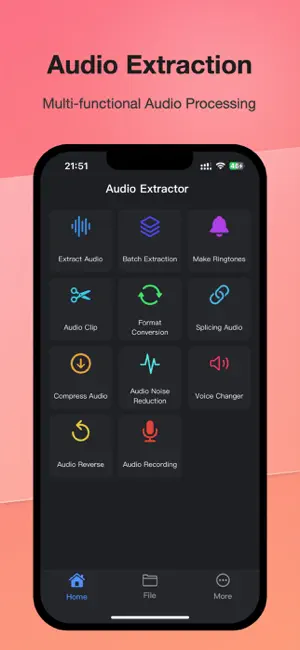
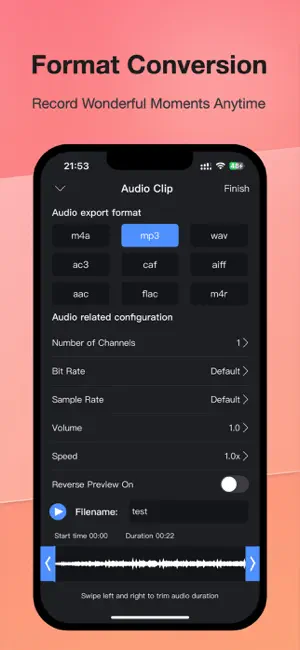
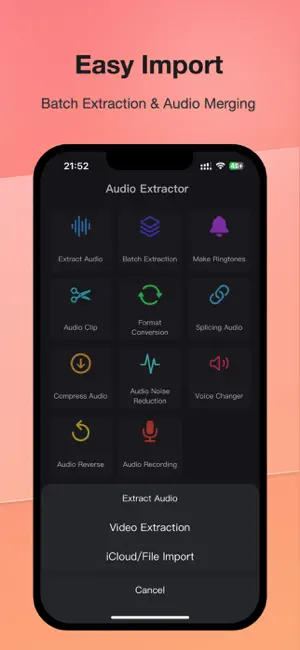
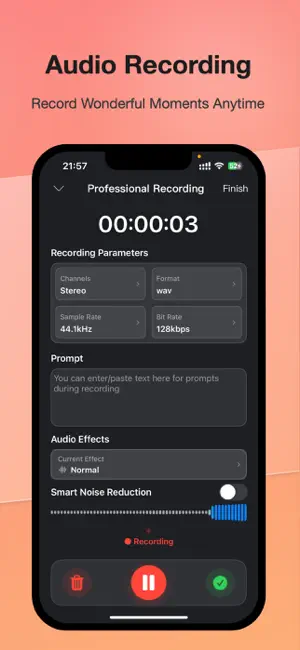
Audio Extractor allows you to quickly and easily extract audio files from videos, and can easily convert audio in various formats or make ringtones - Support to extract audio from various types of videos - Support audio cropping - Support audio splicing - Support audio to make ringtones - Support audio batch extraction - Support audio transcoding in multiple formats - Support audio volume adjustment - Support audio playback and export at double speed - Support custom sampling rate, number of channels, bit rate - Supports audio noise reduction with multiple noise reduction models to choose from - Supports audio compression - Supports audio voice changing - Supports audio reverse playback - Supports recording function with multiple configuration settings, including recording noise reduction and voice changing 【Audio Extractor VIP Subscription】 1. Subscribing to Audio Extractor VIP membership includes the following functions: Unlimited access to all advanced features, batch audio extraction, multi-speed editing, and removal of all ads. 2. Audio Extractor VIP members provide free use (renewed by annual fee) and monthly subscription. We also offer a one-time fee in addition to our existing subscription plans if needed. The price depends on the subscription package you choose. 3. Subscription automatically renews at the selected package price unless cancelled 24 hours in advance of the current subscription period. Subscription fees are charged to your iTunes Account at confirmation of purchase. You can manage subscriptions and turn off auto-renewal by going to your Account Settings after purchase. According to Apple's policy, the current subscription cannot be cancelled during the active subscription period. There will be no refunds for any unused portion after purchase. 4. If you are eligible for a free trial and subscribe before the end of the free trial period, the remaining free trial period will be cancelled after you confirm your purchase. Subscription starts immediately after free usage ends unless cancelled at least 24 hours before the end of the trial. Privacy Policy: https://sites.google.com/view/appaudio/audio/privacy User Agreement: https://sites.google.com/view/appaudio/audio/agreement Feedback Email: [email protected]
Ratings & reviews
4.4
18 ratings
What’s new
Version 2.1.0 · Updated January 20, 2026
Optimize the performance of the app
App privacy
The developer, 宝锋 吴, reported these privacy practices to Apple.
Data Used to Track You
The following data may be used to track you across apps and websites owned by other companies:
- Identifiers: Device ID
Data Not Linked to You
The following data, which may be collected but is not linked to your identity, may be used for the following purposes:
- Purchases: Purchase History
- Identifiers: Device ID
- Usage Data: Advertising Data
- Diagnostics: Crash Data, Performance Data, Other Diagnostic Data
Used for: Third-Party Advertising, Analytics
Alternatives to Audio Extractor &MP3 Converter
Looking for apps like Audio Extractor &MP3 Converter? Here are 6 similar apps on the App Store. The highest rated is MP3 Audio Converterㅤ (5.0/5), and all 6 are free to download.
-
 Audio Editor - Mp3 Converter
3.9
Audio Editor - Mp3 Converter
3.9
-
 MP3 Audio Converterㅤ
5.0
MP3 Audio Converterㅤ
5.0
-
 Export Audio
4.8
Export Audio
4.8
-
 Audio Editor-AI Vocal Remover
4.5
Audio Editor-AI Vocal Remover
4.5
-
 MP3 Converter: Video to Audio
4.6
MP3 Converter: Video to Audio
4.6
-
 Audio Editor & Music Mixer
4.2
Audio Editor & Music Mixer
4.2
| App | Rating | Price | Last updated | Compare |
|---|---|---|---|---|
| Audio Extractor &MP3 Converter | 4.4 / 5 (18 ratings) | Free | January 20, 2026 | |
| Audio Editor - Mp3 Converter | 3.9 / 5 (7) | Free | Sep 9, 2026 | Compare |
| MP3 Audio Converterㅤ | 5.0 / 5 (8) | Free | Aug 20, 2026 | Compare |
| Export Audio | 4.8 / 5 (318) | Free | Aug 23, 2026 | Compare |
| Audio Editor-AI Vocal Remover | 4.5 / 5 (32) | Free | Aug 4, 2026 | Compare |
| MP3 Converter: Video to Audio | 4.6 / 5 (9,882) | Free | Apr 22, 2026 | Compare |
| Audio Editor & Music Mixer | 4.2 / 5 (235) | Free | Sep 18, 2026 | Compare |