

Fliff
Uwe Holtkamp Photo & Video iPhoneiPadiPod touch
Fliff is a free Photo & Video app for iPhone and iPad by Uwe Holtkamp. Requires iOS 15.3. Updated January 2, 2026.
- Price
- Free
- on the App Store
- Size
- 2 MB
- Age 4+
- Updated
- Jan 2
- 2026 · v2.1
Screenshots



About Fliff
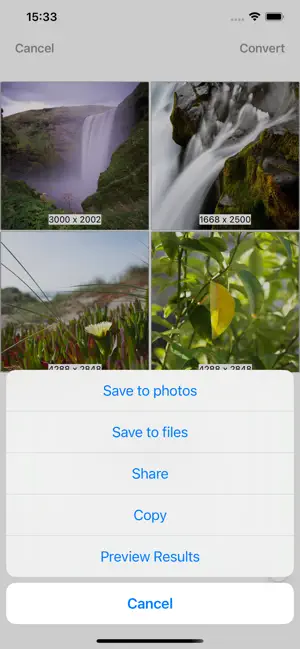
With Fliff you can convert formats of image files or scale them. You can load images from the clipboard, the Photos app, the Files app or from the camera. The converted images files can be saved to file system and to the camera roll and can be copied to the clipboard or shared. You can preview them in order to check the file size and the quality, espicially when using compression. Fliff can also be called from the Share menu in other apps that provide images. Furthermore Fliff is also a photo editing extension, i.e. you can use it as a plugin in the edit mode of the Photos app. This app is freeware. It comes with absolutely no warranty. Use it at your own risk!
What’s new
Version 2.1 · Updated January 2, 2026
Adjustments for iOS 26.
App privacy
The developer, Uwe Holtkamp, reported these privacy practices to Apple.
Data Not Collected
The developer does not collect any data from this app.
Alternatives to Fliff
Looking for apps like Fliff? Here are 6 similar apps on the App Store. The highest rated is Purrge (2.8/5), and 5 of the 6 are free to download.
-
 Compress Photos - Shrnk
-
 Purrge
2.8
-
 FingerSketch Cam: Art Canvas
-
 Exif Lens: Photo Metadata
-
 EditLay
-
 VidEncoBox - Video Editor
| App | Rating | Price | Last updated | Compare |
|---|---|---|---|---|
| Fliff | – | Free | January 2, 2026 | |
| Compress Photos - Shrnk | – | Free | Jul 31, 2025 | Compare |
| Purrge | 2.8 / 5 (29) | 1.99 USD | May 23, 2024 | Compare |
| FingerSketch Cam: Art Canvas | – | Free | Apr 7, 2025 | Compare |
| Exif Lens: Photo Metadata | – | Free | Nov 4, 2026 | Compare |
| EditLay | – | Free | Sep 28, 2026 | Compare |
| VidEncoBox - Video Editor | – | Free | Sep 4, 2026 | Compare |
Compare Fliff with the top alternatives: ratings, updates, ASO score and keyword gaps →