

PDF To Word: PDF Editor
Parsottambhai Dhameliya Utilities iPhoneiPadiPod touch
PDF To Word: PDF Editor is a free Utilities app for iPhone and iPad by Parsottambhai Dhameliya. Rated 4.6/5 from 104 ratings. Requires iOS 13.0.
- Rating
- 4.6
- 104 ratings
- Price
- Free
- on the App Store
- Size
- 33 MB
- Age 4+
- Updated
- Aug 8
- 2026 · v4.7
Screenshots


About PDF To Word: PDF Editor
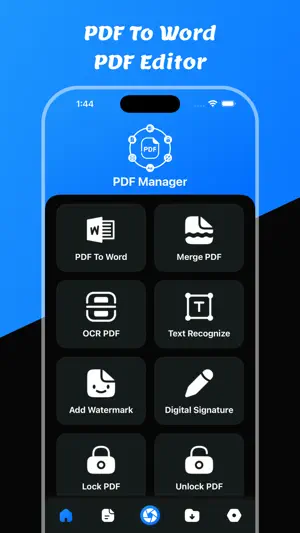
Welcome to PDF To Word: PDF Editor app PDF To Word: PDF Editor – Convert, Edit, Compress & Manage PDF Files Looking for a powerful PDF converter and complete PDF editor in one app? PDF To Word: PDF Editor is your all-in-one solution to convert PDF to Word, compress PDF files, merge documents, extract text with OCR, unlock PDF, and manage all your files easily. Whether you need a fast PDF to Word converter, a reliable PDF compressor, or a smart OCR PDF scanner, this app gives you professional tools in a simple, easy-to-use interface. Convert PDF to Word – Fast & Accurate Easily convert PDF to Word documents while keeping original formatting, fonts, and layout. Edit your Word file after conversion and share it instantly. - PDF to Word converter - Maintain document formatting - View converted Word files - Save Word documents - Share Word files anytime Perfect for contracts, resumes, reports, assignments, invoices, and office documents. Complete PDF Editor Toolkit Get all essential PDF tools in one powerful app: - Compress PDF files to reduce file size - Merge PDF files into one document - Remove PDF pages easily - Unlock PDF files instantly - Convert PDF to images (JPG/PNG) - Convert images to PDF - Extract text with PDF to Text converter - OCR PDF – recognize text from scanned documents - Text recognition for images Edit, organize, and manage your PDF documents without needing multiple apps. OCR PDF & Text Recognition Need to extract text from scanned documents or images? Our advanced OCR PDF technology allows you to: - Scan and recognize text accurately - Convert scanned PDF to editable text - Copy and share recognized text - Turn images into searchable PDF Ideal for students, professionals, business users, and office work. Smart File Manager Keep all your files organized in one secure place: - Save PDF, Word, Text, and Image files - Access saved documents anytime - Delete unwanted files - Share documents quickly - Simple and clean file management Manage your digital documents efficiently and securely. Why Choose PDF To Word: PDF Editor? - All-in-one PDF converter and PDF editor - Fast PDF to Word conversion - High-quality OCR text recognition - Secure PDF file management - Lightweight and powerful performance - Easy-to-use interface - Designed for productivity This app is perfect for: - Students converting study materials - Professionals editing contracts and reports - Office users managing business documents - Anyone needing PDF tools on the go Users can convert any pdf file to a word file. It is easy to use to convert word files. Users can share converted word files. Users can save converted word files in the word files section. Users can convert pdf to word files using pdf to word converter Users can compress pdf files using PDF To Word: PDF Editor app Users can merge pdf documents using this app. Users can convert pdf to text converter with OCR. Users can recognize text using text recognize. Users can remove pdf pages. Users can unlock pdf using unlock option. Users can convert pdf to images using this app. Users can make pdf using images to pdf files. Users can save all PDF, Word, Text, and all images in the saved files section. Features: - Easy to convert pdf to word - View Converted Word File - Save the Converted word file - Share Converted word file - Show Saved all word files - Delete & Share saved word files - PDF To Word - Compress PDF Files - Merge PDF Files - PDF To Text - Text Recognize - OCR PDF - PDF Page Remove - Unlock PDF Files - PDF To Images - Images To PDF File Download and enjoy the PDF To Word: PDF Editor app Privacy Policy: https://glistensolution.com/Apps/App_Privacy.html Terms of use: https://glistensolution.com/Apps/App_TOS.html
Ratings & reviews
4.6
104 ratings
What’s new
Version 4.7 · Updated August 8, 2026
- Crashes Fixed - Rating Updated
App privacy
The developer, Parsottambhai Dhameliya, reported these privacy practices to Apple.
Data Used to Track You
The following data may be used to track you across apps and websites owned by other companies:
- Usage Data: Advertising Data
Data Not Linked to You
The following data, which may be collected but is not linked to your identity, may be used for the following purposes:
- Usage Data: Advertising Data
Used for: Third-Party Advertising
Alternatives to PDF To Word: PDF Editor
Looking for apps like PDF To Word: PDF Editor? Here are 6 similar apps on the App Store. The highest rated is PDF To JPG Convert (4.6/5), and all 6 are free to download.
-
 Convert PDF to Word,Excel,PPT
-
 Word To PDF Converter & Reader
4.2
Word To PDF Converter & Reader
4.2
-
 PDF Compressor: Size Reduce
4.2
PDF Compressor: Size Reduce
4.2
-
 PDF To Text: PDF Editor
4.3
PDF To Text: PDF Editor
4.3
-
 PDF To JPG Convert
4.6
PDF To JPG Convert
4.6
-
 WORD Converter, DOCX to PDF
4.4
WORD Converter, DOCX to PDF
4.4
| App | Rating | Price | Last updated | Compare |
|---|---|---|---|---|
| PDF To Word: PDF Editor | 4.6 / 5 (104 ratings) | Free | August 8, 2026 | |
| Convert PDF to Word,Excel,PPT | – | Free | Oct 16, 2026 | Compare |
| Word To PDF Converter & Reader | 4.2 / 5 (65) | Free | Jan 22, 2026 | Compare |
| PDF Compressor: Size Reduce | 4.2 / 5 (58) | Free | Oct 13, 2026 | Compare |
| PDF To Text: PDF Editor | 4.3 / 5 (3) | Free | May 28, 2026 | Compare |
| PDF To JPG Convert | 4.6 / 5 (617) | Free | Apr 30, 2024 | Compare |
| WORD Converter, DOCX to PDF | 4.4 / 5 (8) | Free | Jul 9, 2025 | Compare |