

LogTimer - Work Hours Tracker
Ajiro Tech Inc. Productivity iPhoneiPadiPod touch
LogTimer - Work Hours Tracker is a free Productivity app for iPhone and iPad by Ajiro Tech Inc. Requires iOS 17.0. Updated September 28, 2026.
- Price
- Free
- on the App Store
- Size
- 6 MB
- Age 4+
- Updated
- Sep 28
- 2026 · v2.1
Screenshots


About LogTimer - Work Hours Tracker
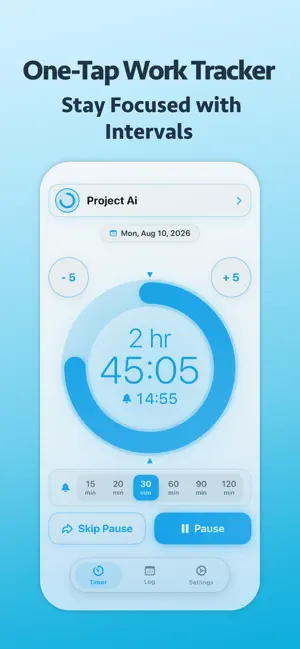
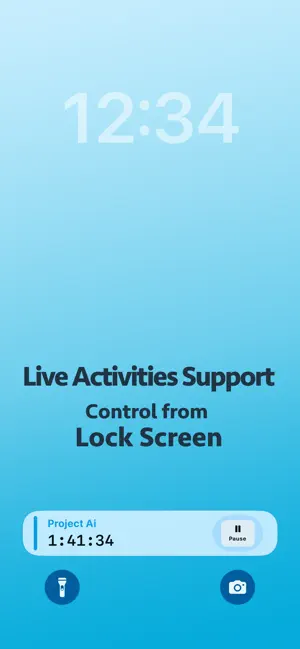
LogTimer is a smart, reliable work hours tracker built specifically for freelancers, contractors, and focused professionals. Stop guessing your billable hours at the end of the month. LogTimer makes it effortless to track project time, visualize productivity, and manage invoice cut-offs accurately. Key Features: - One-Tap Time Tracking: Start and stop with zero friction. - Interval Reminders: Set custom intervals (e.g., 15, 30, 60 mins) to maintain deep focus and prevent burnout. - Client Billing & Cut-off Cycles: Set custom billing dates (monthly, bi-weekly, end of month) per project to match your invoicing needs. - Smart Rounding: Round time up or down (e.g., 15-minute increments) to match professional billing standards. - Visual Analytics: Beautiful daily, weekly, and monthly charts showing where your time actually went. - Live Activities & Lock Screen: Glance at elapsed time and pause/resume without unlocking your phone. - Secure iCloud Sync: Your sensitive work logs are safely stored in your personal iCloud. Whether you are billing clients, managing client projects, or building daily study habits, LogTimer gives you total clarity over your most valuable asset: your time.
What’s new
Version 2.1 · Updated September 28, 2026
Version 2.1 brings a brand-new built-in User Guide, refined Live Activities, and important bug fixes to make your productivity tracking smoother than ever. ■ Built-in User Guide • Added a comprehensive User Guide explaining all key features. Access it anytime via the info screen or from the Settings tab (available in both English and Japanese). • Learn how to get the most out of Interval Auto-Pause, Skip Pause, Carry On, Repeat Cycles, and time rounding settings. ■ Live Activities Improvements • Fixed an issue where duplicate Live Activity cards could appear on the Lock Screen after pausing. • Refined background card behavior when stopped—cards now cleanly auto-dismiss after 1 hour and will not reappear redundantly. ■ "Skip Pause" Enhancements • Fixed an issue where the Skip Pause button and dial marker did not automatically disarm when crossing the interval boundary while the app remained in the foreground. ■ Stability & Bug Fixes • Fixed potential crashes on the project edit screen. • Hardened database save routines for rock-solid reliability. We appreciate your continued support! If you enjoy LogTimer, please consider leaving a review on the App Store.
App privacy
The developer, Ajiro Tech Inc., reported these privacy practices to Apple.
Data Not Linked to You
The following data, which may be collected but is not linked to your identity, may be used for the following purposes:
- Location: Coarse Location
- Usage Data: Product Interaction
- Diagnostics: Crash Data, Performance Data, Other Diagnostic Data
Used for: Analytics
Alternatives to LogTimer - Work Hours Tracker
Looking for apps like LogTimer - Work Hours Tracker? Here are 6 similar apps on the App Store.
-
 作業記録タイマー
-
 Cycle WorkTimer
-
 Timestu
-
 Kiseki - Work Time Tracker
-
 Focuslancer — Deep Work Timer
-
 Clocktower Time Tracker
| App | Rating | Price | Last updated | Compare |
|---|---|---|---|---|
| LogTimer - Work Hours Tracker | – | Free | September 28, 2026 | |
| 作業記録タイマー | – | Free | Jul 19, 2026 | Compare |
| Cycle WorkTimer | – | Free | Oct 11, 2026 | Compare |
| Timestu | – | Free | Dec 4, 2025 | Compare |
| Kiseki - Work Time Tracker | – | Free | Sep 26, 2026 | Compare |
| Focuslancer — Deep Work Timer | – | Free | Aug 30, 2026 | Compare |
| Clocktower Time Tracker | – | Free | Jun 27, 2026 | Compare |