

BT Soccer/Football Scoreboard
The Basketball Temple LLC Sports iPhoneiPadiPod touchApple Watch
BT Soccer/Football Scoreboard is a free Sports app for iPhone and iPad by The Basketball Temple LLC. Rated 5.0/5 from 3 ratings. Requires iOS 15.0.
- Rating
- 5.0
- 3 ratings
- Price
- Free
- on the App Store
- Size
- 112 MB
- Age 4+
- Updated
- Oct 2
- 2026 · v1243
Screenshots



About BT Soccer/Football Scoreboard
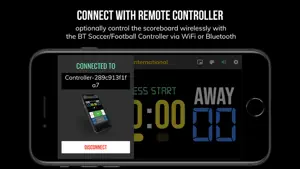
One of the cleanest soccer/football scoreboard apps on the market with many convenient features. Presets for FIFA, Futsal, Youth Leagues, and more. Fully customizable games depending on your league's needs. Scoreboard equipment which can cost you thousands is now available and affordable to everyone. In-depth Tutorial (related product, basics of remote connection relevant to BT Soccer/Football Scoreboard as well): https://youtu.be/fopYwQPOZ2k Use the scoreboard by itself or download the BT Soccer/Football Controller app to remotely control the scoreboard. To connect to the scoreboard open the connect menu on the BT Soccer/Football Controller app, the scoreboard is automatically detected, hit the WiFi or Bluetooth button next to the scoreboard name on the BT Soccer/Football Controller app to connect. BT Soccer/Football Scoreboard Features: - Clean design, no ads - Intuitive direct tap and swipe controls - Remotely control scoreboard with WiFi or Bluetooth using BT Soccer/Football Controller App - Convenient Presets (FIFA, Futsal, Indoor with Quarter, College, Youth Leagues, custom rules, and more...) - Convenient timers: period timer, rest timer, timeout timer, overtime, etc. - Fully customizable game in the settings - BT Scoreboard App can also act as a controller similar to BT Controller App - Quick Start Documentation below For the best experience, use the application on a large tablet, or hook your phone/tablet up to a large display or video projector. You'll feel like you have just bought a professional scoreboard! The BT Soccer/Football Scoreboard app was created by The BT Company. The BT Company focuses on high quality sports academies, leagues, and technologies that are used to support those academies and leagues. We open our technology to the public so everyone in the sports community can experience the same technologies that we use within our institutions. # Quick Start Documentation: Exiting Game and Reseting Times: - Click top right settings icon (if top bar is hidden, click top left hamburger icon to open top app bar) - Scroll down and hit "Exit Game" button Score Controls: - Tap score to increase quickly - Swipe up/down score to increase/decrease - Hold down on team names to adjust name and color of teams Time Controls: - Tap period timer to start/pause - Tap timeout, rest timers to early transition to next stage Timeout Controls: - Tap timeout number to call timeout - Swipe up/down timeouts to adjust numbers Penalty Kicks Controls When the game is still tied after overtime ends: - Tap on indicators to increase penalty goals scored Connect and Remote Control Settings (IMPORTANT: only needed when using the scoreboard as a controller, not needed if the scoreboard is being controlled by another device): - Tap on top-left icon (or swipe left-to-right on the left edge) to open connect menu - Hit "Refresh" to find devices - Tap on WiFi or Bluetooth icon to connect, green icon indicates connected - If unable to connect or having connection errors try one of the following: 1) please ensure all devices are on the same WiFi network 2) please ensure bluetooth is turned ON on all devices 3) lastly, try to restart the app on all devices Time and Game Settings: - Tap on top-right icon (or swipe right-to-left on the right edge) to open settings menu - Edit and save the many settings available Whistle Sound Effect: - There are two faint colored bell icons next to the period number For a full list of our other tutorials please visit: https://www.youtube.com/@btstatsco Feel free to contact us at [email protected] Privacy Policy: https://www.basketballtemple.com/privacy Terms of Use: https://www.apple.com/legal/internet-services/itunes/dev/stdeula/
What’s new
Version 1243 · Updated October 2, 2026
- Added more scoreboard style options - Added end of period button in extra time - Other fixes Please submit any issues to [email protected]. Thank you for using the app!
App privacy
The developer, The Basketball Temple LLC, reported these privacy practices to Apple.
Data Not Collected
The developer does not collect any data from this app.
Alternatives to BT Soccer/Football Scoreboard
Looking for apps like BT Soccer/Football Scoreboard? Here are 6 similar apps on the App Store. The highest rated is SPLAT_ (5.0/5), and 4 of the 6 are free to download.
-
 Football Scoreboard Deluxe
4.5
Football Scoreboard Deluxe
4.5
-
 SPLAT_
5.0
SPLAT_
5.0
-
 Scoreboard with Timer
5.0
Scoreboard with Timer
5.0
-
 Soccer Scoreboard Deluxe
3.0
Soccer Scoreboard Deluxe
3.0
-
 Dime Scoreboard
5.0
Dime Scoreboard
5.0
-
 VolleyShare
| App | Rating | Price | Last updated | Compare |
|---|---|---|---|---|
| BT Soccer/Football Scoreboard | 5.0 / 5 (3 ratings) | Free | October 2, 2026 | |
| Football Scoreboard Deluxe | 4.5 / 5 (2) | 0.99 USD | Mar 17, 2024 | Compare |
| SPLAT_ | 5.0 / 5 (1) | Free | Apr 3, 2026 | Compare |
| Scoreboard with Timer | 5.0 / 5 (2) | Free | Jul 20, 2026 | Compare |
| Soccer Scoreboard Deluxe | 3.0 / 5 (1) | 0.99 USD | Oct 27, 2024 | Compare |
| Dime Scoreboard | 5.0 / 5 (3) | Free | May 29, 2026 | Compare |
| VolleyShare | – | Free | Jun 28, 2026 | Compare |