

Class Schedule
ABLE SRL Education iPhoneiPadiPod touch
Class Schedule is a free Education app for iPhone and iPad by ABLE SRL. Rated 4.0/5 from 4 ratings. Requires iOS 17.0. Updated October 13, 2026.
- Rating
- 4.0
- 4 ratings
- Price
- Free
- on the App Store
- Size
- 2 MB
- Age 4+
- Updated
- Oct 13
- 2026 · v4.0.0
Screenshots


About Class Schedule
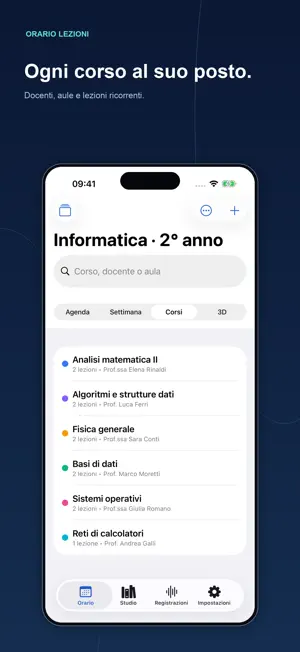
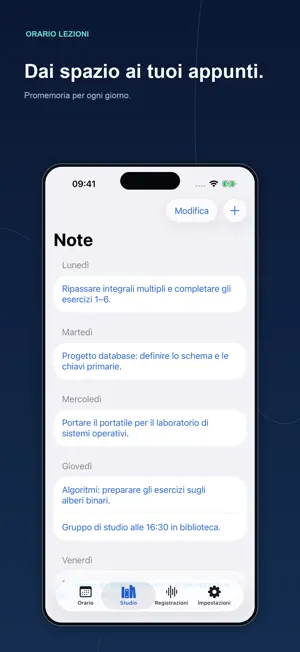
Your college day, organized. With Class Schedule, manage your courses, notes, and grades on iPhone and iPad. From your first class of the week to your last review before an exam, keep the information you need close at hand. YOUR SCHEDULE, YOUR WAY • Browse your daily agenda, weekly timetable, or 3D day cards. • Create multiple timetables and add courses with colors, instructors, rooms, and recurring classes. • Find a class quickly and customize the days, time slots, fonts, and grid dimensions. NOTES AND ACADEMIC PROGRESS • Organize notes and reminders for each day of the week. • Track exams, grades, credits, honors, and pass/fail results. • View arithmetic and weighted averages, earned credits, and a projected degree grade out of 110. RECORD AND LISTEN AGAIN • Record class audio, pause, and resume when you need to. • Listen at different speeds, rename recordings, and share them. • Keep recording in the background and while your screen is locked. • Use recording controls on the Lock Screen and in the Dynamic Island on compatible devices with Live Activities enabled. STUDY MATERIALS AND CALENDAR • Import, download, view, and share study materials. • Open your university’s website from the app. • Export classes to your calendar and enable reminders before they begin. • Check your next class and agenda using widgets. KEEP YOUR DATA ORGANIZED Import compatible timetables from the previous version, share your schedule, and export a data backup containing timetables, notes, grades, and preferences. Share recordings and study materials separately. Grade calculations use the Italian university grading system: marks are out of 30, honors count as 30, and pass/fail exams are excluded from averages. The projection out of 110 excludes thesis points and bonuses.
What’s new
Version 4.0.0 · Updated October 13, 2026
Class Schedule has a fresh interface redesigned for iPhone and iPad. • Clearer navigation between your agenda, weekly timetable, courses, and 3D view. • Widgets for your agenda and next class. • Recording controls on the Lock Screen and in the Dynamic Island on compatible devices. • Tools for notes, exams, averages, and study materials. • Themes, colors, and fonts to personalize your schedule. • Calendar export and data backups for timetables, notes, grades, and preferences. • Support for compatible timetables from the previous version. • An interface available in Italian, French, and English.
App privacy
The developer, ABLE SRL, reported these privacy practices to Apple.
Data Not Collected
The developer does not collect any data from this app.
Alternatives to Class Schedule
Looking for apps like Class Schedule? Here are 6 similar apps on the App Store. The highest rated is ClassTime: School & College (4.8/5), and all 6 are free to download.
-
 ClassTime: School & College
4.8
ClassTime: School & College
4.8
-
 Timetable & Homework Planner
4.6
Timetable & Homework Planner
4.6
-
 School Planner, Class Schedule
4.4
School Planner, Class Schedule
4.4
-
 Smart Diary - Student Planner
4.8
Smart Diary - Student Planner
4.8
-
 Student Timetable
4.2
Student Timetable
4.2
-
 School Planner: Class Schedule
4.6
School Planner: Class Schedule
4.6
| App | Rating | Price | Last updated | Compare |
|---|---|---|---|---|
| Class Schedule | 4.0 / 5 (4 ratings) | Free | October 13, 2026 | |
| ClassTime: School & College | 4.8 / 5 (8) | Free | Jan 7, 2024 | Compare |
| Timetable & Homework Planner | 4.6 / 5 (139) | Free | Mar 5, 2025 | Compare |
| School Planner, Class Schedule | 4.4 / 5 (5) | Free | Oct 19, 2026 | Compare |
| Smart Diary - Student Planner | 4.8 / 5 (42) | Free | Apr 1, 2026 | Compare |
| Student Timetable | 4.2 / 5 (25) | Free | Sep 20, 2026 | Compare |
| School Planner: Class Schedule | 4.6 / 5 (21) | Free | Aug 11, 2026 | Compare |
Compare Class Schedule with the top alternatives: ratings, updates, ASO score and keyword gaps →