

Altitude Checker
Takafumi AMANO Lifestyle iPhoneiPadiPod touch
Altitude Checker is a free Lifestyle app for iPhone and iPad by Takafumi AMANO. Rated 4.0/5 from 4 ratings. Requires iOS 15.0. Updated May 15, 2026.
- Rating
- 4.0
- 4 ratings
- Price
- Free
- on the App Store
- Size
- 282 MB
- Age 4+
- Updated
- May 15
- 2026 · v3.1
Screenshots


About Altitude Checker
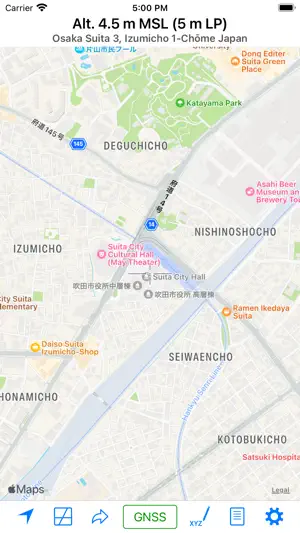
This app is a tool for measuring altitude, either at your current location or at arbitrary points. The app offers two measurement modes: Map Measurement Mode and GNSS Mode. Map Measurement Mode: When you launch the app, it enters this mode. In Map Measurement Mode, the app measures the altitude of the center position of a map using a digital elevation model (DEM). The app utilizes SRTM30 V2 data for altitude measurements. If you enable the “Use GSI’s API” switch in the settings, it can also make use of GSI’s API to obtain the altitude of Fundamental Geospatial Data (FGD) in Japan. GNSS Mode: Tapping on the “Get GNSS Altitude” button activates the GNSS Mode. In this mode, altitude is calculated using GNSS data. For users with an iPhone 3GS or earlier, the returned value represents ellipsoidal height. Settings: - Unit: Choose between Meter and Foot for altitude measurements. - Special Datum: Select from Default (MSL), A. P. (Arakawa), Y. P., O. P., K. P., S. P., A. P. (Yoshinogawa), T. P. W., and B. S. L. - Coordinate System: Opt for “Japan Plane Rectangular Coordinate System” instead of Latitude-Longitude. - Display Address: Toggle this switch to display the address of the current location. When it’s off, coordinates are shown instead of an address. - Use GSI’s API: As mentioned previously. - Use GSI Tiles: Choose to use GSI tiles instead of Apple Maps. - Update to Map Coordinates: Automatically update coordinates on the “Move Anywhere” page to the current position on the maps. - Use Light Mode for Maps: Maps are displayed in Light Mode, even when Dark Mode is enabled. About URL Scheme: - Format: alt://lat/long - lat: Latitude (double value) - long: Longitude (double value) If the latitude is not within the range of ±90 degrees, it will be replaced with the latitude and the longitude.
What’s new
Version 3.1 · Updated May 15, 2026
- Adjusted timeout settings. - Added new datasources.
App privacy
The developer, Takafumi AMANO, reported these privacy practices to Apple.
Data Used to Track You
The following data may be used to track you across apps and websites owned by other companies:
- Location: Coarse Location
- Identifiers: Device ID
- Usage Data: Product Interaction, Advertising Data
- Diagnostics: Crash Data, Performance Data
Data Linked to You
The following data, which may be collected and linked to your identity, may be used for the following purposes:
- Location: Coarse Location
- Identifiers: Device ID
- Usage Data: Product Interaction, Advertising Data
- Diagnostics: Performance Data
Used for: Third-Party Advertising, Analytics
Data Not Linked to You
The following data, which may be collected but is not linked to your identity, may be used for the following purposes:
- Diagnostics: Crash Data
Used for: Third-Party Advertising, Analytics
Alternatives to Altitude Checker
Looking for apps like Altitude Checker? Here are 6 similar apps on the App Store.


| App | Rating | Price | Last updated | Compare |
|---|---|---|---|---|
| Altitude Checker | 4.0 / 5 (4 ratings) | Free | May 15, 2026 | |
| スーパーマップル デジタル | – | Free | Jul 3, 2026 | Compare |
| 旧暦パネル | – | Free | Apr 7, 2026 | Compare |
| 丸山珈琲公式アプリ | – | Free | Oct 28, 2025 | Compare |
| 古今金澤 金沢を古地図で観光アプリ | – | Free | Apr 30, 2025 | Compare |
| シンプル時報 | – | Free | Jun 4, 2026 | Compare |
| Retro Walk | – | Free | Jun 27, 2026 | Compare |
Compare Altitude Checker with the top alternatives: ratings, updates, ASO score and keyword gaps →