

Remote Shutter: camera connect
Security Union LLC Photo & Video iPhoneiPadiPod touchMacApple Watch
Remote Shutter: camera connect is a free Photo & Video app for iPhone and iPad by Security Union LLC. Rated 3.6/5 from 71 ratings. Requires iOS 15.0.
- Rating
- 3.6
- 71 ratings
- Price
- Free
- on the App Store
- Size
- 19 MB
- Age 4+
- Updated
- Sep 27
- 2026 · v13.1.3
Screenshots



About Remote Shutter: camera connect
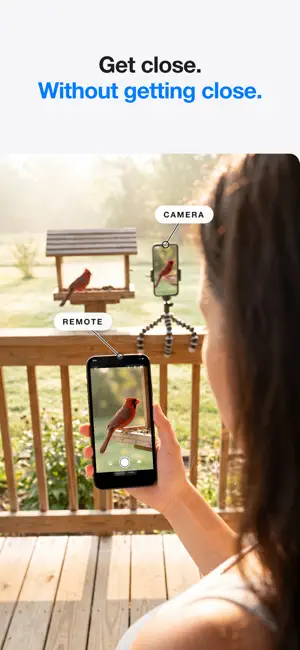
Turn any two devices into a wireless remote camera system — no internet, no router, no account needed. Just connect and shoot. Remote Shutter uses peer-to-peer technology to link two devices directly. One becomes the camera, the other becomes your remote control with a live monitor. Perfect for group photos, selfies, tripod shots, creative angles, and hands-free photography. NEW — MULTICAM: UP TO FOUR CAMERAS, ONE DIRECTOR - Connect up to four iPhones as cameras and see every angle live in a grid - One synced shutter fires photos or video on every camera at the same instant - Footage collects automatically to the director, time-aligned for editing - Set frame rate, resolution, aspect ratio, HDR and focus for every camera from the director - Interviews, music, sports, dance, unboxings — shoot every angle at once FULL MAC SUPPORT - Use your Mac as the camera: built-in, USB and pro webcams, even your iPhone via Continuity Camera - Switch between every camera connected to your Mac, live from your iPhone - Or flip it: use your Mac's big screen as a director's monitor for your iPhone camera FEATURES - Control your camera from your Apple Watch — trigger the shutter from your wrist - Selfies and group shots on the sharp rear camera — frame yourself from the remote's live preview - Wireless remote shutter from up to 50 feet away - Live camera preview on your remote device - Switch cameras remotely — front/back on iPhone, any connected camera on Mac - Camera flash control - Adjustable photo timer - Record video remotely — choose 24/30/60 fps, 1080p or 4K, aspect ratio and HDR from the remote - Tap to focus on the remote's live preview (Pro) - Works with iPhone, iPad, and Mac - No internet or Wi-Fi network required — direct device-to-device connection (just keep Wi-Fi and Bluetooth turned on) HOW TO USE 1. Open Remote Shutter on two devices 2. Devices connect automatically via peer-to-peer 3. Choose which device is the camera and which is the remote 4. Start shooting from anywhere in the room! Whether you're directing four iPhones on a music video, shooting products with a pro camera on your Mac, directing from the big screen, or setting up a family photo, Remote Shutter gives you full wireless control of your camera from another device.
Ratings & reviews
3.6
71 ratings
What’s new
Version 13.1.3 · Updated September 27, 2026
Manual exposure: set shutter speed, ISO and exposure compensation from the remote. Multicam: connect up to four cameras and fire them all with one synced shutter.
App privacy
The developer, Security Union LLC, reported these privacy practices to Apple.
Data Not Collected
The developer does not collect any data from this app.
Alternatives to Remote Shutter: camera connect
Looking for apps like Remote Shutter: camera connect? Here are 6 similar apps on the App Store. The highest rated is CamRanger 2 - Camera Control (4.6/5), and all 6 are free to download.
-
 Remote Camera Control via Air
4.0
Remote Camera Control via Air
4.0
-
 SayCheese - Camera Remote
4.3
SayCheese - Camera Remote
4.3
-
 Camera Remote: Photos Together
4.0
Camera Remote: Photos Together
4.0
-
 CamRanger 2 - Camera Control
4.6
CamRanger 2 - Camera Control
4.6
-
 Remote Legacy
1.9
Remote Legacy
1.9
-
 Remote Shutter
| App | Rating | Price | Last updated | Compare |
|---|---|---|---|---|
| Remote Shutter: camera connect | 3.6 / 5 (71 ratings) | Free | September 27, 2026 | |
| Remote Camera Control via Air | 4.0 / 5 (22) | Free | Sep 4, 2026 | Compare |
| SayCheese - Camera Remote | 4.3 / 5 (14) | Free | Oct 18, 2026 | Compare |
| Camera Remote: Photos Together | 4.0 / 5 (8) | Free | Jun 19, 2026 | Compare |
| CamRanger 2 - Camera Control | 4.6 / 5 (344) | Free | Oct 21, 2026 | Compare |
| Remote Legacy | 1.9 / 5 (113) | Free | Jan 24, 2025 | Compare |
| Remote Shutter | – | Free | Oct 17, 2026 | Compare |