

TickTick:To-Do List & Calendar
Appest Limited Productivity iPhoneiPadiPod touchApple Watch
TickTick:To-Do List & Calendar is a free Productivity app for iPhone and iPad by Appest Limited. Rated 4.9/5 from 46,681 ratings. Requires iOS 15.5.
- Rating
- 4.9
- 46.6K ratings
- Price
- Free
- on the App Store
- Size
- 314 MB
- Age 4+
- Updated
- Oct 28
- 2026 · v8.2.40
Screenshots
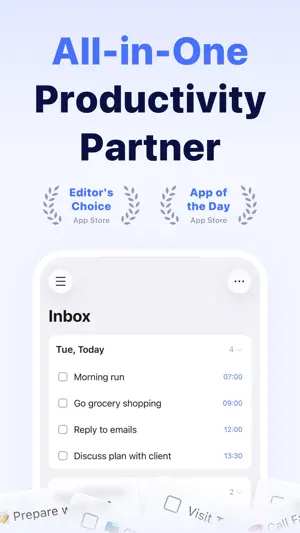


About TickTick:To-Do List & Calendar
TickTick is a powerful to-do list and task management app with seamless cloud sync across all your devices. Whether you need to plan your schedule, take notes, share shopping lists, collaborate with your team, build new habits, or set countdowns for birthdays, TickTick helps you get things done and keep life on track. Key features of TickTick: - Sync tasks across all devices - Multiple reminders - Flexible calendar views - Calendar integrations - Flexible recurring tasks - Create checklists - Four priority levels - Share task lists for collaboration - Add tasks via email - Upload attachments to tasks - Organize tasks with tags - Track birthdays and anniversaries with countdowns - Plan and organize tasks with the AI Assistant More functions to help you stay focused and boost productivity: - Use Siri to create tasks more quickly and easily - Use the Pomo Timer to stay focused - Set goals to build habits - Add tasks by voice with AI - TickTick MCP - Reminders based on time or location - Sort tasks by order, date, title, or priority - Add descriptions/comments to tasks - Batch edit tasks - Quickly search for tasks TickTick is always free, but you can also upgrade to a Premium account to enjoy full access to the most advanced features: - More lists and tasks: 299 lists, 999 tasks in each list, 199 checklist items in each task - Add up to 5 reminders to each task - Share a task list with up to 29 members for better collaboration - Upload up to 199 attachments every day - Subscribe to calendars in TickTick - Full access to calendar views - Custom Smart Lists - Track up to 299 habits - Create up to 299 countdowns How does TickTick help you be more productive? - Get things done - Stay on top of your schedule - Collaborate more efficiently - Sync across multiple platforms - Save time and energy for what matters most Premium subscription billing: Payment will be charged to your Apple Account when your purchase is confirmed. Your subscription renews automatically unless you turn off automatic renewal at least 24 hours before the end of the current subscription period. You can manage or cancel your subscription in your Apple Account settings. If you already have Premium through another platform, we recommend waiting until your current Premium access expires before starting a new subscription. Turn off automatic renewal on your existing subscription if needed. TickTick integrates with HealthKit, allowing you to sync your focus time data with Apple Health. Our Privacy Policy: https://www.ticktick.com/about/privacy Our Terms of Use: https://www.ticktick.com/about/tos For questions, feedback, or tips, we're happy to help you at [email protected] Connect with us: X (Twitter): @ticktickteam Instagram: @ticktickapp Facebook: @TickTickApp Reddit: r/ticktick
Ratings & reviews
4.9
46.6K ratings
What’s new
Version 8.2.40 · Updated October 28, 2026
- Optimized for iPhone Duo: Unfold more room for your plans. Improved Eisenhower Matrix: - Multiple Matrix Views: You can now create multiple views and easily switch between work and personal tasks. Go to Eisenhower Matrix and select "Manage View" in the top-right corner to add a new view. - Assignee Filter: Filter tasks assigned to you in shared lists through matrix rules to focus on your priorities. Regular updates will be made to offer you an ever more smooth and stable journey at TickTick. To follow what’s new, discover tips, or leave us a feedback, let’s chat on Facebook & Instagram @TickTickApp, Twitter @TickTick, or Reddit r/ticktick.
App privacy
The developer, Appest Limited, reported these privacy practices to Apple.
Data Linked to You
The following data, which may be collected and linked to your identity, may be used for the following purposes:
- Contact Info: Email Address, Name
- Identifiers: User ID
- Diagnostics: Crash Data
- User Content: Customer Support, Other User Content
Used for: Developer’s Advertising or Marketing, Analytics, App Functionality
Data Not Linked to You
The following data, which may be collected but is not linked to your identity, may be used for the following purposes:
- Identifiers: Device ID
- Usage Data: Product Interaction
- Diagnostics: Performance Data
Used for: Analytics, App Functionality
Alternatives to TickTick:To-Do List & Calendar
Looking for apps like TickTick:To-Do List & Calendar? Here are 6 similar apps on the App Store. The highest rated is To Do List MinimaList & Widget (4.8/5), and all 6 are free to download.
-
 To Do List MinimaList & Widget
4.8
To Do List MinimaList & Widget
4.8
-
 Todo List & Reminder - Todoery
4.6
Todo List & Reminder - Todoery
4.6
-
 Todoist: To Do List & Calendar
4.8
Todoist: To Do List & Calendar
4.8
-
 Any.do: To do list & Planner
4.6
Any.do: To do list & Planner
4.6
-
 Structured: Daily Planner Todo
4.8
Structured: Daily Planner Todo
4.8
-
 minical - Planner & Calendar
4.8
minical - Planner & Calendar
4.8
| App | Rating | Price | Last updated | Compare |
|---|---|---|---|---|
| TickTick:To-Do List & Calendar | 4.9 / 5 (46,681 ratings) | Free | October 28, 2026 | |
| To Do List MinimaList & Widget | 4.8 / 5 (48,725) | Free | Oct 28, 2026 | Compare |
| Todo List & Reminder - Todoery | 4.6 / 5 (5,750) | Free | Oct 22, 2026 | Compare |
| Todoist: To Do List & Calendar | 4.8 / 5 (130,247) | Free | Oct 26, 2026 | Compare |
| Any.do: To do list & Planner | 4.6 / 5 (50,570) | Free | Oct 22, 2026 | Compare |
| Structured: Daily Planner Todo | 4.8 / 5 (168,174) | Free | Oct 28, 2026 | Compare |
| minical - Planner & Calendar | 4.8 / 5 (6,105) | Free | Sep 30, 2026 | Compare |