

Sound recording recorder
Albert Parti Utilities iPhoneiPadiPod touchApple Watch
Sound recording recorder is a free Utilities app for iPhone and iPad by Albert Parti. Rated 4.5/5 from 561 ratings. Requires iOS 15.6.
- Rating
- 4.5
- 561 ratings
- Price
- Free
- on the App Store
- Size
- 22 MB
- Age 4+
- Updated
- Apr 11
- 2026 · v3.6.2
Screenshots

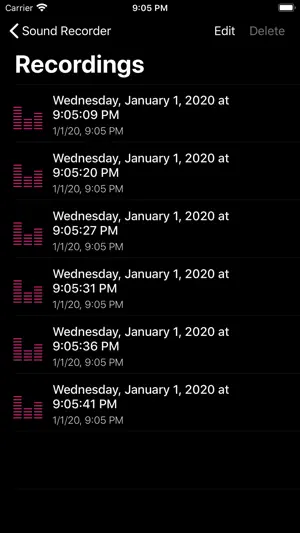
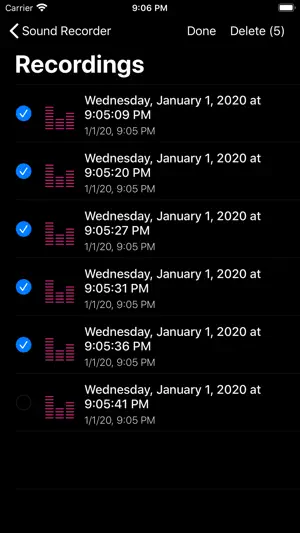

About Sound recording recorder
Tap the Record button to start recording, or press the Record button again to stop recording. During recording, you can pause the recording and start recording. "It is advisable to switch to Airplane mode during voice recording to avoid interference with incoming calls or other processes!" If an incoming call or other speaker activity occurs while recording, the recording will automatically stop and the recorder will notify you. - We can share recorded sounds • In messages • By e-mail • Notes • Facebook • messenger • Installed with 3 rd party applications - Recorded sounds can be renamed. - We can duplicate recorded sounds. -The recorded sounds can be cut at will. - Recorded sounds can be saved in iTunes or (Finder) in the File Sharing window. - Recorded voices can be shared over a Wifi network using the embedded Webserver. - Voices can be uploaded and downloaded to iCloud Drive. (iCloud login required) In the Settings view: • iCloud Auto Sync. • Recording settings format and sound quality. • Webserver-Wifi sharing In-app purchase: To turn off advertising: • (turns off ad serving) Pro Function: • Expand Share • Web sharing • iCloud Sync • Recording settings • (turns off ad serving) Watch Support: You can record audio with the watch. The sounds recorded on the watch are automatically copied to the iPhone. When selecting the file in the recorded list view of the class, you can copy the recorded sounds if for some reason they were not transferred to the device. Previous recordings will remain in the class until they are deleted.
Ratings & reviews
4.5
561 ratings
What’s new
Version 3.6.2 · Updated April 11, 2026
• Bug fixes and performance improvements
App privacy
The developer, Albert Parti, reported these privacy practices to Apple.
Data Used to Track You
The following data may be used to track you across apps and websites owned by other companies:
- Identifiers: Device ID
Data Not Linked to You
The following data, which may be collected but is not linked to your identity, may be used for the following purposes:
- Identifiers: Device ID
Used for: Third-Party Advertising
Alternatives to Sound recording recorder
Looking for apps like Sound recording recorder? Here are 6 similar apps on the App Store. The highest rated is Recorder Plus - Audio Editor (4.8/5), and all 6 are free to download.
-
 Voice Recorder - Dictaphone
4.7
Voice Recorder - Dictaphone
4.7
-
 SmarterNoise
4.6
SmarterNoise
4.6
-
 Recorder Plus - Audio Editor
4.8
Recorder Plus - Audio Editor
4.8
-
 Swipe Photo Cleaner: Unroller
4.7
Swipe Photo Cleaner: Unroller
4.7
-
 Vocam Translator: AI Translate
4.4
Vocam Translator: AI Translate
4.4
-
 Voice Recorder Super
4.5
Voice Recorder Super
4.5
| App | Rating | Price | Last updated | Compare |
|---|---|---|---|---|
| Sound recording recorder | 4.5 / 5 (561 ratings) | Free | April 11, 2026 | |
| Voice Recorder - Dictaphone | 4.7 / 5 (153) | Free | Aug 15, 2026 | Compare |
| SmarterNoise | 4.6 / 5 (117) | Free | Jul 13, 2026 | Compare |
| Recorder Plus - Audio Editor | 4.8 / 5 (3,763) | Free | Oct 21, 2026 | Compare |
| Swipe Photo Cleaner: Unroller | 4.7 / 5 (176) | Free | Oct 19, 2026 | Compare |
| Vocam Translator: AI Translate | 4.4 / 5 (63) | Free | Feb 9, 2026 | Compare |
| Voice Recorder Super | 4.5 / 5 (82) | Free | Aug 26, 2026 | Compare |