

Calculate Comfort
JUN KANAYAMA Productivity iPhoneiPadiPod touch
Calculate Comfort is a free Productivity app for iPhone and iPad by JUN KANAYAMA. Rated 3.9/5 from 35 ratings. Requires iOS 16.0. Updated August 27, 2026.
- Rating
- 3.9
- 35 ratings
- Price
- Free
- on the App Store
- Size
- 13 MB
- Age 4+
- Updated
- Aug 27
- 2026 · v5.7
Screenshots
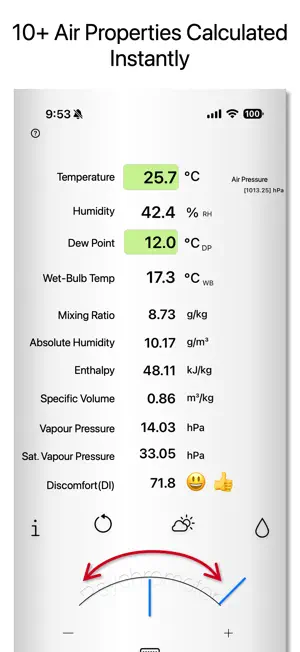


About Calculate Comfort
Calculate Comfort computes the psychrometric properties of moist air — dew point, wet bulb temperature, absolute humidity, enthalpy and more — from temperature and humidity. Turn a dial instead of reading a psychrometric chart. Built for HVAC design, instrumentation, building maintenance and condensation control. Units: the Pro version switches the entire readout between IP and SI in one tap, °F⇄°C included. Useful when your measurements are in IP but the equipment data is in SI. If you work only in Fahrenheit, our companion app Psychrometer °F opens in Fahrenheit by default. ■ Who it's for ・HVAC engineers and contractors who need moist-air properties on site ・Technicians converting psychrometer readings to relative humidity ・Anyone assessing condensation or mold risk from dew point ・Students learning to read a psychrometric chart ■ What it calculates Enter temperature plus relative humidity, dew point or wet bulb temperature: ・Relative humidity (%RH) ・Dew point (°C DP) / frost point (°C FP), switchable below 0 °C ・Wet-bulb temperature (°C WB) ・Mixing ratio, gravimetric absolute humidity (g/kg) ・Absolute humidity, volumetric (g/m³) ・Enthalpy (kJ/kg), for load calculations ・Specific volume (m³/kg) ・Vapor pressure and saturated vapor pressure (hPa) ・Discomfort index (DI) ・Estimated WBGT heat index (indoor, no solar load) ・Comfort indicator (18–28 °C, 40–70 % RH) ■ Main features ◯ Three input modes: relative humidity, dew point or wet bulb temperature. Tap the % icon to switch; keyboard entry also available. ◯ Works in place of a psychrometric chart. Dew point mode traces constant absolute humidity — sensible heating and cooling. Wet bulb mode traces the constant wet-bulb line — humidification and dehumidification. ◯ Three psychrometer types: aspirated (Assmann), wall-mounted (August) and sling. Below freezing you can set whether the wet bulb is iced; below −10 °C this applies automatically, except for the sling type. ◯ Pressure-corrected calculation: standard pressure (1013.25 hPa), built-in barometer, weather data or manual entry (800–1200 hPa). ◯ Automatic weather retrieval from your location, with a recommended indoor temperature (ASHRAE Standard 55). Choose OpenWeatherMap or Apple Weather. ◯ Works offline. A connection and location permission are needed only to fetch outdoor weather. ◯ Comfort indicator in color and emoji. [Common gestures] ・Pressure and index readouts: tap to open settings ・Outdoor air (weather icon), dew point input, wet bulb input and reset buttons: touch and hold to open settings ■ Pro version (one-time in-app purchase) ・Removes all ads ・IP ⇄ SI unit switching in one tap: °C⇄°F, g/kg⇄gr/lb, g/m³⇄gr/ft³, kJ/kg⇄BTU/lb, m³/kg⇄ft³/lb, hPa⇄inHg ・Text export of calculation results ・Extended pressure input: 23–36 inHg ・Selectable saturation vapor pressure formula: Sonntag (WMO), Hyland-Wexler (ASHRAE), Wagner-Pruß (IAPWS-95), Goff-Gratch, Magnus-Tetens ■ Supported devices iPhone with iOS 16.0 or later. Also runs on Apple M1 Mac (macOS 13.0 or later) and visionOS 1.0. Home Screen: ComfortCalc. App header: Psychrometer°Calc. ■ What it does not do ・Does not measure temperature or humidity with the device; outdoor values come from weather data ・Does not perform measured WBGT with a globe thermometer ・Does not draw a psychrometric chart ■ Calculation basis ・Saturated vapor pressure: Sonntag; other formulas in Pro ・Vapor pressure: JIS Z 8806 ・Relative humidity and dew point: JIS and WMO; denominator over supercooled water ・Enthalpy: ASHRAE definition ・Recommended indoor temperature: ASHRAE Standard 55 ■ Notes Extreme input values increase error and may produce an error state. Rounding may shift the last digit when switching modes. Correctness of results is not guaranteed and no liability is accepted for damages arising from use. Documentation, FAQ and calculation specs: https://www7b.biglobe.ne.jp/~kanayama/PsychrometerCalc/
Ratings & reviews
3.9
35 ratings
What’s new
Version 5.7 · Updated August 27, 2026
• Added a link to the support page. • Improved the main screen layout for the paid Pro version.
App privacy
The developer, JUN KANAYAMA, reported these privacy practices to Apple.
Data Used to Track You
The following data may be used to track you across apps and websites owned by other companies:
- Usage Data: Advertising Data
Data Linked to You
The following data, which may be collected and linked to your identity, may be used for the following purposes:
- Usage Data: Advertising Data
Used for: Third-Party Advertising
Data Not Linked to You
The following data, which may be collected but is not linked to your identity, may be used for the following purposes:
- Location: Coarse Location
- Diagnostics: Crash Data, Performance Data
Used for: Third-Party Advertising, Developer’s Advertising or Marketing, Analytics
Alternatives to Calculate Comfort
Looking for apps like Calculate Comfort? Here are 6 similar apps on the App Store. The highest rated is Ductulator - Duct Sizing (4.7/5), and 2 of the 6 are free to download.
-
 Calculator of Air
4.6
Calculator of Air
4.6
-
 HVAC Psychrometric LT
-
 HVAC Psychrometric Plus
3.0
HVAC Psychrometric Plus
3.0
-
 AirCalc_
-
 GARDCO Psychrometric Calc
-
 Ductulator - Duct Sizing
4.7
Ductulator - Duct Sizing
4.7
| App | Rating | Price | Last updated | Compare |
|---|---|---|---|---|
| Calculate Comfort | 3.9 / 5 (35 ratings) | Free | August 27, 2026 | |
| Calculator of Air | 4.6 / 5 (14) | Free | Apr 20, 2026 | Compare |
| HVAC Psychrometric LT | – | 0.99 USD | Oct 23, 2026 | Compare |
| HVAC Psychrometric Plus | 3.0 / 5 (2) | 6.99 USD | Oct 21, 2026 | Compare |
| AirCalc_ | – | 0.99 USD | May 8, 2026 | Compare |
| GARDCO Psychrometric Calc | – | Free | Sep 1, 2024 | Compare |
| Ductulator - Duct Sizing | 4.7 / 5 (353) | 3.99 USD | Mar 24, 2026 | Compare |
Compare Calculate Comfort with the top alternatives: ratings, updates, ASO score and keyword gaps →