

Eternalbum
MY AR UNIPESSOAL LDA. Photo & Video iPhoneiPadiPod touch
Eternalbum is a free Photo & Video app for iPhone and iPad by MY AR UNIPESSOAL LDA. Rated 4.4/5 from 219 ratings. Requires iOS 17.2. Updated May 28, 2026.
- Rating
- 4.4
- 219 ratings
- Price
- Free
- on the App Store
- Size
- 28 MB
- Age 4+
- Updated
- May 28
- 2026 · v5.5
Screenshots



About Eternalbum
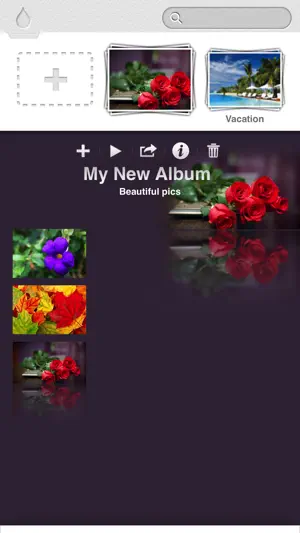
Eternalbum, a smarter way to organize, secure, edit and share you photos in a single app. *:._.:*~*:._.:*~*:._.:*~*:._.:*~*:._.:*~*:._.:*~*:. *:._.:*~*:._.:*~Organize with style*:._.:*~*:._ - Stylish individual album layout with customizable album cover and album background - unique 3D browsing experience - Play slideshow *:._.:*~*:._.:*~ Security *:._.:*~*:._.:*~ - Set up an auto lock with password to protect your photos from preying eyes. - Set up pass lock for each album.(Add-on needed) - Set up a decoy password in case an annoying person insists to see your photos. Fake contents (photos in your local library) will be presented when accessed with a decoy password. (Add-on needed) - Capture intruder's photo whenever an incorrect password or a decoy password is entered.(Same add-on as above) *:._.:*~*:._.:*~Powerful editor*:._.:*~*:._.:*~ - Unlike most photo editor apps, Eternalbum keeps edited photo's original size. (Add-on needed, otherwise high resolution size) - Provides auto enhancement, contrast, brightness, saturation, sharpness adjustment, rotation, flip, crop tools and awesome tools like color accent and horizontal straighten tools. - Real time adjustments. - Edit with ease - simple gestures - Dozens free and cool filters. - Undo at anytime *:._.:*~*:._.:*~photo search*:._.:*~*:._.:*~ - Unique colour-based searching function. - Search history *:._.:*~Import from local and socials*:._.:*~ - Import photos from Facebook, Instagram, Pinterest, Google Photos, tumblr, flickr, local library, other apps, and camera. *:._.:*~*:._.Export / share photos*:._.:*~*:. - Share photos on Facebook, Google Photos, Twitter, tumblr, flickr, Yandex.Disk and Dropbox. - Send photos via email - Send photos to computer with iTunes file sharing - Export to Air print *:._.:*~*:._.:*~*:._.:*~*:._.:*~*:._.:*~*:._.:*~* FAQ Q: Where can I find the app settings. A: Tap top-left Eternalbum icon to enter settings. Q: How can I move photos? A: 1. move photos inside same album: long-press photo and drag-drop it. 2. move photos to a different album: inside sharing photos, "to other album". Q: Why people can still see some of my photos with a decoy password? A: The photos presented when accessed with decoy password are not the photos you saved in Eternalbum but in local Photos app. Q: How can I backup all my photos saved in Eternalbum? A: You can backup your Eternalbum app with iTunes, your photos will be backed-up with the app.
Ratings & reviews
4.4
219 ratings
What’s new
Version 5.5 · Updated May 28, 2026
Routine stability improvements. Now user can move photos between albums.
App privacy
The developer, MY AR UNIPESSOAL LDA., reported these privacy practices to Apple.
Data Not Linked to You
The following data, which may be collected but is not linked to your identity, may be used for the following purposes:
- Usage Data: Product Interaction
- Diagnostics: Crash Data, Performance Data
- Location: Coarse Location
Used for: Analytics, App Functionality
Alternatives to Eternalbum
Looking for apps like Eternalbum? Here are 6 similar apps on the App Store. The highest rated is Photokit: Photo Gallery (5.0/5), and all 6 are free to download.
-
 Phoom: Swipe Photo Cleaner
4.5
Phoom: Swipe Photo Cleaner
4.5
-
 Photokit: Photo Gallery
5.0
Photokit: Photo Gallery
5.0
-
 MyPics - A Powerful PhotoAlbum
4.5
MyPics - A Powerful PhotoAlbum
4.5
-
 Utiful: Move & Organize Photos
4.1
Utiful: Move & Organize Photos
4.1
-
 HashPhotos
4.7
HashPhotos
4.7
-
 Photos, Gallery: Magic AI
4.0
Photos, Gallery: Magic AI
4.0
| App | Rating | Price | Last updated | Compare |
|---|---|---|---|---|
| Eternalbum | 4.4 / 5 (219 ratings) | Free | May 28, 2026 | |
| Phoom: Swipe Photo Cleaner | 4.6 / 5 (40) | Free | Oct 20, 2026 | Compare |
| Photokit: Photo Gallery | 5.0 / 5 (8) | Free | Oct 19, 2026 | Compare |
| MyPics - A Powerful PhotoAlbum | 4.5 / 5 (2,231) | Free | Oct 25, 2026 | Compare |
| Utiful: Move & Organize Photos | 4.1 / 5 (794) | Free | Oct 22, 2026 | Compare |
| HashPhotos | 4.7 / 5 (2,492) | Free | Oct 22, 2026 | Compare |
| Photos, Gallery: Magic AI | 4.0 / 5 (4) | Free | Jul 2, 2025 | Compare |
Compare Eternalbum with the top alternatives: ratings, updates, ASO score and keyword gaps →