

ConnectStats -
Brice Rosenzweig Health & Fitness iPhoneiPadiPod touch
ConnectStats - is a free Health & Fitness app for iPhone and iPad by Brice Rosenzweig. Rated 4.7/5 from 391 ratings. Requires iOS 18.6.
- Rating
- 4.7
- 391 ratings
- Price
- Free
- on the App Store
- Size
- 24 MB
- Age 4+
- Updated
- Feb 21
- 2026 · v9.0
Screenshots
About ConnectStats -
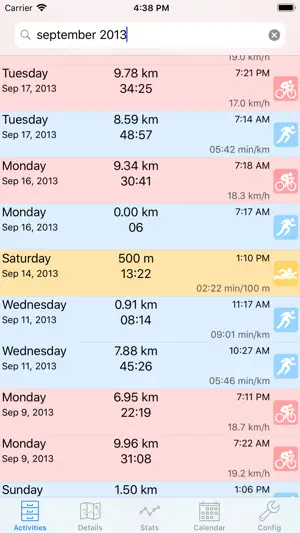
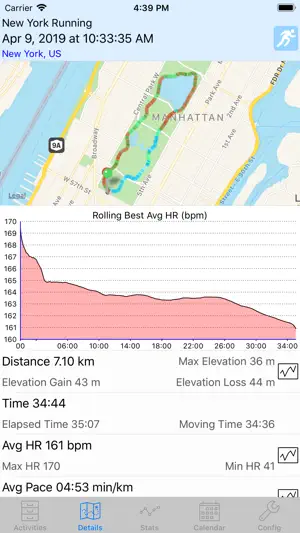
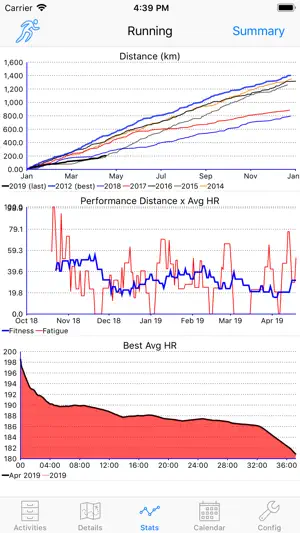
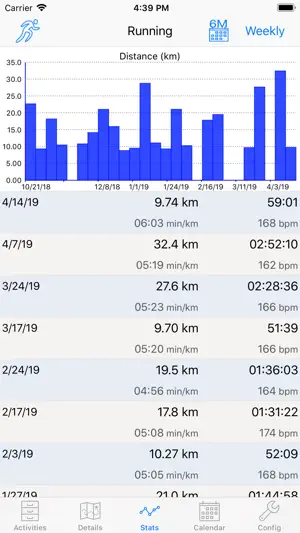
WARNING: The current version due to an API change will currently not see any existing history of your activities for Garmin, but only download activities done after your first install. We are working on a fix, meanwhile you can use strava in addition to Garmin to see some history DESCRIPTION Connect Stats is an activity viewer for Garmin Connect or Strava. It provides in-depth review of your activities, search, analysis, plot and see basic statistics on all your data collected in garmin connect or strava from your iphone or ipad. You can read some of the motivation behind the app in the blog NOTES - Data from activity trackers like vivofit or vivosmart are not supported by this app. - In case of initial connection trouble or issue, please check the support web site, the help or send me a bug report. If you write a negative review I can't reply to you and help you. - This app is updated incrementally regularly, so the latest reviews constantly drop. Feel free to look at all reviews or leave a new one if you like the app. - This app is now open source. See the support web page for details. FEATURES - Detailled report on your activities, with laps break down, map gradient, graphs and statistics - Use gradient color to visually see on the map your heart rate, speed, power or cadence - Calendar view of your activities - Activity search - Monthly/Weekly summary statistics of your activities - Monthly/Weekly/Detailled Historical report and graphs on any collected data - Display scatter plots, trend lines for both historical and track data. - Best Rolling Plots, histograms. - Support multiple garmin connect account simultaneously with multiple profiles. - Support most activity types, including support for lap swimming, ski, run bike, ... - Display the location name for your activities. - Derived metrics (stride length, Power kJ,...), - Calculated and auto laps for arbitrary distances or time. Let's you see you split time or distance, fastest km, etc - Display time in zone for power and heart rate. Zones are downloaded from garmin connect. - Best Rolling plots and lap for HR, pace and power (Critical Power Plot) - This app can import information from your HealthKit Data like the weight to add it to the analysis of your fitness FIRST USE - when you start the program you will be have to choose and enable download for the service of your choice. * Garmin: you can choose the connectstats service, which will pop up a login message or to download from the website in which case you will have to enter your user name and password. * Strava: upon first refresh, the strava login page will popup. - you can then download activities by pulling down on the activity list. - Note that the initial download process can be slow if you have a lot of activities. Also for Garmin activities from Garmin there will be an initial synchronisation that can take some time before the activities are ready. - If you have issue connecting check the trouble shooting section on the web page. - There is also a help section in the setting tab. HOW TO USE IT - You can refresh by pulling down the activity list - You can navigate the different tabs and touching most data will let you drill down on that number. - You can touch a graph or the gear button to rotate through the different graphs options or bring in the graph full screen. - You can reload an activity to update changes in garmin connect by pulling down on the detail tab - You can see full history of any field by selecting the field name in the stats page Check the web site and the blog for a lot more details on how to use it and what the different screen and graph mean.
Ratings & reviews
4.7
391 ratings
What’s new
Version 9.0 · Updated February 21, 2026
Bug fixes and modernize from latest iOS
App privacy
The developer, Brice Rosenzweig, reported these privacy practices to Apple.
Data Not Linked to You
The following data, which may be collected but is not linked to your identity, may be used for the following purposes:
- Usage Data: Product Interaction
- Health & Fitness: Fitness
- Location: Precise Location
- Diagnostics: Other Diagnostic Data
Used for: Analytics, App Functionality
Alternatives to ConnectStats -
Looking for apps like ConnectStats -? Here are 6 similar apps on the App Store. The highest rated is Intervals.icu Companion (4.9/5), and all 6 are free to download.
-
 Sauce for Strava™
4.8
Sauce for Strava™
4.8
-
 dynamicWatch Companion
4.8
dynamicWatch Companion
4.8
-
 Tempo: Run Log & Insights
4.7
Tempo: Run Log & Insights
4.7
-
 RunGap - Workout Data Manager
4.8
RunGap - Workout Data Manager
4.8
-
 FitnessSyncer
2.6
FitnessSyncer
2.6
-
 Intervals.icu Companion
4.9
Intervals.icu Companion
4.9
| App | Rating | Price | Last updated | Compare |
|---|---|---|---|---|
| ConnectStats - | 4.7 / 5 (391 ratings) | Free | February 21, 2026 | |
| Sauce for Strava™ | 4.8 / 5 (4) | Free | Jul 2, 2026 | Compare |
| dynamicWatch Companion | 4.8 / 5 (10) | Free | Jul 25, 2026 | Compare |
| Tempo: Run Log & Insights | 4.7 / 5 (1,034) | Free | Feb 16, 2025 | Compare |
| RunGap - Workout Data Manager | 4.8 / 5 (5,934) | Free | Sep 10, 2026 | Compare |
| FitnessSyncer | 2.6 / 5 (23) | Free | Oct 5, 2026 | Compare |
| Intervals.icu Companion | 4.9 / 5 (35) | Free | Sep 23, 2026 | Compare |
Compare ConnectStats - with the top alternatives: ratings, updates, ASO score and keyword gaps →