

iNotePad PRO
Gianluca Natalini Productivity iPhoneiPadiPod touch
iNotePad PRO is a paid Productivity app for iPhone and iPad by Gianluca Natalini. Rated 1.0/5 from 2 ratings. Requires iOS 16.6. Updated April 29, 2026.
- Rating
- 1.0
- 2 ratings
- Price
- 0.99 USD
- on the App Store
- Size
- 6 MB
- Age 4+
- Updated
- Apr 29
- 2026 · v2.3
Screenshots

About iNotePad PRO
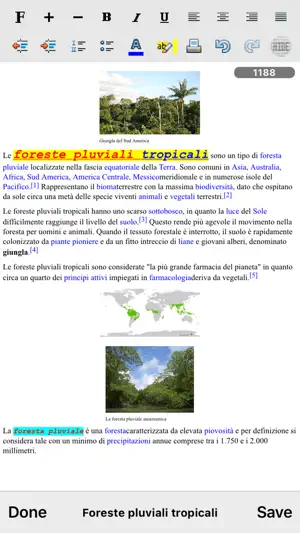
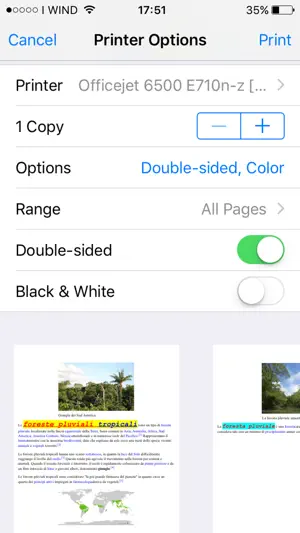
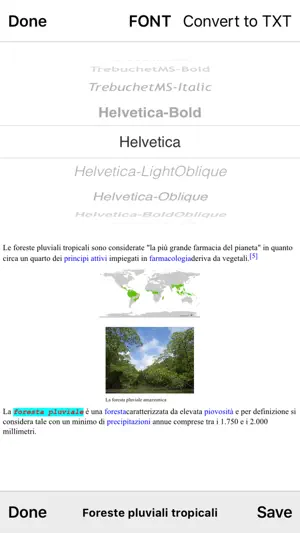
"iNotePad PRO" is a powerful word processor ("rich text editor") that will transform your device in a professional typewriter. "iNotePad PRO" was designed to load RTF, TXT, HTML files, edit them and save the modified document. Useful for journalists, students, writers, office work, for reports, to take fast notes, etc... "iNotePad PRO" can share the written documents using remote storage and sharing systems (e.g. cloud systems, using "Open In"). Using the export to HTML and share function you can also use "iNotePad PRO" to create simple web pages (rich text web pages). Also, by pressing the "Speech To Text" button on the keyboard (devices compatible with "Siri") you can dictate text to be written ... "Speech To Text" will insert for You the dictated text in the document, at the position where the cursor is displayed. Turn your device in a typewriter that can be used sitting on the couch at home, at work or during a trip. Features: - "iNotePad PRO" + "Speech To Text": dictate the text to be written and "Speech To Text" will write automatically for You the dictated text in the document - Intuitive interface: start the program, and in a few seconds you're already writing - Automatic Indentation - AutoFormat Lists - Highlighting text (infinite numbers of colors) - Coloring of text (infinite numbers of colors) - Indentation of the text: left, center, right, justified - Lots of available fonts (all fonts supported by the device) - Bold, Italic, Underline - Font Size - Undo and redo - Export and share the written document using the HTML, RTF, TXT file formats with the ability to send them via email - Sharing files between iPad and iPhone - Sharing remote documents: share your written documents with colleagues or friends far away or work together with Your friends on a cloud system shared document - Ability to convert the rich text into a simple text format and save it in a .TXT file - Automatic counter for the number of the characters written in the document Management for the documents stored in the "iNotePad PRO" Archive": - DOC, RTF, TXT filters to search by type the documents saved in the archive - Creation date and alphabetical sorting documents visualization - Archiving an infinite number of documents and document management: load, edit, save, duplicate, delete, archive, share, etc.. - Import for RTF, TXT, HTML documents via file sharing, copy/paste, Open In, email attachments, etc.. (with the ability to modify them once imported) COPY / PASTE: - Select and copy web pages (or parts of them) using Safari and paste them in the "iNotePad PRO" rich text area (this feature is also compatible with other installed apps like rtfManager, documentsManager, sheetsManager, presentationsManager, megaDownloader Web Browser, secretReader, secret Notes HD, iNotePad, etc…) Import RTF, TXT, HTML, MS Office e iWork documents: Using rtfManager, documentsManager, sheetsManager, presentationsManager, megaDownloader Web Browser and the copy/paste feature of "iNotePad PRO" You can import the RTF, TXT, HTML, MS Office, iWork documents or parts of the documents in the "iNotePad PRO" rich text area, modify and save or export them in the HTML file format Sharing (IN/OUT) documents with: - Dropbox (remote storage systems, cloud) - Open In - iTunes File Sharing - email attachments Display: - Retina display supported "iNotePad PRO" + "Speech To Text": - Write speaking, without using the keyboard Supported device orientations: - Portrait and Landscape (iPad version) Print: - AirPrint App type: - UNIVERSAL APP (you pay only once and runs on all Your devices) Documentation (HTML -> RTF): http://www.ngcybit.it/iTunesApp/inotepad-pro/html-to-rtf-using-cloudconvert.html
What’s new
Version 2.3 · Updated April 29, 2026
* Minor bugs fixed
App privacy
The developer, Gianluca Natalini, reported these privacy practices to Apple.
Data Not Collected
The developer does not collect any data from this app.
Alternatives to iNotePad PRO
Looking for apps like iNotePad PRO? Here are 6 similar apps on the App Store. The highest rated is PomoLite - Focus Timer Keeper (4.9/5), and all 6 are free to download.
-
 Calculator AM
4.0
Calculator AM
4.0
-
 Daily Routine Tracker - Dayful
3.0
Daily Routine Tracker - Dayful
3.0
-
 PomoLite - Focus Timer Keeper
4.9
PomoLite - Focus Timer Keeper
4.9
-
 Bridges: Link Formatting
4.4
Bridges: Link Formatting
4.4
-
 Remote Print: Wireless Printer
4.6
Remote Print: Wireless Printer
4.6
-
 Converter AM
4.7
Converter AM
4.7
| App | Rating | Price | Last updated | Compare |
|---|---|---|---|---|
| iNotePad PRO | 1.0 / 5 (2 ratings) | 0.99 USD | April 29, 2026 | |
| Calculator AM | 4.0 / 5 (2) | Free | May 6, 2026 | Compare |
| Daily Routine Tracker - Dayful | 3.0 / 5 (2) | Free | Apr 25, 2026 | Compare |
| PomoLite - Focus Timer Keeper | 4.9 / 5 (7) | Free | Aug 19, 2024 | Compare |
| Bridges: Link Formatting | 4.4 / 5 (17) | Free | Jul 30, 2026 | Compare |
| Remote Print: Wireless Printer | 4.6 / 5 (63) | Free | Sep 21, 2025 | Compare |
| Converter AM | 4.7 / 5 (515) | Free | Sep 3, 2026 | Compare |
Compare iNotePad PRO with the top alternatives: ratings, updates, ASO score and keyword gaps →