

Canon PRINT Business
Canon Inc. Business iPhoneiPadiPod touch
Canon PRINT Business is a free Business app for iPhone and iPad by Canon Inc. Rated 2.8/5 from 300 ratings. Requires iOS 16.0. Updated September 24, 2025.
- Rating
- 2.8
- 300 ratings
- Price
- Free
- on the App Store
- Size
- 24 MB
- Age 17+
- Updated
- Sep 24
- 2025 · v8.3.3
Screenshots


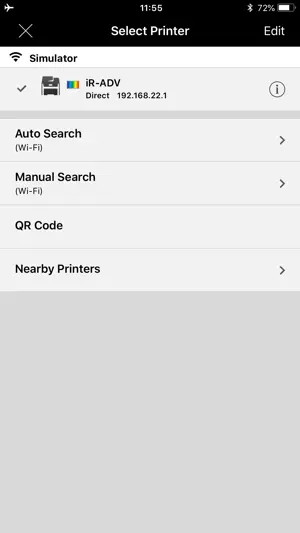
About Canon PRINT Business
Canon PRINT Business is a free application that enables you to use a Canon laser multi-function device or laser printer to print photographs and documents, read scanned data, and upload to cloud storage services, etc. from an iPhone or iPad. * Canon PRINT Business has been merged with Canon PRINT. Please use Canon PRINT in the future. Main Features - Print scanned data, images, documents, camera roll photos, and web pages. - Read scanned data from a multi-function device. - Image capture with a camera. - Work with files in local or cloud storage. - Automatically detect multi-function devices and/or printers on a network, or manually search for them by specifying an IP address or DNS. - Search multi-function devices and/or printers with Bluetooth. - Touch the mobile terminal to log in to the multi-function device and/or printer (Bluetooth installed machine). - Register multi-function devices and/or printers with a QR code. - Use the address book of a mobile terminal in place of the address book registered in a multi-function device. - Check the condition of a multi-function device or printer in detail, such as device status etc., via its Remote UI. - Support VoiceOver (some English and Japanese screens only) - Use the Remote Operation function to display the control panel of the multi-function device and/or printer on a mobile terminal. - Use the app to copy, send faxes, or scan and send by e-mail from a multi-function device or printer. * Functions that can be used vary according to the device, the firmware version of the device, and device settings you are using. Supported Devices imageRUNNER ADVANCE series Color imageRUNNER series imageRUNNER series Color imageCLASS series imageCLASS series i-SENSYS series imagePRESS series LBP series Satera series Laser Shot series Business Inkjet series - Some device models do not support Canon PRINT Business. Check the list of supported device models on the Canon PRINT Business support page of the Canon website. - For printing with PIXMA series, MAXIFY series or SELPHY series devices, use Canon PRINT. - For scanning with imageFORMULA series devices, use CaptureOnTouch Mobile. Required Conditions - Your iPhone or iPad must be connected to a wireless LAN access point. - Your multi-function device and the access point must be connected by LAN or wireless LAN. Items That Can Be Set with the Print Function Output Method, Department ID Management, User Authentication, Output Size, Copies, Print Range, Paper Source, Select Color, 2-Sided, Staple, 2 on 1, Image Quality - Items that can be set vary according to each printer model. Items That Can Be Set With the Scan Function Color/Select Color, Resolution, Original Size/Scan Size, File Format, 2-Sided Original/2-Sided, Original Type, Density, Original Placement - Items that can be set vary according to each printer model.
Ratings & reviews
2.8
300 ratings
What’s new
Version 8.3.3 · Updated September 24, 2025
- Fixed minor bugs
App privacy
The developer, Canon Inc., reported these privacy practices to Apple.
Data Not Linked to You
The following data, which may be collected but is not linked to your identity, may be used for the following purposes:
- Identifiers: Device ID
- Usage Data: Product Interaction, Other Usage Data
Used for: Analytics
Alternatives to Canon PRINT Business
Looking for apps like Canon PRINT Business? Here are 6 similar apps on the App Store. The highest rated is Printer App: Smart Print (4.6/5), and all 6 are free to download.
-
 Smart Printer App - Air Print
4.5
Smart Printer App - Air Print
4.5
-
 Printer App: Smart Print
4.6
Printer App: Smart Print
4.6
-
 Smart Printer App & Scanner
4.5
Smart Printer App & Scanner
4.5
-
 Printer App: Smart Printer •
4.6
Printer App: Smart Printer •
4.6
-
 Mobile Print & Smart Printer
4.3
Mobile Print & Smart Printer
4.3
-
 Printer App: Print & Scan PDF
4.5
Printer App: Print & Scan PDF
4.5
| App | Rating | Price | Last updated | Compare |
|---|---|---|---|---|
| Canon PRINT Business | 2.8 / 5 (300 ratings) | Free | September 24, 2025 | |
| Smart Printer App - Air Print | 4.5 / 5 (12,980) | Free | Sep 8, 2026 | Compare |
| Printer App: Smart Print | 4.6 / 5 (13,631) | Free | Sep 23, 2026 | Compare |
| Smart Printer App & Scanner | 4.5 / 5 (82,416) | Free | Mar 2, 2026 | Compare |
| Printer App: Smart Printer • | 4.6 / 5 (8,725) | Free | Sep 15, 2026 | Compare |
| Mobile Print & Smart Printer | 4.3 / 5 (692) | Free | Nov 13, 2024 | Compare |
| Printer App: Print & Scan PDF | 4.5 / 5 (25,065) | Free | Feb 15, 2025 | Compare |