

AirDisk: File Transfer
Felix Yew Productivity iPhoneiPadiPod touch
AirDisk: File Transfer is a free Productivity app for iPhone and iPad by Felix Yew. Rated 4.1/5 from 147 ratings. Requires iOS 15.0.
- Rating
- 4.1
- 147 ratings
- Price
- Free
- on the App Store
- Size
- 105 MB
- Age 4+
- Updated
- Sep 2
- 2026 · v7.12.5
Screenshots


About AirDisk: File Transfer
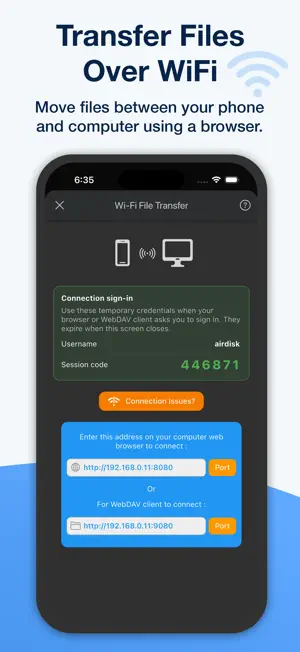
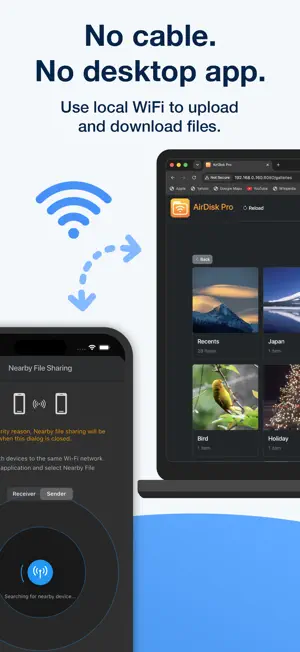
AirDisk is a wireless file transfer and file manager app that helps you move photos, videos, folders, documents, music, and archives between your phone, tablet, and computer. Use local WiFi transfer to access your phone files from a computer browser. Open AirDisk, connect your computer to the same WiFi network, enter the browser address shown in the app, and start uploading or downloading files. No cable, no iTunes, no desktop software, and no cloud upload required for local WiFi transfer. AirDisk is useful when you want to: • Transfer photos from iPhone or iPad to Windows PC • Move videos from phone to computer • Send documents from computer to phone • Transfer files over WiFi using a browser • Access phone files without installing desktop software • Organize folders, media, documents, and archives • Manage files locally on your mobile device • Use cloud storage when needed Key features: Wireless WiFi File Transfer Transfer files between your phone and computer over the same local WiFi network. Use your computer browser to upload, download, and manage files. Photo and Video Transfer Move photos and videos from your phone to your computer without using a cable. This is helpful for backing up camera roll media, moving large videos, or freeing up phone storage. Browser-Based Transfer Access your files from a Mac, Windows PC, Chromebook, or other computer with a web browser. No desktop companion app is required for local WiFi transfer. File Manager Create folders, rename files, move files, copy files, delete files, organize folders, and manage your local storage from one place. Document Viewer Preview common document formats including PDF, Microsoft Office files, Apple iWork files, images, text files, and more. Archive Tools Zip, unzip, and manage archive files directly inside the app. Music and Video Player Play music and videos stored in AirDisk with built-in media player support. Cloud Storage Support Connect to iCloud, Google Drive, Dropbox, OneDrive, Box, FTP, and WebDAV when you want to access or manage cloud files. Privacy and Local Transfer For local WiFi transfer, your files are transferred through your local network instead of requiring cloud upload. Your phone and computer must be connected to the same WiFi network, and AirDisk should stay open while transferring files. AirDisk is designed for people who want a practical way to transfer files wirelessly, manage documents, move photos and videos, and access phone files from a computer browser. Discover how AirDisk simplifies file management and boosts productivity. • Learn more: https://airdisk.app • Terms of Service: https://airdisk.app/terms-of-service • Privacy Policy: https://airdisk.app/privacy-policy
Ratings & reviews
4.1
147 ratings
What’s new
Version 7.12.5 · Updated September 2, 2026
We’ve fixed several bugs and fine-tuned performance to deliver a smoother, faster, and more reliable experience. Thank you for using AirDisk! Your feedback helps us make the app even better — don’t hesitate to reach out and let us know what you think. For more details: Website: https://airdisk.app X (Twitter): https://twitter.com/App2Pro Facebook: https://www.facebook.com/app2pro If you’re loving the app, we’d greatly appreciate a 5-star review. Your support inspires us to keep bringing you exciting new features. Thanks for being part of our journey!
App privacy
The developer, Felix Yew, reported these privacy practices to Apple.
Data Not Collected
The developer does not collect any data from this app.
Alternatives to AirDisk: File Transfer
Looking for apps like AirDisk: File Transfer? Here are 6 similar apps on the App Store. The highest rated is ASUS GlideX (4.8/5), and all 6 are free to download.
-
 ASUS GlideX
4.8
ASUS GlideX
4.8
-
 Data Transfer - Snapdrop
3.8
Data Transfer - Snapdrop
3.8
-
 AirDroid - File Transfer&Share
4.3
AirDroid - File Transfer&Share
4.3
-
 Phone Drive: File Storage
4.7
Phone Drive: File Storage
4.7
-
 USB Disk SE, File Manager
4.4
USB Disk SE, File Manager
4.4
-
 File Transfer - Snapdrop
3.9
File Transfer - Snapdrop
3.9
| App | Rating | Price | Last updated | Compare |
|---|---|---|---|---|
| AirDisk: File Transfer | 4.1 / 5 (147 ratings) | Free | September 2, 2026 | |
| ASUS GlideX | 4.8 / 5 (2,525) | Free | Sep 29, 2026 | Compare |
| Data Transfer - Snapdrop | 3.8 / 5 (312) | Free | May 28, 2024 | Compare |
| AirDroid - File Transfer&Share | 4.3 / 5 (1,133) | Free | Apr 21, 2025 | Compare |
| Phone Drive: File Storage | 4.7 / 5 (1,812) | Free | Oct 5, 2026 | Compare |
| USB Disk SE, File Manager | 4.4 / 5 (846) | Free | Jun 10, 2026 | Compare |
| File Transfer - Snapdrop | 3.9 / 5 (277) | Free | Dec 25, 2023 | Compare |