

Attendance2
David M. Reed Software Productivity iPhoneiPadiPod touch
Attendance2 is a paid Productivity app for iPhone and iPad by David M. Reed Software. Rated 4.1/5 from 22 ratings. Requires iOS 26.0.
- Rating
- 4.1
- 22 ratings
- Price
- 4.99 USD
- on the App Store
- Size
- 32 MB
- Age 4+
- Updated
- Oct 19
- 2026 · v8.0.4
Screenshots
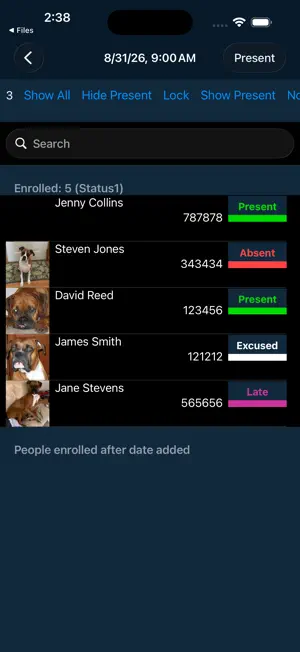
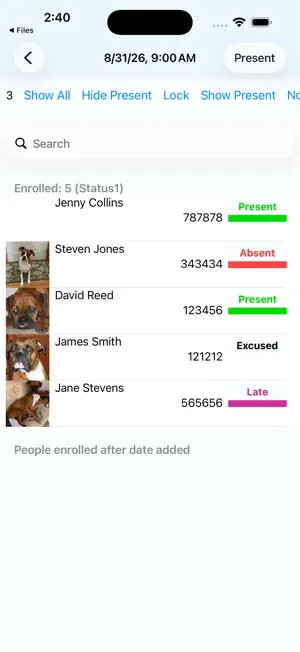
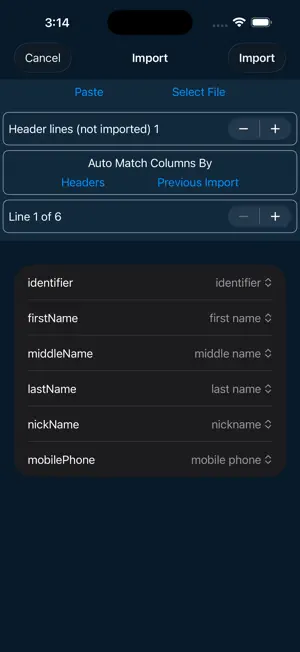

About Attendance2
See two-minute introductory video at www.dave256apps.com/attendance2 Attendance2 is a new app from the developer of the original iOS Attendance app. It is a complete rewrite of the app with a new data format to make it more flexible and easier to use. * Main Features * Easy to get started with and powerful features you can learn if you need them. Flexible importing of names from CSV file or your Contacts (videos on website show how to create an import CSV files) Display photos next to names while taking attendance. Photos can be taken with the device, imported from Dropbox, or from your Photo library. Statuses (i.e., Absent, Present, etc.) are customizable so you can add your own statuses. Each day includes a status, a second status, and a generic note field. Use the second status to track participation points or for dropoff/pickup (more information on website for how to do this). Manually select status for each person or scan QR or barcode to record a person's attendance status (Attendance2 will create QR codes for you). Optionally enter course meetings times (i.e., MWF 9AM) so you add your next class time with one tap or manually select meeting time if course does not meet at regular times. Standard fields for first, middle, last, email, etc. for each person plus 5 custom fields you can optionally use. Customize which person fields are visible while taking attendance in the Take settings. Multiple report options (spreadsheet, summary, detailed report) that can be emailed or saved to Dropbox in CSV format. Reports of students who have missed a specified number of classes to help identify at risk students. Customize what fields are included in the reports in the Report Settings. Each course is a separate data file and you can share your data file with teaching assistants or administrators by sending it to them in an email. Easily backup your data file to Dropbox or via email. Supports TextExpander touch snippet expansion in various note fields. * Gestures while taking attendance * Tap photo to view larger photo or to change the photo. Tap name to enter the note for that day for the person. Tap and hold name to view/edit details for a person. Double tap a name to view summary report of attendance. Tap and hold status to select status from a list. Swipe right/left all the way across screen to switch to previous/next date. * Sharing data between multiple devices or people * Data cannot be synced between multiple users, but as long as you send the data file back and forth between multiple people and the person using it has the latest copy, mutliple people can take attendance at different times. For example, an instructor could take attendance on MWF, email the data file to his/her TA after class Wednesday and the TA could then take attendance at a recitation section on Thursday and email the updated data file back to the instructor afterwards so the instructor could use it again on Wednesday. The same instructions apply for using it on multiple devices - just share the data (via email or Dropbox) with your other device and make certain the device you're using at the momemnt has the latest copy of the data before you modify the data. As of version 2.0 of Attendance2, it includes all the major features of the original Attendance app (version 2.0 adds importing from your Contacts). I have a list of requested features and will continue to update the app regularly as I have time to work on it. While I can't promise to add every feature request, if you have a specific request, feel free to email it to me ([email protected]). See http://www.dave256apps.com for more information about the app. There are a few videos there showing more information about the app and how to use it.
Ratings & reviews
4.1
22 ratings
What’s new
Version 8.0.4 · Updated October 19, 2026
Minor UI improvements
App privacy
The developer, David M. Reed Software, reported these privacy practices to Apple.
Data Linked to You
The following data, which may be collected and linked to your identity, may be used for the following purposes:
- Search History: Search History
- Usage Data: Product Interaction
- User Content: Photos or Videos, Audio Data, Other User Content
Used for: Analytics, Product Personalization, App Functionality
Data Not Linked to You
The following data, which may be collected but is not linked to your identity, may be used for the following purposes:
- Identifiers: User ID
- Diagnostics: Other Diagnostic Data
Used for: Analytics, App Functionality
Alternatives to Attendance2
Looking for apps like Attendance2? Here are 6 similar apps on the App Store. The highest rated is MeetingFull (5.0/5), and 4 of the 6 are free to download.
-
 DeepList
-
 Arch Layout Calculator
-
 Templates for Numbers Pro
-
 MeetingFull
5.0
MeetingFull
5.0
-
 Complete Supervision
-
 ghostWriter Markdown
4.5
ghostWriter Markdown
4.5
| App | Rating | Price | Last updated | Compare |
|---|---|---|---|---|
| Attendance2 | 4.1 / 5 (22 ratings) | 4.99 USD | October 19, 2026 | |
| DeepList | – | Free | Aug 6, 2026 | Compare |
| Arch Layout Calculator | – | 0.99 USD | Aug 12, 2025 | Compare |
| Templates for Numbers Pro | – | 4.99 USD | Dec 4, 2025 | Compare |
| MeetingFull | 5.0 / 5 (2) | Free | Aug 8, 2024 | Compare |
| Complete Supervision | – | Free | Oct 13, 2025 | Compare |
| ghostWriter Markdown | 4.5 / 5 (2) | Free | Oct 15, 2026 | Compare |
Compare Attendance2 with the top alternatives: ratings, updates, ASO score and keyword gaps →