

SigningHub - Document Signing
Ascertia Business iPhoneiPadiPod touch
SigningHub - Document Signing is a free Business app for iPhone and iPad by Ascertia. Rated 2.3/5 from 3 ratings. Requires iOS 14.0.
- Rating
- 2.3
- 3 ratings
- Price
- Free
- on the App Store
- Size
- 92 MB
- Age 4+
- Updated
- Oct 30
- 2026 · v10.0.71
Screenshots



About SigningHub - Document Signing
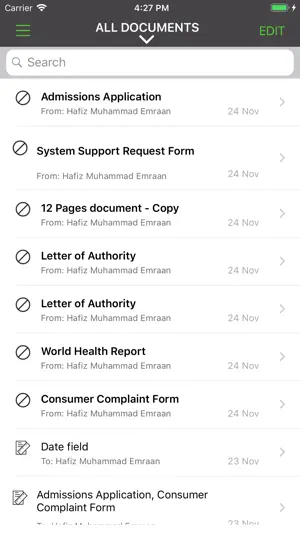
SigningHub optimises how businesses deliver, review, approve and sign documents. It provides users with the ability to prepare and digitally sign business documents with advanced long-term digital signatures, flexible document workflow and approval and status tracking. *** SigningHub wins productivity & collaboration product of the year at the UK Cloud Awards 2016 Every SigningHub digital signature is legally enforceable and complies with international regulatory bodies. Aligning to ISO standards ensures documents can be verified independently of SigningHub and even offline. SigningHub enables organisations to reduce costs, increase data security, improve process efficiency, and prevent time-consuming errors. Key Features • Ability to get documents from Google Drive and Dropbox • Workflow preparation for the document signing • Support for Electronic Signatures and Digital Signatures • Support for TouchID and Secure Enclave for the Authorised Qualified Signatures • Advanced long-term digital signatures • Strong document security using AES 256-bit encryption over TLS/SSL • Increases productivity and collaboration by getting documents signed faster Simplicity • Intuitive and easy to use for busy non-technical users • Allow user to prepare and design the workflow • Draw e-signature mark using stylus or finger • Sign on the same device with in-person signatures • Review and sign anytime and from anywhere Advanced Security • Strong encryption for advanced digital signatures using individual PKI certificates • Additional high strength authentication such as one-time-password (OTP) • Completely standards-based ensures signatures are verifiable using ISO format PDF readers • PKI cryptography provides underlying trust and data integrity Traceability • Signing evidence is embedded directly into digitally signed document • Documents can be independently verified using ISO standard PDF reader • Document workflow and signing status is available with real-time traceability • App syncs directly with user’s online SigningHub account Cost SigningHub for iOS is FREE. To use this app, simply link it to your existing SigningHub account. You can register for a FREE trial account from within this app.
What’s new
Version 10.0.71 · Updated October 30, 2026
• Improves 'Go To Field' navigation. • Updates the permissions required for Azure AD authentication.
App privacy
The developer, Ascertia, reported these privacy practices to Apple.
Data Linked to You
The following data, which may be collected and linked to your identity, may be used for the following purposes:
- Contact Info: Email Address, Name
Used for: App Functionality
Data Not Linked to You
The following data, which may be collected but is not linked to your identity, may be used for the following purposes:
- Diagnostics: Crash Data
Used for: App Functionality
Alternatives to SigningHub - Document Signing
Looking for apps like SigningHub - Document Signing? Here are 6 similar apps on the App Store. The highest rated is RelyOn Student App (5.0/5), and all 6 are free to download.
-
 Twokeyok Organization
-
 Signhost - digital signing
3.7
-
 SpareBank 1 Mobilbank
4.7
-
 RelyOn Student App
5.0
-
 Zoho Sign - Fill & eSign Docs
4.8
-
 Sign PDF Documents - eSign App
4.9
| App | Rating | Price | Last updated | Compare |
|---|---|---|---|---|
| SigningHub - Document Signing | 2.3 / 5 (3 ratings) | Free | October 30, 2026 | |
| Twokeyok Organization | – | Free | Oct 12, 2026 | Compare |
| Signhost - digital signing | 3.7 / 5 (3) | Free | May 12, 2026 | Compare |
| SpareBank 1 Mobilbank | 4.7 / 5 (1,150) | Free | Oct 28, 2026 | Compare |
| RelyOn Student App | 5.0 / 5 (7) | Free | Sep 16, 2026 | Compare |
| Zoho Sign - Fill & eSign Docs | 4.8 / 5 (881) | Free | Oct 30, 2026 | Compare |
| Sign PDF Documents - eSign App | 4.9 / 5 (55) | Free | Jul 14, 2026 | Compare |