

Geometry Pad
Bytes Arithmetic LLC Education iPad
Geometry Pad is a free Education app for iPad by Bytes Arithmetic LLC. Rated 5.0/5 from 1 ratings. Requires iOS 15.0. Updated November 6, 2026.
- Rating
- 5.0
- 1 ratings
- Price
- Free
- on the App Store
- Size
- 27 MB
- Age 4+
- Updated
- Nov 6
- 2026 · v3.2.0
Screenshots
Save to Pinterest


About Geometry Pad
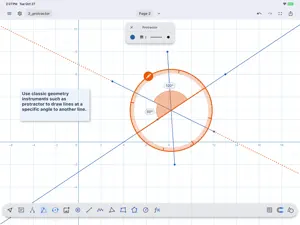
Geometry Pad turns your iPad into an infinite canvas for exact plane geometry. Build points, lines, triangles, polygons, circles and conics with a few taps, and they stay exact: a square stays a square, a parallel stays parallel, and an intersection point stays on its crossing however you move things around. Free to download, with every construction tool included. Unlock Premium with an in-app purchase for even more. CONSTRUCTIONS THAT STAY CONNECTED • Parallel and perpendicular lines, perpendicular bisectors, tangents, chords and intersection points follow their shapes as you drag them. • Altitudes, medians and angle bisectors of triangles and polygons update as the shape changes. • Right, isosceles and equilateral triangles, squares, rectangles, parallelograms, rhombi and regular polygons keep their kind when you edit them. PRECISION BY TOUCH • Points snap to the grid, to vertices, midpoints, sides and curves, and to the crossings of shapes. • A magnifying glass shows exactly where each point lands. • Type exact coordinates, lengths, radii and angles with the built-in calculator (Premium). LIVE MEASUREMENTS • Every shape shows its lengths, angles, slopes, equations, perimeter and area. • Place measurement labels on the canvas. They update as you move the shape. • Show the angles where lines cross with a single tap. CLASSIC INSTRUMENTS AND TRANSFORMATIONS • A compass that draws arcs, and a protractor that draws segments at an exact angle. • Rotate, reflect and translate shapes, or copies of them (Premium). SHAPES FROM NUMBERS (PREMIUM) • Build lines from their equations, triangles from their sides and angles, quadrangles from their sides and an angle, and parabolas and hyperbolas from their equations, with a live preview as you type. WORKSHEETS AND DOCUMENTS • Write notes in text boxes, and add pictures from the camera or photo library (Premium). • Import a PDF and draw and measure on top of its pages (Premium). • Create documents with several pages, on an infinite canvas or on A4 and A3 paper (Premium). • Share your drawing as an image (with cropping) or as a document, or export it as PDF or SVG (Premium). • Your work saves automatically to the Files app. Documents from the previous Geometry Pad open too. MADE FOR THE CLASSROOM • Cartesian, polar and isometric grids. • Real centimeters and inches on screen. • Seven themes, including chalkboard and blueprint, and full dark mode support. • Apple Pencil, keyboard shortcuts, multitasking and VoiceOver. PREMIUM One in-app purchase unlocks editing exact values, transformations, shapes from numbers, picture and PDF import, PDF and SVG export, and multi-page documents with A4 and A3 paper. Bought Premium in the previous Geometry Pad? It's recognized automatically, and Restore Purchase brings it to your other iPads. Geometry Pad is for teachers preparing lessons and worksheets, and for students exploring geometry on their own. We'd love to hear from you: tap Share feedback in the app's Help menu.
What’s new
Version 3.2.0 · Updated November 6, 2026
This update gives you more control over your constructions and makes Geometry Pad fit any window. Here’s what’s new: • Create documents with several pages, on an infinite canvas or on A4 and A3 paper (Premium). • Lock shapes: tap the padlock in the shapes list to keep a shape from being selected or changed. You can still snap to it. • A new layout for narrow windows: in Slide Over or a narrow Split View, the tool bars, panels, formulas and calculator now fit the window. • New “Canvas labels scale” setting: make grid numbers, point names and angle values larger or smaller. • “Import image” has moved from the tool bar to the menu to free up space. We’ve also improved editing measured values, the magnifying glass, documents with PDF content, and the compass and protractor. Updating from version 2? Version 3 was our biggest update in years, with a completely redesigned interface, full iPadOS multitasking, dark mode with new themes, a customizable canvas, documents in the Files app, and better support for accessibility features, including VoiceOver.
App privacy
The developer, Bytes Arithmetic LLC, reported these privacy practices to Apple.
Data Not Linked to You
The following data, which may be collected but is not linked to your identity, may be used for the following purposes:
- Usage Data: Product Interaction
- Diagnostics: Crash Data
Used for: Analytics, App Functionality
Alternatives to Geometry Pad
Looking for apps like Geometry Pad? Here are 6 similar apps on the App Store. The highest rated is Educreations Whiteboard (4.8/5), and all 6 are free to download.
-
 sketchometry
4.7
-
 Number Line, by MLC
4.4
-
 Volume and Geometry
4.5
-
 Fractions, by MLC
3.8
-
 Puppet Pals
3.8
-
 Educreations Whiteboard
4.8
| App | Rating | Price | Last updated | Compare |
|---|---|---|---|---|
| Geometry Pad | 5.0 / 5 (1 rating) | Free | November 6, 2026 | |
| sketchometry | 4.7 / 5 (6) | Free | Jun 12, 2026 | Compare |
| Number Line, by MLC | 4.4 / 5 (15) | Free | Dec 2, 2023 | Compare |
| Volume and Geometry | 4.5 / 5 (180) | Free | Nov 11, 2025 | Compare |
| Fractions, by MLC | 3.8 / 5 (23) | Free | Mar 2, 2024 | Compare |
| Puppet Pals | 3.8 / 5 (52) | Free | Aug 13, 2026 | Compare |
| Educreations Whiteboard | 4.8 / 5 (11,805) | Free | Dec 17, 2025 | Compare |
Compare Geometry Pad with the top alternatives: ratings, updates, ASO score and keyword gaps →