

Mathematics with PocketCAS Pro
Timing Software GmbH Education iPhoneiPadiPod touch
Mathematics with PocketCAS Pro is a paid Education app for iPhone and iPad by Timing Software GmbH. Rated 4.7/5 from 527 ratings. Requires iOS 18.0.
- Rating
- 4.7
- 527 ratings
- Price
- 29.99 USD
- on the App Store
- Size
- 42 MB
- Age 4+
- Updated
- Oct 19
- 2026 · v2026.2.1
Screenshots



About Mathematics with PocketCAS Pro
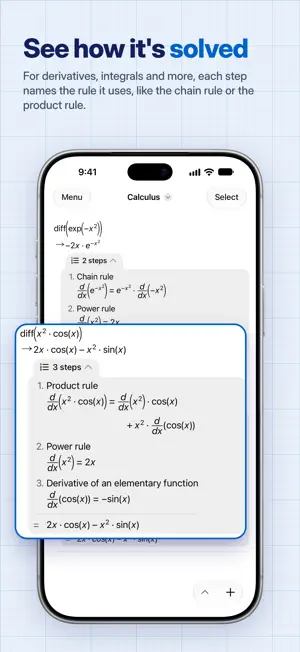
PocketCAS is a graphing calculator and computer algebra system for iPhone and iPad. It graphs your functions, gives exact answers and shows the steps behind derivatives and integrals. Everything runs on your device, so it works without internet or an account, and you buy it once instead of paying for a subscription. Graphs - 2D plots of functions, implicit equations, polar and parametric curves, run charts and vector fields. PocketCAS marks zeros, extrema and intersections. In full screen, tap a mark to read its coordinates. - 3D surfaces and space curves with soft light and shading. Drag to turn them, pinch to zoom, add a floor grid or pick another color map. - Animated plots: use the variable anim in any plot. Suggestions and steps - Under each function, suggestions show what to look at next: its derivative, zeros, extrema, integral or a plot. The answer is already in the suggestion. Tap it to add it to your document. - Functions get a small plot right beside the result. - Calculation steps show the rules behind a derivative, an integral, a differential equation or an extremum, one row per rule. Exact answers - Algebra: solve equations and systems, simplify, expand and factor expressions, divide polynomials. - Calculus: limits, derivatives, integrals, Taylor series and sums. - Linear algebra: matrices, determinants, inverses, eigenvalues and eigenvectors. - Differential equations: ordinary differential equations, solved exactly. - Units and constants: enter physical formulas with units and convert the results. - Scripts: define your own functions with conditions, loops and recursion. Reads like your textbook - Results look the way they do in a textbook: fractions, roots, sums, integrals and matrices. Long results wrap to the width of your screen. - A math keyboard with every function in reach. Your recent functions sit above it, and a hint shows what goes between the brackets. Made for daily work - Documents keep your calculations and plots together, so you can pick up where you left off. - iCloud syncs your documents between iPhone, iPad and Mac. The Mac app is a separate purchase. - Export: print or share plots, entries or whole documents as PDF. - Import: reuse functions from other documents, or load data from CSV files. - Help built in: the reference explains every function with examples, and tutorials get you started. A free version of PocketCAS lets you try the interface and many features first. What users say "This program has an incredible amount of power for such a compact program. I teach high school math, and this program can work with all sorts of expressions, graphs, and help check my work. Definitely worth it!" "One of three Apps I use when teaching A Level maths. Have recommended to numerous students. Excellent." "This app is amazing and could help me with about 98% of the math that I had to do during my mechanical engineering degree all the way from my bachelor to my master." Questions or ideas? Write to us at https://pocketcas.com/support.
Ratings & reviews
4.7
527 ratings
What’s new
Version 2026.2.1 · Updated October 19, 2026
This update explains results without a value, makes large numbers easier to read and fixes a number of smaller things. New in version 2026.2.1: - When a calculation has no value, PocketCAS now says why instead of showing [ ] or undef: No real solution, No solution found, Undefined, Diverges, No limit or Unknown function, with a short reason below. A suggestion offers the next step, such as the complex solutions, the limits from the left and right, or a plot. - PocketCAS marks a typing error in the input, and a suggestion offers the fix: sin x becomes sin(x), and intergrate becomes integrate. A stopped calculation shows how long it ran and offers Calculate Again. - Next to an exact result, the ≈ line now also shows the decimal value of a result with units and of an integral without an exact value. Very large and very small numbers read as 2.43 × 10¹⁸ instead of 2.43E+18. - When rounding changed a decimal result, the suggestion Exactly shows the exact value. - Results and inputs show large numbers in groups of three digits, such as 1 234 567. Settings > Digit Grouping offers another separator, or none. The editor and copied text keep plain digits, and a number too long for the screen continues on the next line. - The Extrema suggestion now finds minima that it missed before, such as the one of abs(x) at 0. - Clearer calculation steps for some integrals and for extrema, and a step that is too wide for the screen continues on the next line. - On iOS 26, the titles of What's New and the welcome pages are no longer cut off at the top. - On an iPhone in landscape, the Tools menu shows all its tools without scrolling. - Plot Settings show a swatch next to each color, and a color that is not in the list appears as Custom Color. - VoiceOver reads ( and ) as parentheses instead of braces, and selecting entries in Select mode works as expected. - Clearer German and French texts, and a suggestion now adds just its calculation, without a comment line above it. - The previous version of PocketCAS still opens your documents. It shows the new reasons as plain text next to the result. Changes from version 2026.1: - Suggestions under your results: the derivative, zeros, extrema and more, with the answers already shown. Tap one to add it to your document. Settings > Suggestions turns them off or shows them only under the newest result. - A small plot appears next to a function's result. Tap it to add the plot. - Calculation steps show how PocketCAS works out derivatives, integrals and a few other calculations. - Results look like a math textbook, and long results wrap to the width of the screen. - Clearer 2D plots with a finer grid, and 3D surfaces with soft light, shading and a floor grid. Plots in a document pan, turn and zoom right where they are. - Vector field plots: enter [f(x,y), g(x,y)] in a plot. - A new keyboard look, with your recent functions right above it. - On iOS 26 and later, PocketCAS uses Apple's new design, Liquid Glass, and has a new icon. - Brackets close by themselves, and printed documents break long lines at the page's width. - Plots now use seven curve colors, so a 7th or later curve in an older document may get a new color. If something works differently from what you are used to, or you find a problem, please write to us.
App privacy
The developer, Timing Software GmbH, reported these privacy practices to Apple.
Data Linked to You
The following data, which may be collected and linked to your identity, may be used for the following purposes:
- Contact Info: Email Address
- Diagnostics: Other Diagnostic Data
Used for: Developer’s Advertising or Marketing, Analytics, App Functionality
Alternatives to Mathematics with PocketCAS Pro
Looking for apps like Mathematics with PocketCAS Pro? Here are 6 similar apps on the App Store. The highest rated is GraphMath (4.8/5), and 4 of the 6 are free to download.
-
 TI-Nspire™ CAS
4.6
TI-Nspire™ CAS
4.6
-
 Vectors and Planes
4.3
Vectors and Planes
4.3
-
 GraphMath
4.8
GraphMath
4.8
-
 Console for MATLAB programming
4.7
Console for MATLAB programming
4.7
-
 Matrix Solver Step by Step
4.8
Matrix Solver Step by Step
4.8
-
 Calculator ∞
4.7
Calculator ∞
4.7
| App | Rating | Price | Last updated | Compare |
|---|---|---|---|---|
| Mathematics with PocketCAS Pro | 4.7 / 5 (527 ratings) | 29.99 USD | October 19, 2026 | |
| TI-Nspire™ CAS | 4.6 / 5 (406) | 29.99 USD | Sep 24, 2026 | Compare |
| Vectors and Planes | 4.3 / 5 (11) | Free | Nov 13, 2025 | Compare |
| GraphMath | 4.8 / 5 (15) | Free | Nov 13, 2025 | Compare |
| Console for MATLAB programming | 4.7 / 5 (17) | Free | Feb 13, 2024 | Compare |
| Matrix Solver Step by Step | 4.8 / 5 (69) | Free | Dec 18, 2025 | Compare |
| Calculator ∞ | 4.7 / 5 (6,384) | 5.99 USD | Mar 12, 2026 | Compare |