

LessonNote
Lesson Study Alliance Education iPhoneiPadiPod touch
LessonNote is a free Education app for iPhone and iPad by Lesson Study Alliance. Rated 4.7/5 from 10 ratings. Requires iOS 17.6. Updated October 30, 2026.
- Rating
- 4.7
- 10 ratings
- Price
- Free
- on the App Store
- Size
- 47 MB
- Age 4+
- Updated
- Oct 30
- 2026 · v6.2
Screenshots
Save to Pinterest


About LessonNote
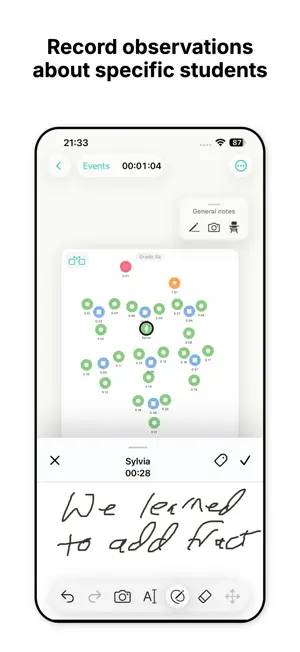
LessonNote is an innovative classroom observation tool for documenting the flow of a lesson and its impact on students. Capture both quantitative and qualitative data: • Track who is talking to whom, when, and for how long. • Jot handwritten, time-stamped notes about what is being said and what students are doing. • Take photos of student work. • Capture time spent in different modalities: whole-class, individual work, group work. Begin by creating a seating chart with icons representing the teacher, students, groups, and display areas such as blackboards or projection screens. Record observations by selecting an icon, or linking two icons for a note about an interaction. Take photos of student work. After a lesson, efficiently review your data for a student-focused conversation that improves teaching and learning. A small seating chart shows exactly who or what a note is about, so you don't need to know the names of the students. A timeline shows how much time was spent in whole-class lecture or discussion, individual work time, and group work time. LessonNote helps you create a fact-based and non-judgemental record of the lesson and its impact on students. LessonNote is ideal for peer observation, coaching, instructional rounds, and of course for Lesson Study. For administrators, LessonNote improves on simple checklists or rating scales by helping document how lessons affect students—which is, ultimately, what teaching is all about. Work with your colleagues and use LessonNote to improve teaching and learning! Read the Terms of Service at: https://LSAlliance.org/LessonNote/terms-of-service.html.
Ratings & reviews
4.7
10 ratings
What’s new
Version 6.2 · Updated October 30, 2026
Bug fix: • Export to archive (and maybe also browser?) would fail if the lesson name contained a '/'. New: • Handles multiple seating charts per lesson – for example, if students go to lab tables. Lessons now require a name for the initial seating chart. • The seating chart name at the top of the recorder is now a control for switching to a different seating chart or creating an additional one (if there is only one). • New button in the classroom editor to rotate the seating chart 180º. • Tag button added (restored?) to note headers in review. • "Correct" and "incorrect" included in the default tag list. • Help sheet for review includes an item (and image) about deleting a note. • Manual accounts server moved to LSAlliance.org/LessonNote/. Server pro.lessonnote.com is discontinued. This should be invisible except the download button is gone.
App privacy
The developer, Lesson Study Alliance, reported these privacy practices to Apple.
Data Linked to You
The following data, which may be collected and linked to your identity, may be used for the following purposes:
- Contact Info: Email Address
Used for: App Functionality
Data Not Linked to You
The following data, which may be collected but is not linked to your identity, may be used for the following purposes:
- Usage Data: Product Interaction
- Diagnostics: Crash Data, Performance Data
Used for: Analytics, App Functionality
Alternatives to LessonNote
Looking for apps like LessonNote? Here are 6 similar apps on the App Store. The highest rated is TeachFX (5.0/5), and all 6 are free to download.
-
 LoiLoNote School
3.5
-
 Classroom Mosaic
4.8
-
 Education Walkthrough
4.8
-
 TeachFX
5.0
-
 Educreations Whiteboard
4.8
-
 Fractions, by MLC
3.8
| App | Rating | Price | Last updated | Compare |
|---|---|---|---|---|
| LessonNote | 4.7 / 5 (10 ratings) | Free | October 30, 2026 | |
| LoiLoNote School | 3.5 / 5 (19) | Free | Oct 26, 2026 | Compare |
| Classroom Mosaic | 4.8 / 5 (168) | Free | May 28, 2026 | Compare |
| Education Walkthrough | 4.8 / 5 (315) | Free | Sep 2, 2026 | Compare |
| TeachFX | 5.0 / 5 (21) | Free | Oct 29, 2026 | Compare |
| Educreations Whiteboard | 4.8 / 5 (11,804) | Free | Dec 17, 2025 | Compare |
| Fractions, by MLC | 3.8 / 5 (23) | Free | Mar 2, 2024 | Compare |
Compare LessonNote with the top alternatives: ratings, updates, ASO score and keyword gaps →