

Norton Password Manager
Gen Digital Inc. Utilities iPhoneiPadiPod touch
Norton Password Manager is a free Utilities app for iPhone and iPad by Gen Digital Inc. Rated 4.5/5 from 41,412 ratings. Requires iOS 15.1.
- Rating
- 4.5
- 41.4K ratings
- Price
- Free
- on the App Store
- Size
- 153 MB
- Age 17+
- Updated
- Oct 6
- 2026 · v8.8.12
Screenshots



About Norton Password Manager
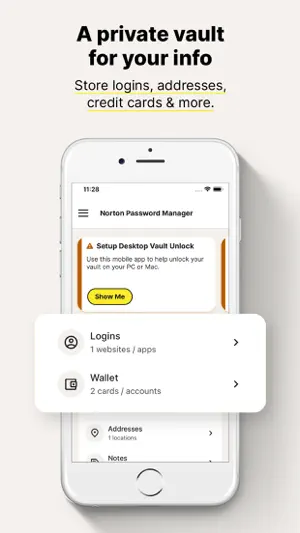
Want a free, powerful password manager? Norton Password Manager is a single solution to help manage your unique passwords in multiple ways. Memorizing complex passwords with symbols, numbers, capital letters, and more, is difficult but using strong passwords is important to help keep your personal information secure. With Norton Password Manager, your information is encrypted, helping keep it secure, yet still available across your devices so you can access it anywhere. Best of all, it’s free!* Why Norton Password Manager • Passwords filled in a single tap When you log in to websites and apps, it’s a smoother, quicker, and more convenient experience. Your passwords are stored in an online vault, which can be used to auto fill online login information with a single tap.¹ • Encrypted With zero knowledge encryption and two-factor authentication, only you control access to your password vault–not even Norton can access it. These security measures help keep your data safer from cybercriminals and hacking attempts. • Free* Norton Password Manager is free and accessible to anyone and works on devices including computers, tablets, and phones. • Sync passwords¹ Your entire password vault can be synced and accessed across your devices. Your logins and credit card credentials can be auto filled. • Biometric unlock² There’s no need to even type in your vault password. Access your vault faster or recover your vault password³ using Apple’s Touch ID® or Face ID®. • Password Assessment Check if your passwords are strong and easily create new passwords or change weak passwords to strong ones that are more difficult to crack. Your information stays private even from us because it’s encrypted using zero-knowledge encryption before being stored in your cloud-based vault. Your passwords and other personal information can be even more secure by enabling two-factor authentication, plus you can use Apple’s Touch ID® or Face ID® so you can access your vault even faster. Creating and remembering complex passwords doesn’t have to be difficult. Norton Password Manager helps you safeguard your personal information by making recommendations to strengthen passwords, adding more security to your online, digital life. * With the free version of Norton Password Manager, we reserve the right to limit the number of entries (like passwords) at any time. This limitation won’t affect any existing entries in your vault. ¹ Requires your device to have an Internet/data plan and be turned on. ² Only available on iOS devices with Fingerprint Authentication or Touch ID/Face ID activated. ³ Vault Password Reset can only be initiated on an iOS smartphone. To work, your smartphone must have the Norton Password Manager mobile app installed, set up, and connected to your Norton account, plus the Biometric Authentication (fingerprint, or Touch ID/Face ID) activated, beforehand. PRIVACY POLICY Norton respects the privacy of our users and carefully safeguards personal data. For more information: https://www.norton.com/privacy
Ratings & reviews
4.5
41.4K ratings
What’s new
Version 8.8.12 · Updated October 6, 2026
We just made your vault even more powerful! Say hello to Identities — a brand new way to securely store your important ID documents right inside your password manager. Whether it's your passport, driving license, or any other government-issued ID, you can now add them to your vault and access them anytime, anywhere, on any device.
App privacy
The developer, Gen Digital Inc., reported these privacy practices to Apple.
Data Linked to You
The following data, which may be collected and linked to your identity, may be used for the following purposes:
- Contact Info: Email Address, Name, Phone Number
- Identifiers: User ID
Used for: App Functionality
Data Not Linked to You
The following data, which may be collected but is not linked to your identity, may be used for the following purposes:
- Location: Coarse Location
- Identifiers: Device ID
- Usage Data: Product Interaction
- Diagnostics: Other Diagnostic Data
- Browsing History: Browsing History
Used for: Analytics, App Functionality
Alternatives to Norton Password Manager
Looking for apps like Norton Password Manager? Here are 6 similar apps on the App Store. The highest rated is Guardio - Mobile Security (4.9/5), and all 6 are free to download.
-
 Guardio - Mobile Security
4.9
-
 TotalAV
4.6
-
 Verizon Protect
4.7
-
 Malwarebytes - Mobile Security
4.5
-
 Total Adblock - Ad Blocker
4.0
-
 LogMeIn Rescue Customer
4.6
| App | Rating | Price | Last updated | Compare |
|---|---|---|---|---|
| Norton Password Manager | 4.5 / 5 (41,412 ratings) | Free | October 6, 2026 | |
| Guardio - Mobile Security | 4.9 / 5 (45,418) | Free | Oct 11, 2026 | Compare |
| TotalAV | 4.6 / 5 (72,103) | Free | Jul 28, 2026 | Compare |
| Verizon Protect | 4.7 / 5 (45,402) | Free | Oct 5, 2026 | Compare |
| Malwarebytes - Mobile Security | 4.5 / 5 (111,016) | Free | Sep 28, 2026 | Compare |
| Total Adblock - Ad Blocker | 4.0 / 5 (43,281) | Free | Jul 6, 2026 | Compare |
| LogMeIn Rescue Customer | 4.6 / 5 (5,014) | Free | Jun 29, 2026 | Compare |