

Cloud Spy
GGM41 Photo & Video iPhoneiPadiPod touch
Cloud Spy is a free Photo & Video app for iPhone and iPad by GGM41. Rated 3.7/5 from 15 ratings. Requires iOS 11.0. Updated June 3, 2024.
- Rating
- 3.7
- 15 ratings
- Price
- Free
- on the App Store
- Size
- 48 MB
- Age 4+
- Updated
- Jun 3
- 2024 · v10.3
Screenshots


About Cloud Spy
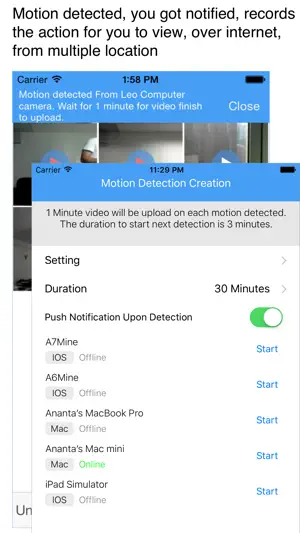
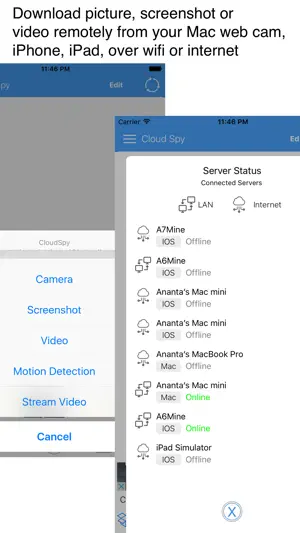
Application to capture photo, video web cam from Mac computer, or other iPhone, iPad, or iPod, with help from Dropbox, and control it over internet. The iPhone, iPad, or iPod can used as client as well as server camera. Optional Mac server software called "Cloud Spy Svr", and please download from Mac App store, if you want to use your Mac computer as server camera or as Client at the same time. http://itunes.apple.com/us/app/cloud-spy-svr/id501988002?ls=1&mt=12 * Using "Cloud Spy" you can easily access your Mac Camera, iPhone, or iPad as server camera capture it, and display it in your iPhone, iPad. * Download 30 second video from server camera * Detect motion in front of Mac webcam, and record the activity, and notify IOS client. * Stream image (WIFI only) * You can also make task to inform server to capture camera from start time, interval of taking snapshot and duration. * Using "copy paste" features, whenever you copy text or image from your mac, the text and image will be automatically send to iPhone/iPad app. * Now you can drag and drop file to iPhone or iPad with easy You can remote control Mac OS X camera and download the image when you on the move. Do not need special software or network setting to use this application, just register for Dropbox account "www.dropbox.com" (its free). Features - Motion detection and inform client through push notification - Record video by your command over internet. - Capture camera on your mac using iPhone, iPad - Capture screenshot on your mac using iPhone, iPad - Send command to server to capture image by tasks (start time, duration, and interval) no need to trigger server to capture camera manually. Easy Install (1) Apply for Dropbox account if you dont have one (www.dropbox.com) (2) Download this software on iPhone or iPad, and link to Dropbox using Dropbox Account. (3) Download server application, run and link to Dropbox using Dropbox Account and you are done. Please go to following website for more detail how to install dan use the software. http://www.gmsoft.net/Cloud%20Spy.html
Ratings & reviews
3.7
15 ratings
What’s new
Version 10.3 · Updated June 3, 2024
Bug fix
App privacy
The developer, GGM41, reported these privacy practices to Apple.
Data Used to Track You
The following data may be used to track you across apps and websites owned by other companies:
- Identifiers: Device ID
- Usage Data: Advertising Data, Other Usage Data
- Diagnostics: Performance Data
Data Linked to You
The following data, which may be collected and linked to your identity, may be used for the following purposes:
- Identifiers: Device ID
- Usage Data: Advertising Data, Other Usage Data
- Diagnostics: Performance Data
Used for: Third-Party Advertising
Alternatives to Cloud Spy
Looking for apps like Cloud Spy? Here are 6 similar apps on the App Store. The highest rated is SP Camera (4.5/5), and 5 of the 6 are free to download.
-
 myCameraPal - Look Busy!
2.7
myCameraPal - Look Busy!
2.7
-
 Remote Video Recorder
-
 Midnight Video Camera
2.7
Midnight Video Camera
2.7
-
 CameraFTP Viewer
3.9
CameraFTP Viewer
3.9
-
 SP Camera
4.5
SP Camera
4.5
-
 PV Cam Viewer
2.5
PV Cam Viewer
2.5
| App | Rating | Price | Last updated | Compare |
|---|---|---|---|---|
| Cloud Spy | 3.7 / 5 (15 ratings) | Free | June 3, 2024 | |
| myCameraPal - Look Busy! | 2.7 / 5 (26) | Free | May 28, 2024 | Compare |
| Remote Video Recorder | – | Free | May 15, 2026 | Compare |
| Midnight Video Camera | 2.7 / 5 (7) | Free | Dec 22, 2025 | Compare |
| CameraFTP Viewer | 3.9 / 5 (17) | Free | May 21, 2026 | Compare |
| SP Camera | 4.5 / 5 (1,758) | 9.99 USD | Mar 22, 2026 | Compare |
| PV Cam Viewer | 2.5 / 5 (30) | Free | Jun 18, 2025 | Compare |
Compare Cloud Spy with the top alternatives: ratings, updates, ASO score and keyword gaps →