

SGA VE Code
voiceye,inc Productivity iPhoneiPadiPod touch
SGA VE Code is a free Productivity app for iPhone and iPad by voiceye,inc. Rated 3.0/5 from 2 ratings. Requires iOS 16.3. Updated October 12, 2026.
- Rating
- 3.0
- 2 ratings
- Price
- Free
- on the App Store
- Size
- 79 MB
- Age 4+
- Updated
- Oct 12
- 2026 · v3.0.0
Screenshots
About SGA VE Code
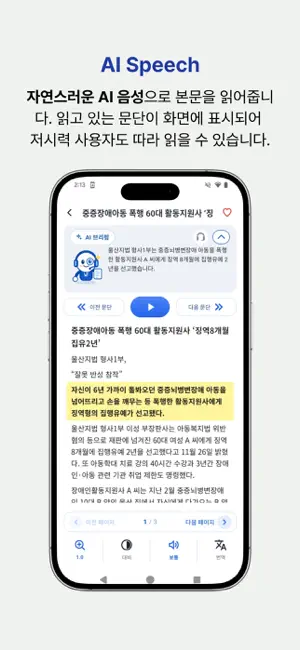
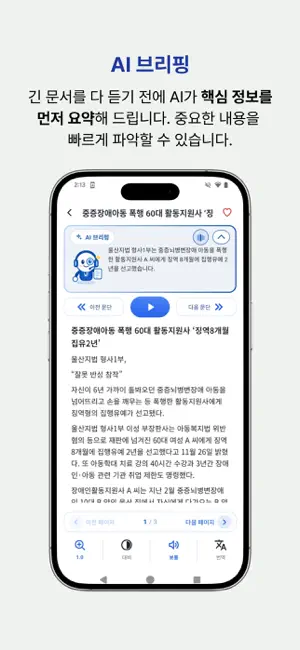
The new way to access printed information for print and visually impaired! VOICEYE is the smartphone application enabling those with print impairments to access printed information using a VOICEYE code on the printed material. Information regarding the VOICEYE code on the printed material: •VOICEYE can hold as much as two A4 pages of text on a 2.5 square centimeter code. •There’s no need for a data or internet connection to decode a VOICEYE code, as the code itself stores the data. •The VOICEYE App will use the phone camera to automatically scan the code and bring all of the text into the phone. Just imagine! You can access any printed information that is around you with your own smartphone. All education materials, all government materials, all books, notice boards in museums or libraries, in fact just about anything, once a document is produced with a VOICEYE code, any material becomes accessible and is accurately identified. In South Korea, the VOICEYE solution has been successfully applied to schools for the blind, universities with special education, publishing companies, state-run corporations, local newspapers and others. The VOICEYE solution is very popular for Dyslexia and the visually impaired. The Korean government has adopted the VOICEYE solution on its official documents, such as social security information, electricity, water, local tax bills and so on. VOICEYE App: Make your dreams come true with a VOICEYE code. Scan a VOICEYE code at the top right corner of the printed material. You then have access to the book you buy, the textbook you study, utility bills and prescriptions, it will then be opened automatically on your smartphone and the text can be read aloud with TTS (Text-to-Speech) software like on the iPhone or iPad (voiceover), or with TALKS or Mobile Speaks. The VOICEYE code is created by the VOICEYE Maker Add-In, which you add into MS-Word, Quark Xpress and Adobe InDesign programs. Quark Xpress and InDesign are programs for publishers. [Main Features] 1. Access to printed information - Scan a VOICEYE code at the top right corner of a page. - Text can be displayed on your smartphone screen in 5 high contrast text viewing modes (colored text) and read out the text with TTS like VoiceOver. - 10 zoom levels in font size - VOICEYE SmartPhone Stand a. This is the aid for visually impaired people so they can find and read VOICEYE code with smartphone. b. Put the smartphone on the smartphone stand and scan VOICEYE code at the top right corner of printed materials. It will be very easy and fast. 2. Magnifier - Provides 6 zoom levels - 5 high contrast viewing modes to maximize text readability - Magnifying various sources using camera or gallery 3. Text-to-Speech with Highlighting - In TTS mode, you will simultaneously hear the words and see them highlighted.
What’s new
Version 3.0.0 · Updated October 12, 2026
- New version released
App privacy
The developer, voiceye,inc, reported these privacy practices to Apple.
Data Not Collected
The developer does not collect any data from this app.
Alternatives to SGA VE Code
Looking for apps like SGA VE Code? Here are 6 similar apps on the App Store. The highest rated is Vision: for blind people (5.0/5), and all 6 are free to download.
-
 Supersense - AI for Blind
4.2
Supersense - AI for Blind
4.2
-
 Vision: for blind people
5.0
Vision: for blind people
5.0
-
 Envision AI
4.2
Envision AI
4.2
-
 PiccyBot
4.1
PiccyBot
4.1
-
 Seeing AI
4.3
Seeing AI
4.3
-
 PDF Viewer by Nutrient
4.6
PDF Viewer by Nutrient
4.6
| App | Rating | Price | Last updated | Compare |
|---|---|---|---|---|
| SGA VE Code | 3.0 / 5 (2 ratings) | Free | October 12, 2026 | |
| Supersense - AI for Blind | 4.2 / 5 (282) | Free | May 13, 2024 | Compare |
| Vision: for blind people | 5.0 / 5 (1) | Free | Sep 24, 2026 | Compare |
| Envision AI | 4.2 / 5 (594) | Free | Mar 16, 2026 | Compare |
| PiccyBot | 4.1 / 5 (60) | Free | Sep 30, 2026 | Compare |
| Seeing AI | 4.3 / 5 (631) | Free | Sep 4, 2025 | Compare |
| PDF Viewer by Nutrient | 4.6 / 5 (9,099) | Free | Oct 9, 2026 | Compare |
Compare SGA VE Code with the top alternatives: ratings, updates, ASO score and keyword gaps →