

Dream Camera
Michal Kasza Photo & Video iPhoneiPadiPod touch
Dream Camera is a paid Photo & Video app for iPhone and iPad by Michal Kasza. Rated 4.8/5 from 18 ratings. Requires iOS 15.6. Updated August 22, 2026.
- Rating
- 4.8
- 18 ratings
- Price
- 0.99 USD
- on the App Store
- Size
- 8 MB
- Age 4+
- Updated
- Aug 22
- 2026 · v5.2
Screenshots
About Dream Camera
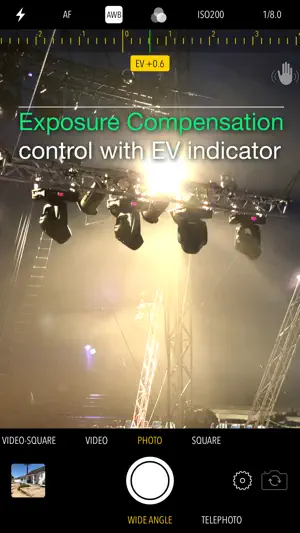
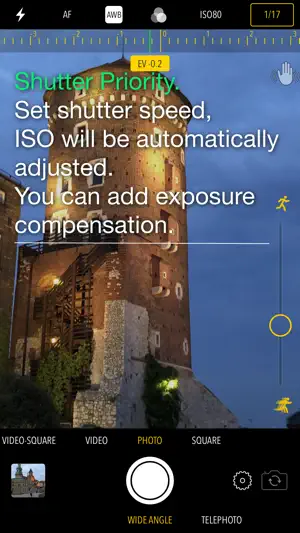
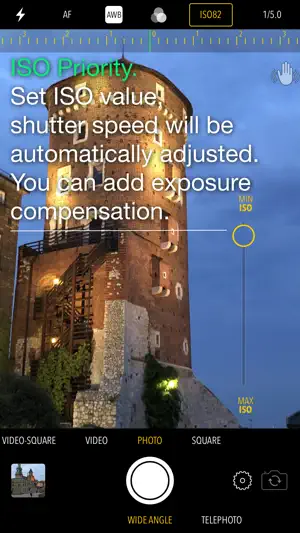
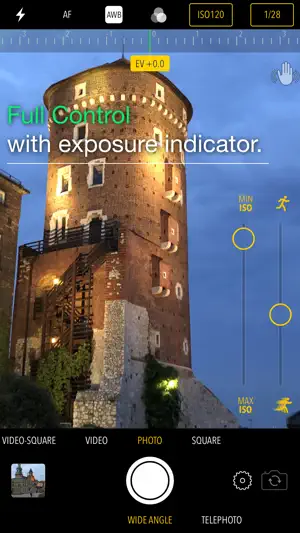
Features manual and semi-automatic exposure modes, plenty of filters, white balance control and more Exposure - Easy exposure compensation control with EV indicator. Just slide your finger up/down or right/left anywhere on the screen - Shutter Priority. Tap shutter speed indicator and use the slider to set the value, ISO will be automatically adjusted. You can add exposure compensation to it as well. - ISO Priority. Tap ISO indicator and use the slider to set the value, shutter speed will be automatically adjusted. You can add exposure compensation to it as well. - Full Control. Select both shutter speed and ISO indicators, set the values with the sliders. Exposure indicator will tell you how well you are doing. Flash/Torch Modes - On/Off or auto Focus Modes - Auto - Manual - set the value with the slider - Macro - Landscape White Balance Presets - Auto - Daylight - Cloudy - Shade - Fluorescent - Tungsten - Candle Filters - Effect: Dream, XPro1, XPro2, 70s, Art - Color: Normal, Black & White, Sepia, Redscale, Cyanotype - Contrast & Brightness: Light, Strong, Extreme - Edges: No Fading, Vignette, Mate Mix and match the filters from each category above Cameras - Front, Back, Tele and Ultra Wide (if available) Shooting Modes - Photo and Square Photo - Video and Square Video Photo Settings - Guide grid On/Off - Auto Photo Stabilization for longer shutter speed settings - Timer with 2, 5, 10, 20 or 30 second delay - Burst of 3, 5 or 10 photos; can be combined with timer - File format: JPG, PNG, TIFF or HEIF (if supported by the device) - Information about estimated photo file size Video Settings - Microphone On/Off - Stabilization Off/Standard/Cinematic (if supported by the device) - File Format: Most Compatible (H.264), High Efficiency (HEVC-H.265) (if supported by the device) - Resolution: 720SD, 1080HD, 4K UHD (if supported by the device) - Frames per Second: 24, 30, 60 or 120 (requires iPhone 7 or newer) - Information about estimated video file size Browser - Photo preview and edit - Video playback - Scrubber bar to skim through your photos and videos - Sharing using standard iOS features Photo Editor - Orientation correction - Filter manipulation Dream Camera saves your photos and video directly to Camera Roll. You can access them either through the built-in browser or standard Photos app. Taking pictures is fun, enjoy it!
Ratings & reviews
4.8
18 ratings
What’s new
Version 5.2 · Updated August 22, 2026
- improve photo preview for ultra wide camera - add 4K UHD 60fps video mode for qualifying devices
App privacy
The developer, Michal Kasza, reported these privacy practices to Apple.
Data Not Collected
The developer does not collect any data from this app.
Alternatives to Dream Camera
Looking for apps like Dream Camera? Here are 6 similar apps on the App Store.
-
 My Dream Cam
-
 Candens - 90's Film Camera
-
 Just So Camera
-
 Emulsion: Film Camera
-
 Island Pop - Instant Camera
-
 Retro Camera 1960
| App | Rating | Price | Last updated | Compare |
|---|---|---|---|---|
| Dream Camera | 4.8 / 5 (18 ratings) | 0.99 USD | August 22, 2026 | |
| My Dream Cam | – | Free | Jun 17, 2025 | Compare |
| Candens - 90's Film Camera | – | Free | Oct 14, 2026 | Compare |
| Just So Camera | – | Free | Oct 1, 2026 | Compare |
| Emulsion: Film Camera | – | Free | Oct 22, 2026 | Compare |
| Island Pop - Instant Camera | – | Free | Sep 28, 2026 | Compare |
| Retro Camera 1960 | – | Free | Oct 12, 2026 | Compare |
Compare Dream Camera with the top alternatives: ratings, updates, ASO score and keyword gaps →