

Just Quick Search
Mill White Utilities iPhoneiPadiPod touch
Just Quick Search is a free Utilities app for iPhone and iPad by Mill White. Rated 4.5/5 from 4 ratings. Requires iOS 26.0. Updated October 15, 2025.
- Rating
- 4.5
- 4 ratings
- Price
- Free
- on the App Store
- Size
- 9 MB
- Age 17+
- Updated
- Oct 15
- 2025 · v4.2
Screenshots

About Just Quick Search
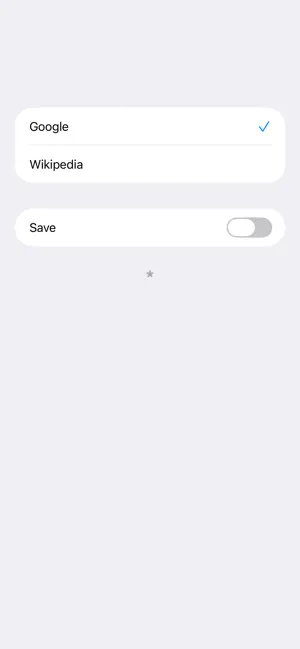
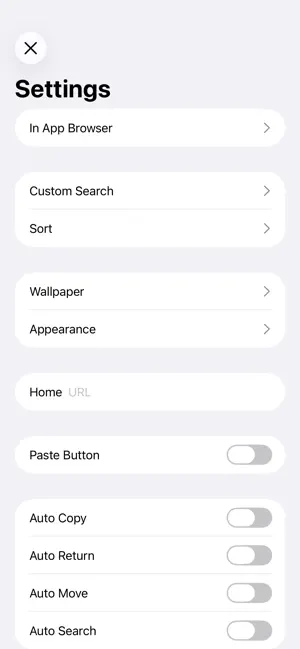
Just Quick Search is helper app to your search very quickly. # Search Targets - Google - Wikipedia - In addition to the above, you can add search targets. # You can input quickly - You don't need to scroll. - You don't need to tap the text field. - When application resumed, text field is empty and you can input immediately. # Save Switch - ON: When application launch or resume, the search target is you selected last. - OFF: When application launch or resume, the search target is the top. # History - Keywords you enter are recorded. - Max 300 items. - Can delete all. - Can delete selectively. # Autocomplete - Input candidates will be displayed in a two-stage. - Top: from History. - Bottom: from Web. # Settings - The view shows when you tap the "STAR" button at the bottom of the right screen. ## In App Browser - You can make settings related to the in app browser. - In app browser's URL Scheme is "jqs". ## Custom Search - You can customize the search targets. - The number of search targets you can add is unlimited. - For more information, please visit the support page. ## Sort - You can sort search targets. ## Wallpaper - You can set the wallpaper. - Optimal image size is the pixel size of the device. - Ex) iPhone 16 Pro: 2,622 x 1,206 pixels. ## Appearance - You can select the appearance, default or light or dark. ## Home - You can specify the URL of Home page. - In the search screen, when the text field is empty and you tap the "Search" button, the home page will be displayed. ## Paste Button - Paste button to the search screen will be displayed. - When you tap the Paste button on the search screen, the contents of the clipboard will be pasted into the text field. ## Auto Copy - When execute search, the contents of the text field will be copied to the clipboard. ## Auto Return - When select the search target, go back to the search screen automatically. ## Auto Move - Automatically displays the search target selection screen when the application is launched or restarted. ## Auto Search - When launching from the custom URL scheme or notification center, the search is execute automatically. ## Open URL - When you execute a search with the URL is entered, open the URL directly. - For more information, please visit the support page. ## Hide Page Control - Hide page control in search screen. ## Support - Jump to the support page of this app. # Custom URL Scheme - Custom URL Scheme is "justquicksearch". ## justquicksearch:// - Launch this app. ## justquicksearch://${keyword} - With the ${keyword} has been entered, this app is launched. # EULA - https://www.apple.com/legal/internet-services/itunes/dev/stdeula/
What’s new
Version 4.2 · Updated October 15, 2025
Optimized for iOS 26.
App privacy
The developer, Mill White, reported these privacy practices to Apple.
Data Used to Track You
The following data may be used to track you across apps and websites owned by other companies:
- Location: Coarse Location
- Identifiers: Device ID
Data Linked to You
The following data, which may be collected and linked to your identity, may be used for the following purposes:
- Location: Coarse Location
- Identifiers: Device ID
- Usage Data: Product Interaction, Advertising Data
Used for: Third-Party Advertising, Developer’s Advertising or Marketing, Analytics, App Functionality
Data Not Linked to You
The following data, which may be collected but is not linked to your identity, may be used for the following purposes:
- Diagnostics: Performance Data, Other Diagnostic Data, Crash Data
Used for: Third-Party Advertising, Developer’s Advertising or Marketing, Analytics, App Functionality
Alternatives to Just Quick Search
Looking for apps like Just Quick Search? Here are 6 similar apps on the App Store. The highest rated is stoobit search (5.0/5), and all 6 are free to download.
-
 stoobit search
5.0
stoobit search
5.0
-
 BrowseHub: Private Browser
3.0
BrowseHub: Private Browser
3.0
-
 Search-it
5.0
Search-it
5.0
-
 Fetch - AI Search Engine
3.0
Fetch - AI Search Engine
3.0
-
 Braver Search
4.4
Braver Search
4.4
-
 Bump Search
4.5
Bump Search
4.5
| App | Rating | Price | Last updated | Compare |
|---|---|---|---|---|
| Just Quick Search | 4.5 / 5 (4 ratings) | Free | October 15, 2025 | |
| stoobit search | 5.0 / 5 (1) | Free | Mar 31, 2025 | Compare |
| BrowseHub: Private Browser | 3.0 / 5 (2) | Free | Sep 20, 2026 | Compare |
| Search-it | 5.0 / 5 (2) | Free | Oct 20, 2026 | Compare |
| Fetch - AI Search Engine | 3.0 / 5 (1) | Free | Dec 8, 2024 | Compare |
| Braver Search | 4.4 / 5 (28) | Free | Oct 12, 2026 | Compare |
| Bump Search | 4.5 / 5 (17) | Free | Jun 13, 2024 | Compare |
Compare Just Quick Search with the top alternatives: ratings, updates, ASO score and keyword gaps →