

PushTo: Transfer Text & Files
Martin Wiget Utilities iPhoneiPadiPod touch
PushTo: Transfer Text & Files is a free Utilities app for iPhone and iPad by Martin Wiget. Rated 5.0/5 from 1 ratings. Requires iOS 15.1.
- Rating
- 5.0
- 1 ratings
- Price
- Free
- on the App Store
- Size
- 45 MB
- Age 12+
- Updated
- Oct 13
- 2026 · v3.0.4
Screenshots


About PushTo: Transfer Text & Files
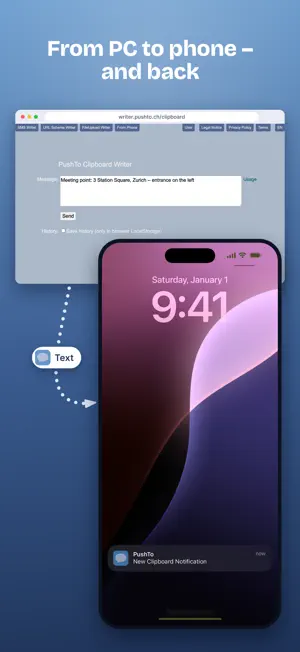
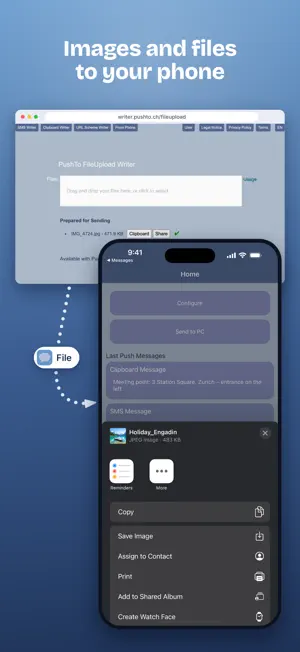
Write texts comfortably on your computer or select files – and send them directly to your smartphone. And the other way round: photos, files and texts from your phone straight to your PC. How it works: Open the PushTo Writer in your browser on your PC (writer.pushto.ch), sign in with the same account as in the app – and everything arrives on your phone as a push notification. From PC to phone: • SMS message: insert text and recipient directly into a new SMS • Clipboard: type text on your PC and paste it anywhere on your phone • URL scheme: open links or trigger actions in other apps • Files: copy images to the clipboard or share files via "Share" From phone to PC (new): • "Send to PC": choose photos, files or text – they appear in the Writer under "From Phone", ready to download or copy No cable, no detour via email or chat apps – ideal when your phone and computer are not from the same manufacturer. Privacy: Content is transferred encrypted, only stored briefly and deleted automatically after one day. We do not look at your content. Free and optional: PushTo is free and funded by ads. With the "PushTo Ad-Free" (no ads) and "PushTo Fileupload Plus" (files up to 50 MB and up to 1 GB per day instead of 6 MB and 100 MB) subscriptions you support its development. Fast, simple and flexible. Terms of Use: https://www.apple.com/legal/internet-services/itunes/dev/stdeula/
What’s new
Version 3.0.4 · Updated October 13, 2026
New in 3.0.4: • Send to PC: send photos, files and texts from your phone straight to the PushTo Writer (writer.pushto.ch, "From Phone"). • Change your ad consent at any time under "Configure". • Reworked purchases and subscriptions, "Restore Purchases" now works reliably. • Technical renewal and bug fixes.
App privacy
The developer, Martin Wiget, reported these privacy practices to Apple.
Data Used to Track You
The following data may be used to track you across apps and websites owned by other companies:
- Identifiers: User ID, Device ID
- Usage Data: Product Interaction, Advertising Data
Data Linked to You
The following data, which may be collected and linked to your identity, may be used for the following purposes:
- Location: Coarse Location
- Identifiers: User ID, Device ID
- Usage Data: Advertising Data, Product Interaction
- Purchases: Purchase History
- Contact Info: Email Address
- User Content: Emails or Text Messages, Photos or Videos, Other User Content
Used for: Third-Party Advertising, Developer’s Advertising or Marketing, Analytics, App Functionality
Data Not Linked to You
The following data, which may be collected but is not linked to your identity, may be used for the following purposes:
- Diagnostics: Performance Data, Crash Data
Used for: Third-Party Advertising, Developer’s Advertising or Marketing, Analytics, App Functionality
Alternatives to PushTo: Transfer Text & Files
Looking for apps like PushTo: Transfer Text & Files? Here are 6 similar apps on the App Store. The highest rated is Cachera: Redact ID to PDF (5.0/5), and all 6 are free to download.
-
 TextQuickDrop
-
 Cachera: Redact ID to PDF
5.0
Cachera: Redact ID to PDF
5.0
-
 Grow Rich
-
 Text Fixing
-
 AdBrick
-
 Trenzo: Transfer Files, Share
| App | Rating | Price | Last updated | Compare |
|---|---|---|---|---|
| PushTo: Transfer Text & Files | 5.0 / 5 (1 rating) | Free | October 13, 2026 | |
| TextQuickDrop | – | Free | Sep 9, 2025 | Compare |
| Cachera: Redact ID to PDF | 5.0 / 5 (1) | Free | Jul 6, 2026 | Compare |
| Grow Rich | – | Free | Jul 24, 2018 | Compare |
| Text Fixing | – | Free | Sep 16, 2025 | Compare |
| AdBrick | – | Free | Dec 28, 2023 | Compare |
| Trenzo: Transfer Files, Share | – | Free | Mar 16, 2026 | Compare |