

iWriteMusic Pro SE
iWriteMusicProject Music iPad
iWriteMusic Pro SE is a free Music app for iPad by iWriteMusicProject. Rated 4.5/5 from 207 ratings. Requires iOS 16.0. Updated October 25, 2026.
- Rating
- 4.5
- 207 ratings
- Price
- Free
- on the App Store
- Size
- 19 MB
- Age 4+
- Updated
- Oct 25
- 2026 · v3.6.18
Screenshots

About iWriteMusic Pro SE
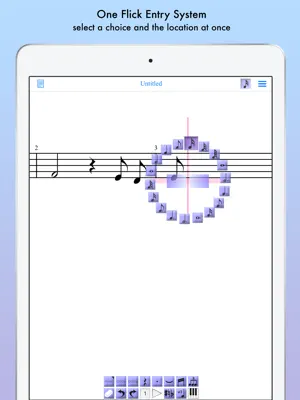
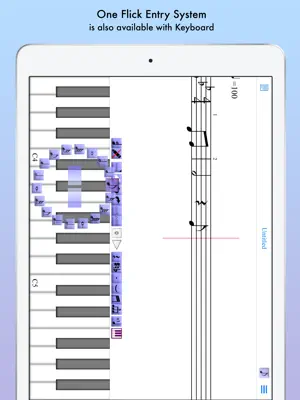
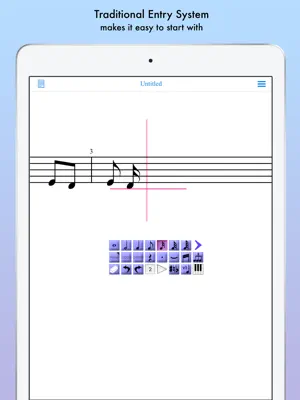
Music Writing is easy and fun when you use iWriteMusic! Experience the perfect harmony of ease and versatility in sheet music creation with iWriteMusic! Say goodbye to complicated notation apps and hello to intuitive design. Enjoy quick and beautiful sheet music creation with a comprehensive suite of essential tools for concerts, lessons, and music classes. Best fit for professional musicians, music teachers and students. For songwriters, composers and arrangers. For both singers and instrumentalists (piano, violin, cello, guitar, flute, saxophone, trumpet, drums, etc.). Great for writing down ideas, creating lesson materials, creating lead sheets, or creating scores and parts for chorus groups, choirs, chamber orchestras, jazz bands, Latin bands, orchestras, and more. For daily practice, rehearsals, concerts, iWriteMusic will help you enrich your musical life! Check out 8 reasons to choose iWriteMusic SE (Special Edition) 1. You can understand this app almost instantly! Because of Truly Intuitive and Extremely Simple user interface, you barely need to read pages of manuals nor watching numbers of instruction videos. Unlike Finale, Sibelius and other similar apps, you just have a few things to learn to be able to use this app pretty well. 2.Double your productivity with our Highly Efficient Input System. If you’re already familiar with notation apps and looking for faster & more efficient entry system, try our innovative One-Flick Entry System along with Traditional Entry System to get your job done in no time! What is Traditional Entry System? - The choices will appear with ToolBox. - Select a value and the location separately. - Recommended to those who are not yet familiar with any music notation apps. What is OneFlick Entry System? - The choices will appear when you touch the screen. - Select a location and the value at once. - The selection will change as you slide your finger to left/right. - Recommended to those who are familiar with music notation apps and looking for faster and more efficient entry system. 3. Creates beautiful sheet music / music score - absolutely professional quality! - rich options for page layout adjustment - easy parts creation - easy score/parts management - direct print-out via AirPrint 4. Supports most of major notation elements - multi-track writing - multi-voice writing - percussion/drums notation - chord symbols and lyrics - multi-bar rest - time change - key change - clef change - tempo change - grace note - articulations and dynamics marks - easy song transpose - partial transpose and many more! 5. Useful playback options for practice - mixer with solo, mute and voice select - loop and swing options 6. Data & sheet music sharing - exports/Imports iWriteMusic data file - exports PDF or JPG - exports Standard MIDI file which can be imported by other apps such as GarageBand 7. Extremely Compact Size (15 MB) You can save your device storage space for photos and other apps. 8. Best of all, it's Free! Yes, it's Free and Over 1.4 Million people all over the world has created music with this app family. Let's get started now! Note: This is for iPhone (iPad version sold separately) ATTENTION: Latency during playback and drawing may occur by device capacity or number of tracks and background applications. Limitations on SE (Special Edition): 1. Water mark appears on page views and printouts. 2. Can’t save more than 5 songs. 3. Can't play more than 30 seconds at a time. 4. Can't import iWriteMusic data file. (export only) 5. Can't export Standard MIDI file.
Ratings & reviews
4.5
207 ratings
What’s new
Version 3.6.18 · Updated October 25, 2026
Fixed an issue where some buttons were not displayed correctly on iPadOS 27, and improved screen layout and usability. Important notice about version 3.7.0: • The paid edition of iWriteMusic will transition to a free download with feature-based in-app purchases. • This legacy free edition will continue to receive bug fixes and OS compatibility support for the time being, but no new features will be added. • MusicXML Export and Audio Export will be available as in-app purchase features in the new unified edition. Version 3.7.0 is currently planned for release in mid-November 2026. To receive future features, we recommend moving to the new unified edition when it becomes available. Please see the in-app notice for more information.
App privacy
The developer, iWriteMusicProject, reported these privacy practices to Apple.
Data Not Collected
The developer does not collect any data from this app.
Alternatives to iWriteMusic Pro SE
Looking for apps like iWriteMusic Pro SE? Here are 6 similar apps on the App Store. The highest rated is KeyScore - Sheet Music (4.8/5), and 5 of the 6 are free to download.
-
 Staventabs: Compose & Notate
3.8
Staventabs: Compose & Notate
3.8
-
 Symphony Pro - Music Notation
3.8
Symphony Pro - Music Notation
3.8
-
 KeyScore - Sheet Music
4.8
KeyScore - Sheet Music
4.8
-
 Composer Pro-Sheet Music Maker
4.5
Composer Pro-Sheet Music Maker
4.5
-
 Score Creator: compose music
3.5
Score Creator: compose music
3.5
-
 MusicJot TryOut
1.0
MusicJot TryOut
1.0
| App | Rating | Price | Last updated | Compare |
|---|---|---|---|---|
| iWriteMusic Pro SE | 4.5 / 5 (207 ratings) | Free | October 25, 2026 | |
| Staventabs: Compose & Notate | 3.8 / 5 (71) | Free | Oct 28, 2026 | Compare |
| Symphony Pro - Music Notation | 3.8 / 5 (474) | 14.99 USD | Feb 4, 2026 | Compare |
| KeyScore - Sheet Music | 4.8 / 5 (461) | Free | Sep 24, 2025 | Compare |
| Composer Pro-Sheet Music Maker | 4.5 / 5 (696) | Free | Sep 23, 2026 | Compare |
| Score Creator: compose music | 3.5 / 5 (495) | Free | Oct 21, 2026 | Compare |
| MusicJot TryOut | 1.0 / 5 (1) | Free | Feb 6, 2025 | Compare |
Compare iWriteMusic Pro SE with the top alternatives: ratings, updates, ASO score and keyword gaps →