

Shopper's Note
Kenji Minoshima Lifestyle iPhoneiPadiPod touch
Shopper's Note is a free Lifestyle app for iPhone and iPad by Kenji Minoshima. Rated 3.0/5 from 1 ratings. Requires iOS 15.6. Updated March 15, 2026.
- Rating
- 3.0
- 1 ratings
- Price
- Free
- on the App Store
- Size
- 11 MB
- Age 17+
- Updated
- Mar 15
- 2026 · v4.21
Screenshots
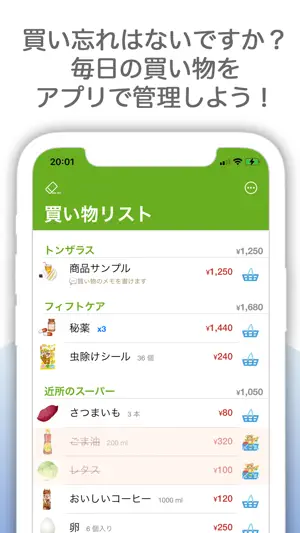


About Shopper's Note
"Shopper's Note" is a simple and convenient shopping support app. You can easily add and edit items, stores, and shopping lists, as well as compare prices with simple operations. Additionally, it supports shopping by allowing you to write shopping memos, compile meal ingredients, and check monthly expenses from purchase history. [Key Features] - Easily add and edit items by category. Items can belong to multiple categories. - Items can have images, quantities, notes, and prices from multiple stores for comparison. - Tap the checkbox next to registered items to add them to your shopping list. - Tap the item image to change it. Search images can be selected by long-pressing. - Set purchase dates for items on your shopping list. You can also set notifications for regular purchases or purchase times. - Take notes of store locations and phone numbers. If you register a location, you can display directions. - Items marked as purchased in the shopping list will be stored in your history. Check your monthly expenses. [Other Features] - Long-pressing categories will display details. - Writing phonetic readings or product groups in item tags makes them easier to search for. - Long-pressing the checkbox for an item shows detailed shopping settings. - Changing item names or notes in shopping settings does not affect registered items. - The prices of items in purchase history are those at the time of purchase and won't be updated even if the item price changes. [Backup] You can access the settings screen from the top right button of the shopping list. You can back up your data from the settings screen. You can transfer data to other devices such as PCs. Use the "File" function to load backup data. Save it in the device's "Files" and load it from there. [Ad Removal] You can purchase ad removal in the settings screen. Once purchased, the ads currently displayed (banners or ads during data saving) will be hidden. If you use the same Apple ID, you can restore purchases even if you change devices using the "Restore Purchases" option.
What’s new
Version 4.21 · Updated March 15, 2026
Added “Category (Top)” sorting. If an item has multiple categories, it will be sorted by its first category.
App privacy
The developer, Kenji Minoshima, reported these privacy practices to Apple.
Data Used to Track You
The following data may be used to track you across apps and websites owned by other companies:
- Location: Coarse Location
- Identifiers: Device ID
- Usage Data: Product Interaction, Advertising Data
- Diagnostics: Crash Data, Performance Data
Data Linked to You
The following data, which may be collected and linked to your identity, may be used for the following purposes:
- Location: Coarse Location
- Identifiers: Device ID
- Usage Data: Product Interaction, Advertising Data
- Diagnostics: Crash Data, Performance Data
Used for: Third-Party Advertising
Alternatives to Shopper's Note
Looking for apps like Shopper's Note? Here are 6 similar apps on the App Store.
-
 ソコネオ|底値帳・買い物メモでスーパー価格比較
-
 価格比較アプリCompey(こんぺい)
-
 価格比較メモ
-
 Usual Shopping List
-
 We’re Out! Cute Shopping List
-
 Where’s Cheaper? Price Tracker
| App | Rating | Price | Last updated | Compare |
|---|---|---|---|---|
| Shopper's Note | 3.0 / 5 (1 rating) | Free | March 15, 2026 | |
| ソコネオ|底値帳・買い物メモでスーパー価格比較 | – | Free | Aug 21, 2026 | Compare |
| 価格比較アプリCompey(こんぺい) | – | Free | May 24, 2026 | Compare |
| 価格比較メモ | – | Free | Apr 17, 2024 | Compare |
| Usual Shopping List | – | Free | Jan 7, 2024 | Compare |
| We’re Out! Cute Shopping List | – | Free | Sep 14, 2026 | Compare |
| Where’s Cheaper? Price Tracker | – | Free | Mar 2, 2026 | Compare |
Compare Shopper's Note with the top alternatives: ratings, updates, ASO score and keyword gaps →