

Canon Publisher Mobile
Canon Production Printing Netherlands B.V. Productivity iPhoneiPadiPod touch
Canon Publisher Mobile is a free Productivity app for iPhone and iPad by Canon Production Printing Netherlands B.V. Rated 5.0/5 from 1 ratings.
- Rating
- 5.0
- 1 ratings
- Price
- Free
- on the App Store
- Size
- 14 MB
- Age 17+
- Updated
- May 28
- 2024 · v2.10
Screenshots



About Canon Publisher Mobile
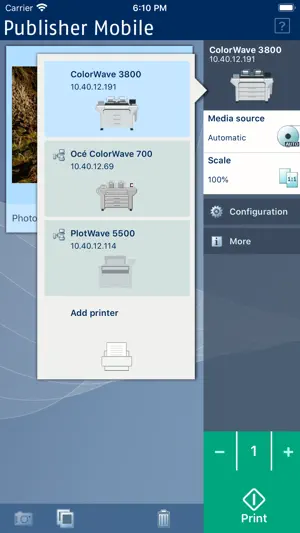
With Publisher Mobile, you can print your PDF, DWF, PLT (HP-GL, HP-GL/2, HP RTL), JPG, and TIFF documents to Océ and Canon plotters. Reprint your documents, scale your plots, access the main settings, view the queue, media and ink/toner status of your plotter at any time. Available in 20 languages. Printing with Publisher Mobile is easy: CONFIGURE Publisher Mobile Tap the printer button > Publisher Mobile detects the compatible printers that are available in your network. The detected printer (indicated with a 'Connection' icon) is added to your printers list. When your printer is not detected, you can add it manually: tap the 'Add' printer button. Enter the IP address or hostname of the printer > Give it a name > Check or define the printer model > Define the number of rolls > Indicate if there is a folder > Add / Save > Ready! OPEN A DOCUMENT From your e-mail, web browser or any other App: Select a document and use the "Open in" functionality > Select Publisher Mobile. Or From Publisher Mobile: Tap the “Photos” icon > Browse your Photo Gallery to select a document; or Tap the “Camera” icon > Take a picture. PRINT A DOCUMENT Select a printer > Define the print settings you need > Tap the Green button > You print! DELETE A DOCUMENT Select a document > Tap the "Delete" icon > Confirm ADDITIONAL INFO 1. Publisher Mobile operates with all the TDS, TCS, PlotWave and ColorWave printers. 2. Publisher Mobile displays a preview of your PDF, JPG and TIFF documents. To preview a DWF file, you must use a dedicated App. 3.Plotting PDF and DWF depends on system configuration. 4.PLT files in HPGL1/2 5.Find out more on the Publisher Mobile Support page
What’s new
Version 2.10 · Updated May 28, 2024
Add support for new colorWAVE T60 and colorWAVE T65 printers. Add support for new plotWAVE T30/35, plotWAVE T50/55 and plotWAVE T75 printer.
App privacy
The developer, Canon Production Printing Netherlands B.V., reported these privacy practices to Apple.
Data Not Linked to You
The following data, which may be collected but is not linked to your identity, may be used for the following purposes:
- Usage Data: Product Interaction
Used for: Analytics
Alternatives to Canon Publisher Mobile
Looking for apps like Canon Publisher Mobile? Here are 6 similar apps on the App Store. The highest rated is PrintHand Mobile Print (5.0/5), and all 6 are free to download.
-
 CaptureOnTouch Mobile
2.5
CaptureOnTouch Mobile
2.5
-
 Cloud Ready printer
4.0
Cloud Ready printer
4.0
-
 PrinterShare: WiFi & PDF
4.9
PrinterShare: WiFi & PDF
4.9
-
 PrintHand Mobile Print
5.0
PrintHand Mobile Print
5.0
-
 Remote Print: Wireless Printer
4.6
Remote Print: Wireless Printer
4.6
-
 Air Printer App
4.0
Air Printer App
4.0
| App | Rating | Price | Last updated | Compare |
|---|---|---|---|---|
| Canon Publisher Mobile | 5.0 / 5 (1 rating) | Free | May 28, 2024 | |
| CaptureOnTouch Mobile | 2.5 / 5 (2) | Free | Oct 1, 2024 | Compare |
| Cloud Ready printer | 4.0 / 5 (1,672) | Free | Jul 27, 2026 | Compare |
| PrinterShare: WiFi & PDF | 4.9 / 5 (388) | Free | Oct 23, 2026 | Compare |
| PrintHand Mobile Print | 5.0 / 5 (20) | Free | Oct 23, 2026 | Compare |
| Remote Print: Wireless Printer | 4.6 / 5 (63) | Free | Sep 21, 2025 | Compare |
| Air Printer App | 4.0 / 5 (2,813) | Free | Aug 18, 2026 | Compare |